Nº 008 of 520
Command palette
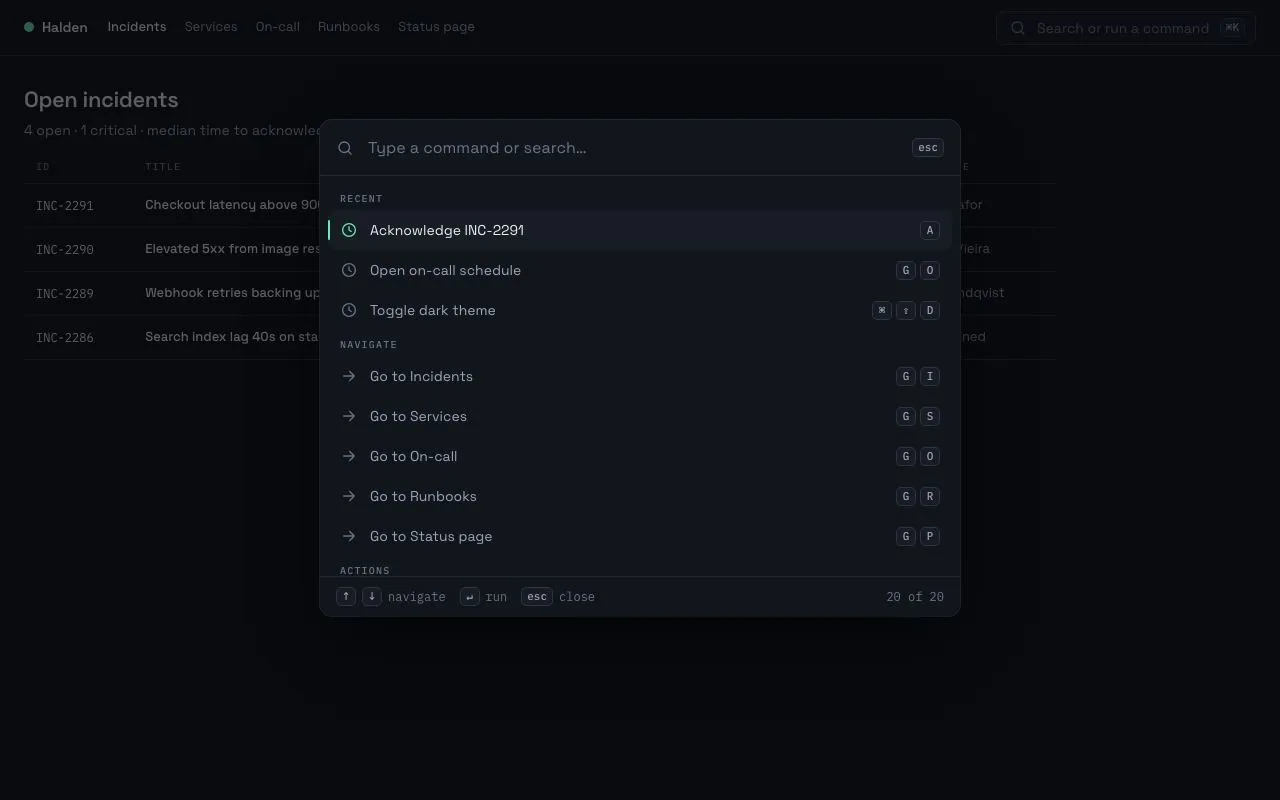
A ⌘K command palette that opens with a 200ms scale-and-fade, fuzzy-filters 20 grouped commands, and is fully driven from the keyboard with shortcut hints on the right.
Preview
Use it
Free to use · credit appreciated1 Once, in your project
npx skills add SusanAcharya/Design-Lounge 2 Then ask
Using the Design Lounge skill, build "Command palette" (piece command-palette) in my stack. Match its brief; restyle it onto my product's theme.
No skill? Paste the brief instead. It carries the numbers, tokens and behaviour.
<!-- Design Lounge Nº 008 · "Command palette" · designlounge.vercel.app -->

# Command palette

> **Build brief for a coding agent.** Rebuild this piece in the reader's stack. If they haven't said which stack, ask once, then default to semantic HTML + CSS + a little vanilla JS. Match the numbers below; don't "improve" them.

## What it is

A ⌘K command palette for an incident-management web app ("Halden"). It floats 120px from the top of the viewport over a dimmed app, 640px wide, and lists ~20 commands in five groups (Recent, Navigate, Actions, Settings, People). Typing fuzzy-filters the list and highlights the matched letters in the accent colour; arrow keys move a selection that never leaves the keyboard; each row shows its shortcut as mono key-caps on the right. The one detail worth copying is the opening motion: 200ms, scale 0.96 → 1 with an 8px downward settle, on an expo-out curve, while the scrim fades on the standard curve — fast enough to feel like a keystroke, not a modal.

## Reference behaviour

1. Initial state: the palette is **already open** over the app. The app behind (top bar with brand, nav, and a "Search or run a command ⌘K" button; a table of four open incidents) is dimmed by a `rgba(6,8,12,.62)` scrim. The input has focus and shows the placeholder "Type a command or search…". The first row ("Acknowledge INC-2291" under Recent) is selected. The footer's right side reads "20 of 20".
2. Typing filters every group by subsequence match (each typed character must appear in order in the label, case-insensitive). Matched characters render in the accent colour at weight 500. The **Recent** group is hidden as soon as the query is non-empty. Groups with no matches disappear with their heading. Within a group, results sort by the index of the first matched character. Selection resets to the first visible row on every keystroke. The footer count updates, e.g. "3 of 20".
3. A query with no matches shows a centred empty state: "No commands match **query**" in `--ink-3` with the query in `--ink-2`, 36px vertical padding.
4. ↓ / ↑ move the selection; the list scrolls so the selected row stays in view (`scrollIntoView({block:'nearest'})`). Home / End jump to first / last. Selection wraps at neither end (clamps).
5. Moving the mouse over a row selects it (mousemove, not mouseenter, so a scrolling list does not steal selection).
6. Enter or click runs the selected command: the palette closes (200ms reverse of the open motion) and the top bar's live-region status text shows "Ran · <label>" in accent mono, fading in over 140ms. Focus returns to the top-bar search button.
7. Esc closes; clicking the scrim closes. ⌘K (macOS) / Ctrl+K (elsewhere) toggles from anywhere; clicking the top-bar search button opens. Opening always clears the query, re-renders and focuses the input.
8. Rows are 40px tall; a selected row gets `--panel-2` background, `--ink` text, accent icon and a 2px accent bar on its left edge (top and bottom inset 10px).

## Structure

```
1280 × 800
┌────────────────────────────────────────────────────────────────────────┐
│ topbar 56 · Halden · Incidents Services On-call …   [status] [Search ⌘K]│
│                                                                        │
│            ┌──────────────── 640 ─────────────────┐   ← top = 120      │
│            │ ⌕  Type a command or search…    esc │ head 56             │
│            │──────────────────────────────────────│                     │
│            │ RECENT                               │ group heading       │
│            │ ▌◷ Acknowledge INC-2291          A  │ row 40 (selected)   │
│            │  ◷ Open on-call schedule      G  O  │                     │
│            │  ◷ Toggle dark theme       ⌘ ⇧ D   │                     │
│            │ NAVIGATE                             │                     │
│            │  → Go to Incidents            G  I  │                     │
│            │  → Go to Services             G  S  │  list max-h 400,    │
│            │  …                                   │  overflow auto      │
│            │──────────────────────────────────────│                     │

… 198 more lines. Copy or download for the full brief. Loading the source…Brief
238 linesBuild brief for a coding agent. Rebuild this piece in the reader’s stack. If they haven’t said which stack, ask once, then default to semantic HTML + CSS + a little vanilla JS. Match the numbers below; don’t “improve” them.
What it is
A ⌘K command palette for an incident-management web app (“Halden”). It floats 120px from the top of the viewport over a dimmed app, 640px wide, and lists ~20 commands in five groups (Recent, Navigate, Actions, Settings, People). Typing fuzzy-filters the list and highlights the matched letters in the accent colour; arrow keys move a selection that never leaves the keyboard; each row shows its shortcut as mono key-caps on the right. The one detail worth copying is the opening motion: 200ms, scale 0.96 → 1 with an 8px downward settle, on an expo-out curve, while the scrim fades on the standard curve — fast enough to feel like a keystroke, not a modal.
Reference behaviour
- Initial state: the palette is already open over the app. The app behind (top bar with brand, nav, and a “Search or run a command ⌘K” button; a table of four open incidents) is dimmed by a
rgba(6,8,12,.62)scrim. The input has focus and shows the placeholder “Type a command or search…”. The first row (“Acknowledge INC-2291” under Recent) is selected. The footer’s right side reads “20 of 20”. - Typing filters every group by subsequence match (each typed character must appear in order in the label, case-insensitive). Matched characters render in the accent colour at weight 500. The Recent group is hidden as soon as the query is non-empty. Groups with no matches disappear with their heading. Within a group, results sort by the index of the first matched character. Selection resets to the first visible row on every keystroke. The footer count updates, e.g. “3 of 20”.
- A query with no matches shows a centred empty state: “No commands match query” in
--ink-3with the query in--ink-2, 36px vertical padding. - ↓ / ↑ move the selection; the list scrolls so the selected row stays in view (
scrollIntoView({block:'nearest'})). Home / End jump to first / last. Selection wraps at neither end (clamps). - Moving the mouse over a row selects it (mousemove, not mouseenter, so a scrolling list does not steal selection).
- Enter or click runs the selected command: the palette closes (200ms reverse of the open motion) and the top bar’s live-region status text shows “Ran ·
- Esc closes; clicking the scrim closes. ⌘K (macOS) / Ctrl+K (elsewhere) toggles from anywhere; clicking the top-bar search button opens. Opening always clears the query, re-renders and focuses the input.
- Rows are 40px tall; a selected row gets
--panel-2background,--inktext, accent icon and a 2px accent bar on its left edge (top and bottom inset 10px).
Structure
1280 × 800
┌────────────────────────────────────────────────────────────────────────┐
│ topbar 56 · Halden · Incidents Services On-call …   [status] [Search ⌘K]│
│                                                                        │
│            ┌──────────────── 640 ─────────────────┐   ← top = 120      │
│            │ ⌕  Type a command or search…    esc │ head 56             │
│            │──────────────────────────────────────│                     │
│            │ RECENT                               │ group heading       │
│            │ ▌◷ Acknowledge INC-2291          A  │ row 40 (selected)   │
│            │  ◷ Open on-call schedule      G  O  │                     │
│            │  ◷ Toggle dark theme       ⌘ ⇧ D   │                     │
│            │ NAVIGATE                             │                     │
│            │  → Go to Incidents            G  I  │                     │
│            │  → Go to Services             G  S  │  list max-h 400,    │
│            │  …                                   │  overflow auto      │
│            │──────────────────────────────────────│                     │
│            │ ↑↓ navigate  ↵ run  esc close  20/20│ foot 40             │
│            └──────────────────────────────────────┘                     │
│  dimmed incident table behind (scrim rgba(6,8,12,.62))                 │
└────────────────────────────────────────────────────────────────────────┘
<header class="top">— brand (10px accent dot + “Halden” 600),<nav>of five labels (current one 500 /--ink), a<span class="status" aria-live="polite">and a<button class="search" aria-haspopup="dialog" aria-controls="layer">260×34 with a search icon and a<kbd>⌘K</kbd>.<main>— h1 “Open incidents”, one-line subtitle, a<table>of 4 incidents (ID in mono, title 500, service, status pill, opened, assignee).<div class="layer" role="dialog" aria-modal="true" aria-label="Command palette">— fixed,inset:0, flex,align-items:flex-start,padding-top:120px..scrim— absolute fill..pal— 640px,--panelbackground, 12px radius, shadow0 24px 64px -16px rgba(0,0,0,.75)plus a 1px--linering, flex column,overflow:hidden..head56px: 18px search icon,<input role="combobox" aria-controls="list" aria-autocomplete="list" aria-expanded="true">,<kbd>esc</kbd>.<ul class="list" role="listbox">— padding 8px,max-height:400px,overflow:auto. Children:.ghgroup headings (<div>) and<li role="option">rows: icon SVG,.lblabel (ellipsis),.keys(one<kbd>per key)..foot40px: three hint pairs and a right-aligned count.
Command inventory
Render exactly these 20 commands, in this order. Keys are space-separated; each becomes its own <kbd>. Icon per group: Recent = clock, Navigate = arrow-right, Actions = bolt, Settings = sliders, People = person (18px, 1.75 stroke).
| Group | Label | Keys |
|---|---|---|
| Recent | Acknowledge INC-2291 | A |
| Recent | Open on-call schedule | G O |
| Recent | Toggle dark theme | ⌘ ⇧ D |
| Navigate | Go to Incidents | G I |
| Navigate | Go to Services | G S |
| Navigate | Go to On-call | G O |
| Navigate | Go to Runbooks | G R |
| Navigate | Go to Status page | G P |
| Actions | Declare incident | ⌘ ⇧ I |
| Actions | Acknowledge current incident | A |
| Actions | Resolve incident | ⌘ ⇧ R |
| Actions | Assign incident to me | ⌘ ⇧ A |
| Actions | Add timeline note | N |
| Actions | Snooze alerts for 1 hour | — |
| Settings | Toggle dark theme | ⌘ ⇧ D |
| Settings | Notification preferences | ⌘ , |
| Settings | Switch workspace… | ⌘ ⇧ W |
| Settings | Sign out | — |
| People | Page Ines Okafor | — |
| People | Page Tomas Vieira | — |
The app behind the palette lists four incidents: INC-2291 “Checkout latency above 900ms p95” (payments-api, critical, 14 min ago, Ines Okafor); INC-2290 “Elevated 5xx from image resizer” (media-edge, acknowledged, 1 h ago, Tomas Vieira); INC-2289 “Webhook retries backing up (eu-1)” (events, acknowledged, 3 h ago, Mara Lindqvist); INC-2286 “Search index lag 40s on staging” (search, monitoring, Yesterday, Unassigned). Rows are 44px with 1px --line dividers; the subtitle reads “4 open · 1 critical · median time to acknowledge 3m 12s this week”.
Tokens
:root {
  /* colour — cool near-black, one mint accent */
  --bg: #0b0d12;          /* page */
  --panel: #12151c;       /* palette body, search button */
  --panel-2: #181c25;     /* selected row, kbd fill */
  --line: #232833;        /* hairlines, ring */
  --line-2: #2e3441;      /* kbd + input borders */
  --ink: #e8eaf0;         /* primary text */
  --ink-2: #9aa3b5;       /* row text, kbd text */
  --ink-3: #6b7386;       /* headings, placeholder, icons */
  --accent: #6ee7b7;      /* matches, selected icon, left bar, status */
  --accent-ink: #04140d;  /* text on accent (unused here, reserved) */
  --warn: #f5b14c;        /* acknowledged pill */
  --scrim: rgba(6, 8, 12, .62);

  /* type */
  --font: "Space Grotesk", system-ui, sans-serif;
  --mono: "IBM Plex Mono", ui-monospace, monospace;

  /* layout */
  --w: 640px;             /* palette width */
  --top: 120px;           /* palette offset from viewport top */
  --row: 40px;            /* option row height */
  --r: 12px;              /* palette radius */
  --r-item: 8px;          /* row radius */
  --shadow: 0 24px 64px -16px rgba(0,0,0,.75), 0 0 0 1px var(--line);

  /* motion */
  --t-fast: 140ms;        /* status fade, hover */
  --t-open: 200ms;        /* open / close */
  --ease: cubic-bezier(.2, .7, .2, 1);
  --ease-out: cubic-bezier(.16, 1, .3, 1);
}
Typography
| Role | Family | Size | Weight | Line-height | Tracking | Case |
|---|---|---|---|---|---|---|
| Body / rows | Space Grotesk | 14px | 400 | 1.45 | 0 | sentence |
| Search input | Space Grotesk | 16px | 400 | 1 | 0 | sentence |
| Brand | Space Grotesk | 14px | 600 | 1.2 | −0.01em | sentence |
| Page title | Space Grotesk | 22px | 600 | 1.2 | −0.02em | sentence |
| Group heading | IBM Plex Mono | 10px | 500 | 1 | +0.12em | UPPERCASE |
Key-cap <kbd> | IBM Plex Mono | 11px | 500 | 1 | 0 | as-is |
| Footer hints | IBM Plex Mono | 12px | 400 | 1.4 | 0 | sentence |
| Status (top bar) | IBM Plex Mono | 12px | 400 | 1.4 | 0 | sentence |
| Matched letters | inherit | — | 500 | — | — | colour --accent, no background |
Motion
| Element | Trigger | Property | From → To | Duration | Easing | Notes |
|---|---|---|---|---|---|---|
.pal | open | transform, opacity | scale(.96) translateY(-8px), 0 → none, 1 | 200ms | transform --ease-out, opacity --ease | |
.pal | close | same, reversed | none, 1 → scale(.96) translateY(-8px), 0 | 200ms | same | .layer keeps visibility:visible for 200ms via transition: visibility 0s 200ms |
.scrim | open / close | opacity | 0 ↔ 1 | 200ms | --ease | |
.status | command run | opacity | 0 → 1 | 140ms | linear-ish (default) | stays visible until next run |
| selected row | arrow / hover | background, colour | instant | 0 | — | never transition selection; it must feel like a cursor |
| list scroll | arrow | scrollTop | nearest | native | — | scrollIntoView({block:'nearest'}) |
Reduced motion: every transition-duration becomes 1ms and .pal drops the scale/translate (opacity-only, effectively instant).
States
- Row default: colour
--ink-2, icon--ink-3, transparent background. - Row selected (
aria-selected="true"): background--panel-2, colour--ink, icon--accent, 2px accent bar atleft:0; top:10px; bottom:10px, radius 2px. - Matched characters:
<mark>with no background, colour--accent, weight 500. - Empty query: Recent group visible at top. Non-empty query: Recent hidden.
- No results: single
.emptyrow, 36px padding, centred. - Search button (top bar) hover: border
--ink-3. Focus-visible: 2px accent outline, 2px offset. - Input focus: no ring on the input itself (the whole palette is the focus context); the caret is
--ink. - Status:
.showclass → opacity 1; content “Ran · - Incident status pills: critical
#ff8a80on border#5a2a27; acknowledged--warnon#5a4520; monitoring--accenton#1f4a3a.
Accessibility
- Container:
role="dialog" aria-modal="true" aria-label="Command palette". - Input:
role="combobox" aria-autocomplete="list" aria-expanded="true" aria-controls="list", andaria-activedescendantupdated to the selected option’s id on every selection change. The input keeps DOM focus at all times while open. - List:
role="listbox" aria-label="Commands"; rowsrole="option" aria-selected. Group headings are plain<div>s (visual only) — if your a11y target requires it, userole="group" aria-labelper section instead. - Keys: ↓/↑ move, Home/End jump, Enter runs, Esc closes; ⌘K / Ctrl+K toggles globally (
preventDefaultso the browser’s address-bar focus doesn’t fire). - Focus return: closing moves focus to the top-bar search button that opened it.
- Live region:
.statushasaria-live="polite"so the ran command is announced. - Contrast:
--ink-2on--panel8.6:1;--ink-3on--panel4.6:1 (used only for ≥ 10px mono headings, placeholder and icons);--accenton--panel-211:1. - Hit targets: rows 40px; search button 34px tall (web; fine at ≥ 24px min for pointer).
Responsive rules
- ≥ 1280: as specified (640px palette, 120px from top).
- 1024–1279: unchanged.
- 768–1023: palette width
min(640px, calc(100vw − 48px)); top offset 80px; top-bar nav labels collapse to the current one only. - < 640: palette becomes full-bleed with 12px side margins and
top: 16px;max-heightof the list becomescalc(100dvh − 16px − 56px − 40px − 32px); hide the.keyscolumn (shortcuts are not typeable on touch); footer hints hidden except the count.
Acceptance checklist
- Palette is 640px wide, its top edge 120px from the viewport top, 12px radius, 1px
#232833ring plus the long soft shadow. - On open the palette animates
scale(.96) translateY(-8px)→ identity over 200ms oncubic-bezier(.16,1,.3,1); the scrim fades over 200ms. - The page loads with the palette open and the input focused; first row selected.
- Typing “goi” matches “Go to Incidents” (subsequence), with g, o, i coloured
#6ee7b7. - Recent group disappears on the first typed character and returns when the query is cleared.
- Empty groups (and their headings) are not rendered.
- ↓ ↑ Home End move selection without moving DOM focus off the input;
aria-activedescendanttracks it. - Enter runs the selected command, closes the palette, and the top-bar live region reads “Ran ·
- Esc and scrim-click close; ⌘K / Ctrl+K toggles; the top-bar button opens; focus returns to that button on close.
- Rows are 40px; selected row shows the 2px accent bar inset 10px top and bottom.
- Every shortcut renders as separate
<kbd>chips (11px mono, 5px radius,#2e3441border). - No results state renders the query text (escaped) and the count shows “0 of 20”.
- With reduced motion the open/close is instantaneous.
Implementation notes
Open/close without display:none — keep the layer mounted so the input can be focused synchronously and the close animation can play. Delay visibility on the way out only:
.layer { position: fixed; inset: 0; visibility: hidden; transition: visibility 0s var(--t-open); }
.layer.open { visibility: visible; transition-delay: 0s; }
.pal { transform: scale(.96) translateY(-8px); opacity: 0;
       transition: transform var(--t-open) var(--ease-out), opacity var(--t-open) var(--ease); }
.open .pal { transform: none; opacity: 1; }
Subsequence fuzzy match that returns the matched indexes (used both to filter and to build the <mark>s):
function fz(needle, hay) {
  if (!needle) return [];
  const n = needle.toLowerCase(), h = hay.toLowerCase(), idx = [];
  let j = 0;
  for (let i = 0; i < h.length && j < n.length; i++) if (h[i] === n[j]) { idx.push(i); j++; }
  return j === n.length ? idx : null;   // null = no match, [] = empty query matches all
}
Sort each group’s hits by idx[0] so prefix matches float up; that is enough ranking for 20 commands. Don’t pull in a scoring library.
Selection is a cursor, not focus. Keep DOM focus on the input and move aria-selected + aria-activedescendant:
function select(i) {
  sel = Math.max(0, Math.min(i, items.length - 1));
  items.forEach((li, k) => li.setAttribute('aria-selected', String(k === sel)));
  input.setAttribute('aria-activedescendant', items[sel].id);
  items[sel].scrollIntoView({ block: 'nearest' });
}
Common mistakes: transitioning the selected-row background (it should snap); using mouseenter for hover-select (fires spuriously while the list scrolls under a still mouse — use mousemove); forgetting to clear the query on reopen; inserting the raw query into the empty-state HTML without escaping.
Details
- Palette
- Type
- Space Grotesk · IBM Plex Mono
- Motion
- Subtle motion
- Build
- One session
- Tags
Studied
Tailwind CSS docsPut each instruction next to its code. Draw the grid with thin lines and let the empty sides carry a faint hatch.
All sourcesOn the shelves