Nº 496 of 520
Look around a small room
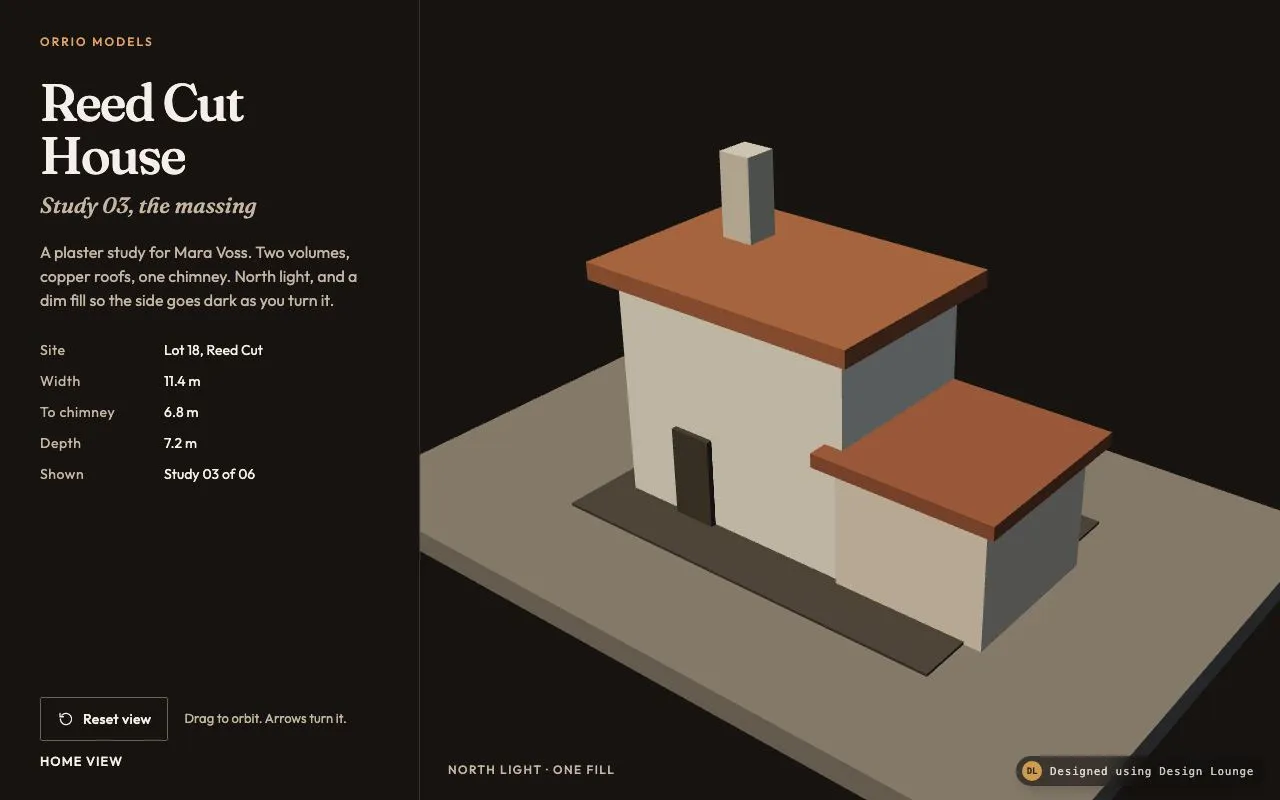
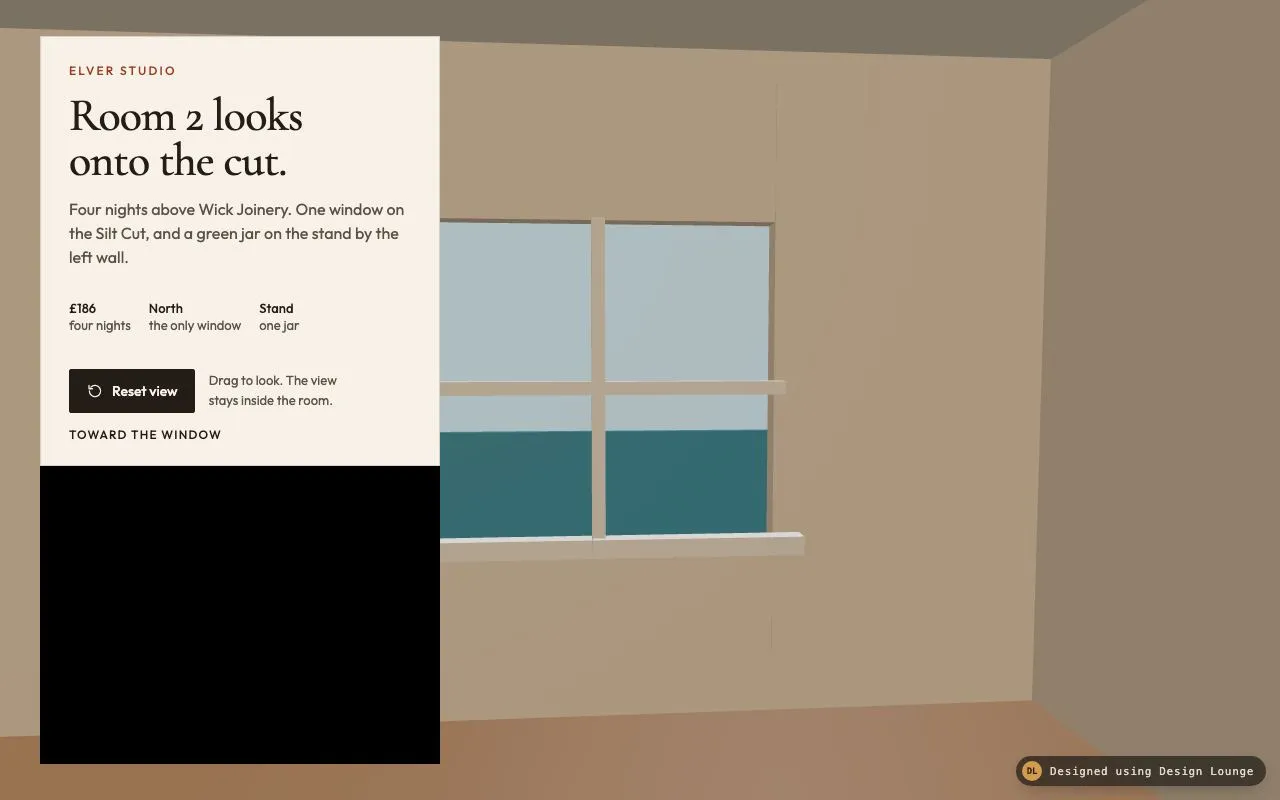
Drag looks around a room with one window on the cut and a jar on a stand. Yaw and pitch stay clamped. Reset faces the window.
Preview
Use it
Free to use · credit appreciated1 Once, in your project
npx skills add SusanAcharya/Design-Lounge 2 Then ask
Using the Design Lounge skill, build "Look around a small room" (piece three-room-look) in my stack. Match its brief; restyle it onto my product's theme.
No skill? Paste the brief instead. It carries the numbers, tokens and behaviour.
<!-- Design Lounge Nº 496 · "Look around a small room" · designlounge.vercel.app -->

# Look around a small room

> **Build brief for a coding agent.** Rebuild this piece in the reader's stack. If they haven't said which stack, ask once, then default to semantic HTML + CSS + a little vanilla JS. Match the numbers below; don't "improve" them.

The page chrome is HTML and CSS. The room is a Three.js scene. Build it from the scene graph in Implementation notes. The Lounge demo is raw WebGL so it stays one file. Do not rebuild the room as CSS boxes, and do not put a Three.js script in the demo file.

## What it is

The hero for Elver Studio's page about Room 2, four nights above Wick Joinery. The visitor is standing in a small room and drags to look around: oak floor, plaster walls, one window onto the Silt Cut, and one object, a green jar on a timber stand. Yaw and pitch are clamped, so the view stays inside the room. There is no pointer lock, because this runs in an iframe. Reset faces the window again. The first frame is already that view: the window, with sky above a band of water, not a blank wall.

## Reference behaviour

1. First frame: the camera is fixed at `(0.15, 1.42, 0.72)`. Yaw is `0.08` radians (about 4.6° to the right). Pitch is `-0.06` radians (about 3.4° down). Field of view is 52°. The look direction is `(0.080, -0.060, -0.995)`, so the gaze meets `(0.230, 1.360, -0.275)` one unit out. The window is in the middle of the view: pale sky `#7EADC0` above, water `#245E6C` below, a cream mullion cross, a sill. The readout says "Toward the window".
2. Press on the canvas and drag. Do not call the pointer lock API. Use the pointer's client coordinates. Each pixel of drag right adds `0.0045` radians of yaw. Each pixel of drag up adds `0.0035` radians of pitch (screen-down is negative pitch). The cursor is `grabbing` while the button is down.
3. Yaw is clamped to ±`1.02` radians (about ±58°). Pitch is clamped to `-0.48` (about -27°) through `0.36` (about 21°). Further dragging does not accumulate past the clamp. At the yaw limit you see a side wall and, toward the left, the stand. You never spin around to face only the wall behind the camera.
4. Release. The view stays. There is no inertia. The polite live region takes the readout text.
5. The readout is "Toward the window" when yaw is within `0.04` of `0.08` and pitch is within `0.04` of `-0.06`. Otherwise it reads "Yaw N° · Pitch M°" with N and M rounded to integers.
6. "Reset view" eases yaw and pitch back to `0.08` and `-0.06`, 16% of the gap per frame. With `prefers-reduced-motion: reduce`, reset snaps in one frame. Dragging is unchanged either way, because it is direct. The live region says "Toward the window".
7. Focus the canvas. Left and Right change yaw by `0.08` radians. Up and Down change pitch by `0.056` radians. Home resets. All five keys call `preventDefault`.
8. The window is a hole, not a texture on a solid wall. Four plaster boxes frame it (left pier, right pier, sill, header). Behind the hole, a sky panel and a water panel sit outside the room. A vertical and a horizontal mullion cross the opening. If the piers do not overlap the sill and header, a slit of sky runs floor to ceiling. Overlap them by about 0.04.
9. The only object inside the room, besides the architecture, is the stand and the jar. The jar is an icosahedron of radius `0.16`, built in code. No loaded model.
10. Dragging starts on the canvas. The paper card does not look around. It sits above the canvas and receives its own clicks.

## Structure

```
1280 × 800, canvas is the full frame
┌──────────────────────────────────────────────────────────────────┐
│ ┌────────────────────┐                                           │
│ │ ELVER STUDIO       │                                           │
│ │ Room 2 looks       │         window: sky, mullions, water      │
│ │ onto the cut.      │                                           │
│ │ Four nights above… │                                           │
│ │ £186   North  Stand│                                           │
│ │ [Reset view] hint  │                                           │
│ │ TOWARD THE WINDOW  │                                           │
│ └────────────────────┘                                           │
│                         floor                                    │

… 252 more lines. Copy or download for the full brief. Loading the source…Brief
292 linesBuild brief for a coding agent. Rebuild this piece in the reader’s stack. If they haven’t said which stack, ask once, then default to semantic HTML + CSS + a little vanilla JS. Match the numbers below; don’t “improve” them.
The page chrome is HTML and CSS. The room is a Three.js scene. Build it from the scene graph in Implementation notes. The Lounge demo is raw WebGL so it stays one file. Do not rebuild the room as CSS boxes, and do not put a Three.js script in the demo file.
What it is
The hero for Elver Studio’s page about Room 2, four nights above Wick Joinery. The visitor is standing in a small room and drags to look around: oak floor, plaster walls, one window onto the Silt Cut, and one object, a green jar on a timber stand. Yaw and pitch are clamped, so the view stays inside the room. There is no pointer lock, because this runs in an iframe. Reset faces the window again. The first frame is already that view: the window, with sky above a band of water, not a blank wall.
Reference behaviour
- First frame: the camera is fixed at
(0.15, 1.42, 0.72). Yaw is0.08radians (about 4.6° to the right). Pitch is-0.06radians (about 3.4° down). Field of view is 52°. The look direction is(0.080, -0.060, -0.995), so the gaze meets(0.230, 1.360, -0.275)one unit out. The window is in the middle of the view: pale sky#7EADC0above, water#245E6Cbelow, a cream mullion cross, a sill. The readout says “Toward the window”. - Press on the canvas and drag. Do not call the pointer lock API. Use the pointer’s client coordinates. Each pixel of drag right adds
0.0045radians of yaw. Each pixel of drag up adds0.0035radians of pitch (screen-down is negative pitch). The cursor isgrabbingwhile the button is down. - Yaw is clamped to ±
1.02radians (about ±58°). Pitch is clamped to-0.48(about -27°) through0.36(about 21°). Further dragging does not accumulate past the clamp. At the yaw limit you see a side wall and, toward the left, the stand. You never spin around to face only the wall behind the camera. - Release. The view stays. There is no inertia. The polite live region takes the readout text.
- The readout is “Toward the window” when yaw is within
0.04of0.08and pitch is within0.04of-0.06. Otherwise it reads “Yaw N° · Pitch M°” with N and M rounded to integers. - “Reset view” eases yaw and pitch back to
0.08and-0.06, 16% of the gap per frame. Withprefers-reduced-motion: reduce, reset snaps in one frame. Dragging is unchanged either way, because it is direct. The live region says “Toward the window”. - Focus the canvas. Left and Right change yaw by
0.08radians. Up and Down change pitch by0.056radians. Home resets. All five keys callpreventDefault. - The window is a hole, not a texture on a solid wall. Four plaster boxes frame it (left pier, right pier, sill, header). Behind the hole, a sky panel and a water panel sit outside the room. A vertical and a horizontal mullion cross the opening. If the piers do not overlap the sill and header, a slit of sky runs floor to ceiling. Overlap them by about 0.04.
- The only object inside the room, besides the architecture, is the stand and the jar. The jar is an icosahedron of radius
0.16, built in code. No loaded model. - Dragging starts on the canvas. The paper card does not look around. It sits above the canvas and receives its own clicks.
Structure
1280 × 800, canvas is the full frame
┌──────────────────────────────────────────────────────────────────┐
│ ┌────────────────────┐                                           │
│ │ ELVER STUDIO       │                                           │
│ │ Room 2 looks       │         window: sky, mullions, water      │
│ │ onto the cut.      │                                           │
│ │ Four nights above… │                                           │
│ │ £186   North  Stand│                                           │
│ │ [Reset view] hint  │                                           │
│ │ TOWARD THE WINDOW  │                                           │
│ └────────────────────┘                                           │
│                         floor                                    │
└──────────────────────────────────────────────────────────────────┘
card 400px at top 36, left 40 the rest of the canvas is the drag surfacemain.room: the canvas, thenaside, then a hidden polite live region, then a hidden error line.- Canvas: tabindex 0, accessible name “Look around Room 2. Drag, or use the arrow keys. The view stays inside the room.” Described by the hint.
aside(400px, paper#F7F1E8, 1px border): brand, the onlyh1, lede, a meta row of three figures, the resetbutton, the hint, the readout.- The card is
position: absolute; top: 36px; left: 40px. It is in the document after the canvas so it paints on top and receives pointer events. The canvas hastouch-action: none.
Room shell, inner faces. Floor top at y 0. Ceiling bottom at y 2.55. Left inner face at x -2. Right inner face at x 2. Window wall inner face at z -2.4. Back wall inner face at z 1.9. Camera at z 0.72, inside.
Window opening roughly x -0.44 to 0.92, y 0.66 to 1.91. The boxes below overlap so the hole has no slit.
| Mesh | Geometry | Position | Colour | Metal | Rough | Emissive |
|---|---|---|---|---|---|---|
| Floor | box 4.2 × 0.12 × 4.4 | 0, -0.06, -0.2 | #7A5234 | 0.03 | 0.82 | none |
| Ceiling | box 4.2 × 0.10 × 4.4 | 0, 2.60, -0.2 | #EFE6D8 | 0 | 0.92 | none |
| Left wall | box 0.12 × 2.55 × 4.4 | -2.06, 1.275, -0.2 | #E4D5C3 | 0 | 0.90 | none |
| Right wall | box 0.12 × 2.55 × 4.4 | 2.06, 1.275, -0.2 | #E4D5C3 | 0 | 0.90 | none |
| Back wall | box 4.0 × 2.55 × 0.12 | 0, 1.275, 1.96 | #E4D5C3 | 0 | 0.90 | none |
| Left pier | box 1.56 × 2.55 × 0.10 | -1.22, 1.275, -2.45 | #E4D5C3 | 0 | 0.90 | none |
| Right pier | box 1.08 × 2.55 × 0.10 | 1.46, 1.275, -2.45 | #E4D5C3 | 0 | 0.90 | none |
| Sill wall | box 1.48 × 0.66 × 0.10 | 0.24, 0.33, -2.45 | #E4D5C3 | 0 | 0.90 | none |
| Header | box 1.48 × 0.64 × 0.10 | 0.24, 2.23, -2.45 | #E4D5C3 | 0 | 0.90 | none |
| Sky panel | box 2.4 × 2.2 × 0.04 | 0.24, 1.35, -2.78 | #7EADC0 | 0 | 1 | #B7D4E2 at 1.15 |
| Water panel | box 2.4 × 0.72 × 0.04 | 0.24, 0.72, -2.74 | #245E6C | 0.20 | 0.40 | #2E7584 at 0.55 |
| Mullion, upright | box 0.05 × 1.25 × 0.06 | 0.24, 1.285, -2.36 | #F6F1E8 | 0.02 | 0.55 | none |
| Mullion, bar | box 1.42 × 0.05 × 0.06 | 0.24, 1.28, -2.36 | #F6F1E8 | 0.02 | 0.55 | none |
| Sill shelf | box 1.56 × 0.07 × 0.08 | 0.24, 0.68, -2.34 | #F4EFE6 | 0.02 | 0.60 | none |
| Stand top | box 0.64 × 0.045 × 0.42 | -1.15, 0.62, -0.35 | #6B4530 | 0.04 | 0.62 | none |
| Four legs | box 0.045 × 0.58 × 0.045 | (±0.25, 0.31, ±0.15) from the top’s centre | #6B4530 | 0.04 | 0.66 | none |
| Jar | icosahedron r 0.16 | -1.15, 0.84, -0.35 | #1C4A42 | 0.12 | 0.38 | none |
Leg centres in world space: (-1.40, 0.31, -0.50), (-0.90, 0.31, -0.50), (-1.40, 0.31, -0.20), (-0.90, 0.31, -0.20).
Tokens
:root {
  --wall: #E4D5C3;       /* plaster */
  --floor: #7A5234;      /* oak */
  --ceiling: #EFE6D8;
  --sky: #8EB8C8;        /* canvas clear, close to the sky panel */
  --water: #245E6C;
  --jar: #1C4A42;
  --wood: #6B4530;
  --mullion: #F6F1E8;
  --ink: #241C16;
  --paper: #F7F1E8;      /* the card */
  --muted: #5C5148;
  --accent: #9C3D24;     /* brand and focus */
  --line: rgba(36, 28, 22, 0.16);
  --serif: "Cormorant Garamond", Georgia, serif;
  --sans: "Outfit", system-ui, sans-serif;
  --text: 16px;
  --ease: cubic-bezier(0.2, 0.7, 0.2, 1);
  --fast: 160ms;
  --radius: 2px;
}
Page background behind the canvas is #CDBBA6, in case the canvas has not drawn. The renderer clear is #8EB8C8 (sRGB 142, 184, 200).
Typography
| Role | Family | Size | Weight | Line-height | Tracking | Case |
|---|---|---|---|---|---|---|
| Brand | Outfit | 12px | 500 | 1 | 0.18em | uppercase, #9C3D24 |
| Title | Cormorant Garamond | 46px | 500 | 0.98 | -0.02em | sentence |
| Lede | Outfit | 16px | 400 | 1.5 | 0 | sentence |
| Meta figure | Outfit | 13px | 500 | 1.3 | 0 | the value is #241C16, the caption #5C5148 |
| Button | Outfit | 14px | 500 | 1 | 0 | sentence, on #241C16 |
| Hint | Outfit | 13px | 400 | 1.4 | 0 | sentence, max 18ch |
| Readout | Outfit | 12px | 500 | 1 | 0.10em | uppercase |
At 900px and under, the title is 36px and the card padding is 20px.
Motion
| Thing | Trigger | Property | From → to | Duration | Easing | Reduced motion |
|---|---|---|---|---|---|---|
| Look | pointer drag | yaw, pitch | direct, 0.0045 and 0.0035 rad per pixel | none | none | same, still direct |
| Reset | button or Home | yaw, pitch | current → 0.08, -0.06 | 16% of the gap per frame | exponential | one-frame snap |
| Button | hover | background | #241C16 → #3A2E26 | 160ms | cubic-bezier(0.2, 0.7, 0.2, 1) | no transition |
| Button | active | background | #3A2E26 → #1A1410 | 160ms | same | no transition |
No coast after drag. The loop runs during reset only, then stops. The first frame is drawn immediately, before any animation frame.
States
- Canvas idle: cursor
grab. Pointer down:grabbing. - Readout “Toward the window” at the home yaw and pitch. Otherwise the degree pair.
- Reset hover darkens the fill to
#3A2E26. Active goes to#1A1410. - Focus-visible on the button and the canvas: 2px solid
#9C3D24, 3px offset. - At the yaw or pitch clamp, further drag in that direction changes nothing. The other axis still moves.
- WebGL failure: the error line shows in
#9C3D24on the paper card colour. The card copy remains. - No second mode, no loading state. The room is present on the first frame.
Accessibility
- One
h1: “Room 2 looks onto the cut.” - The canvas name tells you to drag or use arrows, and that the view stays inside the room. The hint it points at reads “Drag to look. The view stays inside the room.”
- Do not use the pointer lock API. An iframe with
sandbox="allow-scripts"will not grant it, and a lock request throws or fails. Drag with client coordinates. - Tab order: reset button (it is in the aside, which follows the canvas in the tab order if the canvas is first; put the aside first in the tab order by keeping the button a real
buttonand the canvastabindex="0"). Both are reachable. Keys work when the canvas is focused. - Left, Right, Up, Down, Home. Prevent default so the page does not scroll.
- Polite live region updates on pointerup and on reset, not on every move event.
- Reset is 44px tall, with an
aria-hiddenSVG and the visible words “Reset view”. - Card text
#241C16and#5C5148on#F7F1E8both clear 4.5:1. The brand#9C3D24on#F7F1E8clears 4.5:1 at 12px. - The drag surface is the canvas outside the card, most of the 1280 × 800 frame.
Responsive rules
- At 1280 and above: the card is 400px at top 36px, left 40px. The window sits to the right of the card. Fov stays 52°.
- At 1024: the same layout. The card still fits. Yaw limits do not change.
- At 900 and below, including 768 and under 640: the card moves to
top: auto; bottom: 16px; left: 16px; right: 16px; width: auto, so it becomes a bottom bar and the window occupies the upper frame. Title 36px. Drag still works on the canvas above the card. No horizontal overflow. The room camera does not change.
Acceptance checklist
Always
- The camera position is fixed. Drag changes yaw and pitch only.
- Yaw and pitch are clamped. You cannot orbit the room or look through the floor.
- The pointer lock API is not used.
- First frame looks at the window: sky, a mullion cross, and the water band. It does not open on a blank wall.
- The room has a floor, walls, one window, and one object.
- Reset returns yaw and pitch to the home values.
- Reduced motion snaps the reset. Drag still tracks the pointer.
- Arrow keys look around when the canvas is focused. Home resets.
- Focus rings are visible. No horizontal overflow at 1280.
This demo
- The
h1reads “Room 2 looks onto the cut.” The brand reads “Elver Studio”. - The lede names Wick Joinery, the Silt Cut, and the jar. Meta reads £186, four nights; North, the only window; Stand, one jar.
- Home pose is eye
(0.15, 1.42, 0.72), yaw0.08, pitch-0.06, fov 52°. - Clamps are yaw ±1.02 radians and pitch
-0.48to0.36. - Plaster is
#E4D5C3, floor#7A5234, jar#1C4A42, sky panel#7EADC0with emissive#B7D4E2. - The readout on the first frame is “Toward the window”.
Implementation notes
The Lounge demo is raw WebGL so it stays one file. Build the product from this scene graph in Three.js. Do not add Three.js to the demo file. Do not replace the room with CSS boxes or a panorama image.
1. Scene graph
The control is drag yaw and pitch, not OrbitControls and not pointer lock.
import * as THREE from 'three';

const scene = new THREE.Scene();
scene.background = new THREE.Color('#8EB8C8');

const camera = new THREE.PerspectiveCamera(52, width / height, 0.05, 30);
const EYE = new THREE.Vector3(0.15, 1.42, 0.72);

const renderer = new THREE.WebGLRenderer({ antialias: true });
renderer.setPixelRatio(Math.min(devicePixelRatio, 2));
renderer.toneMapping = THREE.ACESFilmicToneMapping;
renderer.toneMappingExposure = 1.05;

const key = new THREE.DirectionalLight('#F7FBFE', 4.2);
key.position.set(0.35, 0.85, -1.35);
scene.add(key);
const fill = new THREE.DirectionalLight('#E7C7A4', 0.85);
fill.position.set(-0.4, 0.35, 1.1);
scene.add(fill);
scene.add(new THREE.AmbientLight('#E4D5C3', 0.38));

function solid(w, h, d, color, metal, rough, x, y, z, emissive, emissiveIntensity) {
  const mat = new THREE.MeshStandardMaterial({
    color, metalness: metal, roughness: rough,
    emissive: emissive || '#000000',
    emissiveIntensity: emissiveIntensity || 0
  });
  const mesh = new THREE.Mesh(new THREE.BoxGeometry(w, h, d), mat);
  mesh.position.set(x, y, z);
  scene.add(mesh);
}

const wall = '#E4D5C3';
solid(4.2, 0.12, 4.4, '#7A5234', 0.03, 0.82, 0, -0.06, -0.2);
solid(4.2, 0.1, 4.4, '#EFE6D8', 0, 0.92, 0, 2.6, -0.2);
solid(0.12, 2.55, 4.4, wall, 0, 0.9, -2.06, 1.275, -0.2);
solid(0.12, 2.55, 4.4, wall, 0, 0.9, 2.06, 1.275, -0.2);
solid(4.0, 2.55, 0.12, wall, 0, 0.9, 0, 1.275, 1.96);
solid(1.56, 2.55, 0.1, wall, 0, 0.9, -1.22, 1.275, -2.45);
solid(1.08, 2.55, 0.1, wall, 0, 0.9, 1.46, 1.275, -2.45);
solid(1.48, 0.66, 0.1, wall, 0, 0.9, 0.24, 0.33, -2.45);
solid(1.48, 0.64, 0.1, wall, 0, 0.9, 0.24, 2.23, -2.45);
solid(2.4, 2.2, 0.04, '#7EADC0', 0, 1, 0.24, 1.35, -2.78, '#B7D4E2', 1.15);
solid(2.4, 0.72, 0.04, '#245E6C', 0.2, 0.4, 0.24, 0.72, -2.74, '#2E7584', 0.55);
solid(0.05, 1.25, 0.06, '#F6F1E8', 0.02, 0.55, 0.24, 1.285, -2.36);
solid(1.42, 0.05, 0.06, '#F6F1E8', 0.02, 0.55, 0.24, 1.28, -2.36);
solid(1.56, 0.07, 0.08, '#F4EFE6', 0.02, 0.6, 0.24, 0.68, -2.34);
solid(0.64, 0.045, 0.42, '#6B4530', 0.04, 0.62, -1.15, 0.62, -0.35);
[[-1.4, -0.5], [-0.9, -0.5], [-1.4, -0.2], [-0.9, -0.2]].forEach(([x, z]) => {
  solid(0.045, 0.58, 0.045, '#6B4530', 0.04, 0.66, x, 0.31, z);
});
const jar = new THREE.Mesh(
  new THREE.IcosahedronGeometry(0.16, 0),
  new THREE.MeshStandardMaterial({ color: '#1C4A42', metalness: 0.12, roughness: 0.38 })
);
jar.position.set(-1.15, 0.84, -0.35);
scene.add(jar);
The sky and water panels are emissive so they stay bright through the hole. The key light sits toward the window (z negative). The fill sits back toward the camera so the plaster you are looking at is readable. If the key and the fill are the same strength, the window stops reading as the light source.
2. Drag yaw and pitch
let yaw = 0.08, pitch = -0.06;
const YAW = 1.02, P0 = -0.48, P1 = 0.36;
const look = new THREE.Vector3();

function aim() {
  const cp = Math.cos(pitch), sp = Math.sin(pitch);
  const sy = Math.sin(yaw), cy = Math.cos(yaw);
  look.set(EYE.x + sy * cp, EYE.y + sp, EYE.z - cy * cp);
  camera.position.copy(EYE);
  camera.lookAt(look);
}

canvas.addEventListener('pointermove', (e) => {
  if (!drag) return;
  const dx = e.clientX - lastX;
  const dy = e.clientY - lastY;
  lastX = e.clientX;
  lastY = e.clientY;
  yaw = Math.max(-YAW, Math.min(YAW, yaw + dx * 0.0045));
  pitch = Math.max(P0, Math.min(P1, pitch - dy * 0.0035));
  aim();
  renderer.render(scene, camera);
});
Reset lerps yaw to 0.08 and pitch to -0.06 by 16% per frame, or assigns them when reduced motion is set. Never call requestPointerLock or exitPointerLock.
3. Common mistakes
- Pointer lock. It fails in the sandboxed iframe, and the drag then does nothing.
- A full spin. Without the yaw clamp the back wall becomes the picture, and the first frame instruction is easy to miss.
- One solid wall with a window texture. Build the hole from the four boxes so the sky panel is actually behind it.
- A gap between the right pier and the sill. That gap is a floor-to-ceiling slit of sky. Overlap the frame boxes.
- Forgetting emissive on the sky panel. A standard material facing the camera, lit only from outside, renders as a dark rectangle.
- Adding Three.js to the Lounge demo, or stacking CSS divs for the walls. The product uses the graph above.
Details
- Palette
- Type
- Cormorant Garamond · Outfit
- Motion
- Subtle motion
- Build
- Multi-step
- Tags
Studied
StripeLet one big moving thing carry the colour. Keep the words light and the cards real.
All sourcesOn the shelves