Nº 505 of 520
Mallow Court brick rally
A finishable Mallow Court rally: paddle, bricks, three lives, a score from cleared bricks, Esc to pause, and Play again.
Preview
Use it
Free to use · credit appreciated1 Once, in your project
npx skills add SusanAcharya/Design-Lounge 2 Then ask
Using the Design Lounge skill, build "Mallow Court brick rally" (piece game-playfield) in my stack. Match its brief; restyle it onto my product's theme.
No skill? Paste the brief instead. It carries the numbers, tokens and behaviour.
<!-- Design Lounge Nº 505 · "Mallow Court brick rally" · designlounge.vercel.app -->

# Mallow Court brick rally

> **Build brief for a coding agent.** Rebuild this piece in the reader's stack. If they haven't said which stack, ask once, then default to semantic HTML + CSS + a little vanilla JS. Match the numbers below; don't "improve" them.

## What it is

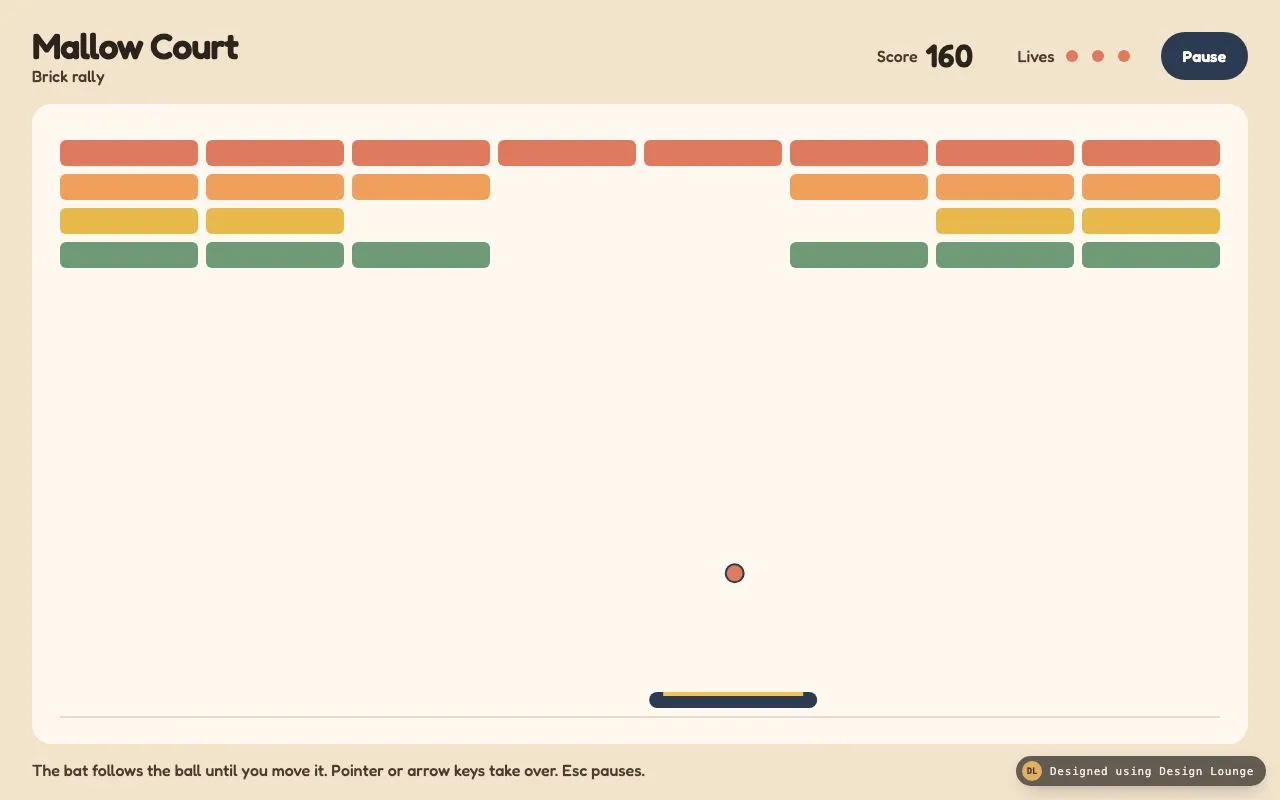
Mallow Court is a small rally you can finish: a bat, a ball, and four rows of bricks on a warm court. It is the game, not a title card and not a pixel cabinet. The first frame is already mid-rally. Eight bricks are gone, the score is the sum of those bricks, three lives are full, and the ball is in the air. Until the player moves the pointer or an arrow key, the bat follows the ball and the ball stays below the bricks, so the picture holds. Taking over lifts that limit. Clearing a brick adds its points. Missing the ball costs a life. At zero lives the court shows Game over, the score, and Play again. Clearing the rack shows Court clear with the same score line and the same button. Escape pauses.

## Reference behaviour

1. First paint is mid-rally. No title, no "click to start". Score is 160. Lives read 3. The pause card and the end card are hidden. The pause button reads Pause and `aria-pressed` is false. The ball is drawn before the first animation frame, at 25 percent of the court width and 58 percent of the court height, radius 9, velocity x 3.6 and y -5.2 (up). The bat is centred.
2. Court box at 1280x800: x 32, y 104, width 1216, height 640. The canvas bitmap matches that box in CSS pixels, multiplied by `min(devicePixelRatio, 2)`.
3. Bricks are 8 columns by 4 rows. Side margin 28. Gap 8. Brick height 26. First row starts at y 36. Width is `(courtWidth - 56 - 56) / 8`. Row colours and points, top to bottom: `#E07A5F` 40, `#F0A05A` 30, `#E8B84A` 20, `#6E9A78` 10. Corner radius 6.
4. These cells start empty (row-column, zero-based): 1-3, 1-4, 2-2, 2-3, 2-4, 2-5, 3-3, 3-4. That is two 30-point bricks, four 20-point bricks, and two 10-point bricks. 60 + 80 + 20 = 160. The score element is set from that sum in script. Do not type 160 as the source of the number.
5. Until `handed` is false, two demo rules apply. The bat's x is the ball's x minus half the bat width, clamped to the court. If the ball's y would rise above `brickBottom + 46` (164 + 46 = 210) with a negative vy, y is set to 210 and vy flips positive. The ball therefore bounces in the open court. Bricks do not change. Lives stay at 3. Score stays at 160.
6. The first `pointermove` over the page, or the first ArrowLeft or ArrowRight, sets `handed` true. The ceiling rule stops. The bat no longer tracks. Pointer moves set the bat from the pointer. Arrow keys set flags on keydown and clear them on keyup, at 8px per 16.67ms. Both can be held.
7. Walls: left and right reverse vx and pin the ball to the radius. The top reverses vy. The bat, only when vy is positive and the ball overlaps the bat, sets vx to `hit * 5.2` where hit is -1 at the left tip and +1 at the right tip. If the absolute vx is under 1.5, push it out to 1.5 so the ball cannot fall straight. vy becomes -5.2. The ball is placed just above the bat.
8. A brick hit removes that brick, adds its point value, and reflects on the shallower overlap axis. One brick per frame. When no brick remains alive, the end card shows Court clear and the score. A full rack of points is 800 (8 times 40 + 30 + 20 + 10). The opening 160 is already included, so clearing the rest ends at 800.
9. If the ball's top passes the bottom of the court, lives drop by 1. At 1 or 2 lives, the ball is served from the bat: centred on the bat, 20px above it, vx 4.2 or -4.2 by `lives % 2`, vy -5.2. At 0 lives, the end card shows Game over and the score. The pause button is disabled.
10. Escape toggles pause unless the end card is open. The header button does the same: its label switches between Pause and Resume, and `aria-pressed` follows. The pause card shows Paused, Score N, and Resume. Resume or Escape continues. Arrows do not move the bat while paused or after the end card.
11. Play again hides the end card, enables Pause, restores the eight empty cells, sets the score back to the opening sum (160), sets lives to 3, clears `handed`, recentres the bat, and serves the opening ball (not the from-bat serve). Focus returns to the Pause button. Live region: "Playing. Score 160."
12. A resize of the viewport calls the same reset as Play again, so the bitmap matches the new court. Do not read or write storage.
13. The loop is `requestAnimationFrame`. Delta is capped at 32ms and divided by 16.6667. No `setInterval`, no timer under 16ms.

## Structure

```
1280 x 800, padding 20px 32px 16px, gap 12, column
┌────────────────────────────────────────────────────────────────────────────┐
│ Mallow Court                         Score 160    Lives ● ● ●    [Pause] │ 72
│ Brick rally                                                                │
├────────────────────────────────────────────────────────────────────────────┤
│ court #FFF8F0, radius 20, 1216 x 640                                      │
│ bricks from y 36, four rows, a bite out of the middle                     │
│ ball in the lower court, bat 168 x 16 at y = height - 52                  │
│ floor rule: 2px #EAD9C6 from x 28 to width-28, at y = height - 28         │
│                                                                            │
│ pause card and end card are centred on the court, hidden at first         │

… 216 more lines. Copy or download for the full brief. Loading the source…Brief
256 linesBuild brief for a coding agent. Rebuild this piece in the reader’s stack. If they haven’t said which stack, ask once, then default to semantic HTML + CSS + a little vanilla JS. Match the numbers below; don’t “improve” them.
What it is
Mallow Court is a small rally you can finish: a bat, a ball, and four rows of bricks on a warm court. It is the game, not a title card and not a pixel cabinet. The first frame is already mid-rally. Eight bricks are gone, the score is the sum of those bricks, three lives are full, and the ball is in the air. Until the player moves the pointer or an arrow key, the bat follows the ball and the ball stays below the bricks, so the picture holds. Taking over lifts that limit. Clearing a brick adds its points. Missing the ball costs a life. At zero lives the court shows Game over, the score, and Play again. Clearing the rack shows Court clear with the same score line and the same button. Escape pauses.
Reference behaviour
- First paint is mid-rally. No title, no “click to start”. Score is 160. Lives read 3. The pause card and the end card are hidden. The pause button reads Pause and
aria-pressedis false. The ball is drawn before the first animation frame, at 25 percent of the court width and 58 percent of the court height, radius 9, velocity x 3.6 and y -5.2 (up). The bat is centred. - Court box at 1280x800: x 32, y 104, width 1216, height 640. The canvas bitmap matches that box in CSS pixels, multiplied by
min(devicePixelRatio, 2). - Bricks are 8 columns by 4 rows. Side margin 28. Gap 8. Brick height 26. First row starts at y 36. Width is
(courtWidth - 56 - 56) / 8. Row colours and points, top to bottom:#E07A5F40,#F0A05A30,#E8B84A20,#6E9A7810. Corner radius 6. - These cells start empty (row-column, zero-based): 1-3, 1-4, 2-2, 2-3, 2-4, 2-5, 3-3, 3-4. That is two 30-point bricks, four 20-point bricks, and two 10-point bricks. 60 + 80 + 20 = 160. The score element is set from that sum in script. Do not type 160 as the source of the number.
- Until
handedis false, two demo rules apply. The bat’s x is the ball’s x minus half the bat width, clamped to the court. If the ball’s y would rise abovebrickBottom + 46(164 + 46 = 210) with a negative vy, y is set to 210 and vy flips positive. The ball therefore bounces in the open court. Bricks do not change. Lives stay at 3. Score stays at 160. - The first
pointermoveover the page, or the first ArrowLeft or ArrowRight, setshandedtrue. The ceiling rule stops. The bat no longer tracks. Pointer moves set the bat from the pointer. Arrow keys set flags on keydown and clear them on keyup, at 8px per 16.67ms. Both can be held. - Walls: left and right reverse vx and pin the ball to the radius. The top reverses vy. The bat, only when vy is positive and the ball overlaps the bat, sets vx to
hit * 5.2where hit is -1 at the left tip and +1 at the right tip. If the absolute vx is under 1.5, push it out to 1.5 so the ball cannot fall straight. vy becomes -5.2. The ball is placed just above the bat. - A brick hit removes that brick, adds its point value, and reflects on the shallower overlap axis. One brick per frame. When no brick remains alive, the end card shows Court clear and the score. A full rack of points is 800 (8 times 40 + 30 + 20 + 10). The opening 160 is already included, so clearing the rest ends at 800.
- If the ball’s top passes the bottom of the court, lives drop by 1. At 1 or 2 lives, the ball is served from the bat: centred on the bat, 20px above it, vx 4.2 or -4.2 by
lives % 2, vy -5.2. At 0 lives, the end card shows Game over and the score. The pause button is disabled. - Escape toggles pause unless the end card is open. The header button does the same: its label switches between Pause and Resume, and
aria-pressedfollows. The pause card shows Paused, Score N, and Resume. Resume or Escape continues. Arrows do not move the bat while paused or after the end card. - Play again hides the end card, enables Pause, restores the eight empty cells, sets the score back to the opening sum (160), sets lives to 3, clears
handed, recentres the bat, and serves the opening ball (not the from-bat serve). Focus returns to the Pause button. Live region: “Playing. Score 160.” - A resize of the viewport calls the same reset as Play again, so the bitmap matches the new court. Do not read or write storage.
- The loop is
requestAnimationFrame. Delta is capped at 32ms and divided by 16.6667. NosetInterval, no timer under 16ms.
Structure
1280 x 800, padding 20px 32px 16px, gap 12, column
┌────────────────────────────────────────────────────────────────────────────┐
│ Mallow Court                         Score 160    Lives ● ● ●    [Pause] │ 72
│ Brick rally                                                                │
├────────────────────────────────────────────────────────────────────────────┤
│ court #FFF8F0, radius 20, 1216 x 640                                      │
│ bricks from y 36, four rows, a bite out of the middle                     │
│ ball in the lower court, bat 168 x 16 at y = height - 52                  │
│ floor rule: 2px #EAD9C6 from x 28 to width-28, at y = height - 28         │
│                                                                            │
│ pause card and end card are centred on the court, hidden at first         │
├────────────────────────────────────────────────────────────────────────────┤
│ The bat follows the ball until you move it. Pointer or arrow keys take    │ 28
│ over. Esc pauses.                                                          │
└────────────────────────────────────────────────────────────────────────────┘headerholds.name(h1plus ap) and.readout(score, lives, pause button).main.courtholds the canvas (aria-hidden="true"),#pause-card, and#end-card.- Each card is a full-court scrim with an inner 360px panel. Cards use the
hiddenattribute. CSS is.card[hidden] { display: none }. - Score number is
b#score. Pause score line is#pause-score. End title ish2#end-title. End score is#end-score. - Lives are three inline SVGs (circle r 8 in a 24 viewBox) inside
[role="img"]#lives.data-leftis “3”, “2”, “1”, or “0”. Spent dots use#E4D0BC. - Footer is one
p. A visually hidden#livehasaria-live="polite". - Canvas id
cv. Drawing uses CSS pixels aftersetTransform(dpr, 0, 0, dpr, 0, 0).
Bat: width 168, height 16, radius 8, fill #2C3A52, with a #F2C14E lip 4px tall, inset 14px from each end. Ball: fill #E07A5F, stroke 2px #2C3A52. Court clear colour inside the canvas is #FFF8F0.
Opening rack, left to right. A mark is a brick. A dot is an empty cell that still occupies its slot so the neighbours do not slide.
row 0  40  coral    ■ ■ ■ ■ ■ ■ ■ ■
row 1  30  apricot  ■ ■ ■ · · ■ ■ ■
row 2  20  butter   ■ ■ · · · · ■ ■
row 3  10  sage     ■ ■ ■ · · ■ ■ ■
Alive count at the start is 24. Empty count is 8. At 1216px court width the brick width is (1216 - 56 - 56) / 8 = 138px. With the 8px gap, the pitch is 146px. The first brick starts at x 28. A 138px brick with a 6px corner still reads as a slab, not a pill. Column index of each dot: row 1 columns 3 and 4, row 2 columns 2 through 5, row 3 columns 3 and 4. Row 0 has no dots. That bite is the evidence the rally has already started. Do not centre a single missing brick. Do not remove a whole row.
One physics frame, in this order, only while not paused and not ended:
- If not handed, set bat x from the ball. If handed, apply arrow flags.
- Add velocity times
dt / 16.6667to the ball. - If not handed and the ball is above y 210 while rising, pin it to 210 and send it down.
- Bounce off the left, right, and top walls.
- If the ball is falling and overlaps the bat, reflect with english and pin it above the bat.
- Test bricks. Remove at most one. Add its points. If none remain, open Court clear and stop.
- If the ball’s top is past the court bottom and the end card is still closed, subtract a life or open Game over.
Draw after the step: court fill, floor line, living bricks, bat, lip, ball. Do not draw empty cells. Do not draw text on the canvas. The floor line is 2px tall, colour #EAD9C6, from x 28 to width minus 28, at y = height - 28. It is a mark on the court, not a wall. The ball can pass it. The miss test is the ball’s top edge past the canvas height, not past the line.
Call draw() once synchronously after the opening reset(), then start the animation frame. The first paint then already has bricks, the ball, and the bat. Waiting for the first frame would flash an empty court.
Hover on a navy button moves the fill to #243246 in 160ms with cubic-bezier(0.2, 0.7, 0.2, 1). Reduced motion sets that transition to none. The ball keeps moving either way. A disabled Pause button stays at opacity 0.4 and does not toggle.
The bat lip is a 4px #F2C14E rect, inset 14px from each end of the 168px bat, drawn after the navy rounded rect. It is not a gradient.
The page background #F3E2CC and the court #FFF8F0 are the whole colour story, plus navy and coral. Do not add a pattern, a grain overlay, or a second card beside the court. The footer is one line at 16px, height 28, colour #4A3B2E. If it wraps, the fixed height will clip it, so keep that sentence on one line at 1280.
Names on the court stay in Fredoka. Do not switch the score to a monospace family. Tabular numbers are font-variant-numeric: tabular-nums on the score figure and on the card score line, so 160 and 800 occupy the same width. The lives caption and the three dots are a group with an 8px gap. Each dot svg is 18px. The gap between dots is 8px.
Header pause and the card Resume both call the same toggle. While paused, the header label is Resume so the control you can see above the court matches the card. When the end card is open, that header button is disabled and Escape is ignored, so Game over cannot be dismissed except by Play again. The scrim is rgba(243, 226, 204, 0.78), which tints the court without blurring it.
Tokens
:root {
  --paper: #f3e2cc;
  --court: #fff8f0;
  --ink: #2a241c;
  --muted: #4a3b2e;
  --navy: #2c3a52;
  --navy-ink: #243246;
  --coral: #e07a5f;
  --apricot: #f0a05a;
  --butter: #e8b84a;
  --sage: #6e9a78;
  --lip: #f2c14e;
  --spent: #e4d0bc;
  --line: #ead9c6;
  --sans: "Fredoka", "Trebuchet MS", sans-serif;
  --ease: cubic-bezier(0.2, 0.7, 0.2, 1);
  --header-h: 72px;
  --footer-h: 28px;
  --pad-top: 20px;
  --pad-x: 32px;
  --pad-bottom: 16px;
  --gap: 12px;
  --court-radius: 20px;
  --card-radius: 16px;
  --bat-w: 168px;
  --bat-h: 16px;
}
Page background is --paper. The court is the only large radius. Buttons are pills (999px) because the bat and the buttons are the soft hardware. Bricks are 6px, not pills. Do not add a second accent family. Coral is the ball and the live lives. Navy is the bat and the buttons. Butter is only the bat lip and the third brick row.
The end panel uses a 1px --line border and box-shadow: 0 12px 28px rgba(42, 36, 28, 0.12). That shadow is the card sitting on the court. Nothing else glows. No gradient text. No purple.
Typography
One family, Fredoka, weights 500, 600, and 700. Load only that family.
| Role | Weight | Size | Line-height | Tracking | Colour |
|---|---|---|---|---|---|
| Mallow Court | 600 | 36px | 1 | -0.03em | --ink |
| Brick rally, footer, labels | 500 | 16px | 1, footer 28px | 0 | --muted |
| Score figure | 600 | 32px | 1 | 0, tabular-nums | --ink |
| Pause, Resume (header) | 600 | 16px | 1 | 0 | --court on --navy |
| Card title | 600 | 40px | 1.1 | -0.03em | --ink |
| Card score | 600 | 24px | 1 | 0, tabular-nums | --ink |
| Play again, card Resume | 600 | 18px | 1 | 0 | --court on --navy |
The h1 has no margin. The kicker sits 4px under it. Header controls are vertically centred in the 72px row.
Motion
The ball is the motion. It is gameplay, so reduced motion does not freeze it. Decorative UI is the only thing that shortens.
| Thing | Trigger | Property | From, to | Duration | Easing | Reduced motion |
|---|---|---|---|---|---|---|
| Ball and bat | every frame while running | canvas position | physics step | cap 32ms | linear in time | still steps |
| Header and card buttons | hover | background | #2C3A52 to #243246 | 160ms | --ease | transition none |
| Cards | open or close | display | hidden attribute | instant | none | instant |
There is no CSS animation on the court. Do not add a trail, a shake, or a particle burst on a brick. The brick simply stops being drawn.
Frame budget: dt = min(32, now - last), step = dt / 16.6667. Speeds above are in CSS pixels per 16.67ms, then multiplied by step.
States
- Playing, not yet handed: ball in the lower court, bat under it, score 160, three coral dots, Pause enabled.
- Playing, handed: the player owns the bat. Score rises by 40, 30, 20, or 10 as rows fall. Lives fall from 3 to 2 to 1, and the matching dots turn
#E4D0BCfrom the right. - Paused: scrim
rgba(243, 226, 204, 0.78)over the court. Panel 360px wide, padding 32px 36px 28px, radius 16, title Paused, line “Score N”, button Resume. Header button also reads Resume andaria-pressed="true". Ball does not step. - Game over: same panel. Title Game over. Pause disabled at opacity 0.4. Esc does nothing.
- Court clear: same panel. Title Court clear. Same score line and Play again.
- Hover on navy buttons: background
#243246. - Focus-visible: 3px solid
#E07A5F, offset 3px, on the header button and on card buttons. - Disabled Pause does not toggle.
- After Play again or resize: identical to the first playing state, including
handedfalse.
Empty, loading, and error do not apply. The rack always starts with the eight-cell bite, never with a blank court and never with a full untouched rack.
Accessibility
h1is Mallow Court. Card titles areh2(Paused, Game over, Court clear).- The canvas is
aria-hidden. Score, lives, and the cards carry the state. #livesisrole="img"witharia-label“3 lives”, “2 lives”, “1 life”, or “0 lives”.- Pause, Resume, and Play again are
button type="button", height 48. Header Pause has horizontal padding 22px. Card buttons are at least 160px wide. - ArrowLeft and ArrowRight call
preventDefaultso the page does not scroll. They move the bat only when not paused and not over, and they also hand control over. - Escape toggles pause when the end card is hidden. It does not close Game over.
- Focus: opening pause moves focus to Resume. Closing pause returns focus to the header button. Opening the end card focuses Play again. Play again returns focus to Pause. A hidden card’s button must not keep focus.
#liveis clipped to 1px andaria-live="polite". It speaks “Paused.”, “Playing.”, “N lives left.”, “Game over. Score N.”, “Court clear. Score N.”, and “Playing. Score 160.”- Contrast:
#2A241Con#F3E2CCis about 12:1.#4A3B2Eon#F3E2CCis about 8:1.#FFF8F0on#2C3A52is about 11:1. Use--mutedfor the kicker and the footer, not a lighter tan.
Responsive rules
The court is a flex child, so its box is the viewport minus the padding, the 72px header, the 28px footer, and two 12px gaps. At 1280x800 that is 1216 by 640. Script measures the canvas box once at reset.
- At 1280 and above: one header row. Readout is
margin-left: auto. - At 1024: the same column. The court gets shorter and narrower. Brick width is recomputed because a resize resets the rally. The eight-cell bite stays in the same columns.
- At 800 and under: the header
heightbecomesautowithmin-height: 72pxandflex-wrap: wrap. The readout losesmargin-left: autoand sits on the next line if needed. The court still fills the rest.overflowon the body stays hidden. - Under 640: the same wrap. Do not fix the canvas at 1216. A resize listener calls reset so the bitmap matches. Type sizes stay. The card remains 360px unless the court is narrower, in which case cap the card at
calc(100% - 48px)if you must, but the 1280 frame uses 360.
Pointer coordinates are CSS pixels relative to the canvas box, not bitmap pixels. If you forget that, the bat drifts on a 2x display.
Acceptance checklist
Always
- First frame shows a court with bricks still standing, a ball, a bat, a score, and three lives. No title card.
- Score equals the sum of points of bricks that are not alive, updated when a brick is cleared.
- Three lives. A miss removes one. Zero lives shows Game over, the score, and Play again.
- Clearing every brick shows a finish state with the score and Play again.
- Escape pauses and resumes. Pointer and arrow keys both move the bat after the player takes over.
- Play again returns to the opening layout, score, and lives.
- Buttons are at least 48px tall. Focus-visible is a 3px coral outline.
- One file. Fredoka only. No
script src, no images, no storage, noalert.
This demo
- Name is Mallow Court. Kicker is Brick rally. Footer is “The bat follows the ball until you move it. Pointer or arrow keys take over. Esc pauses.”
- Opening score is 160 from cells 1-3, 1-4, 2-2, 2-3, 2-4, 2-5, 3-3, 3-4.
- Row points are 40, 30, 20, 10. Colours are
#E07A5F,#F0A05A,#E8B84A,#6E9A78. - Before input, the ball does not rise above y 210 and the bat follows it. After input, bricks score and misses count.
- Bat is 168 by 16. Ball radius is 9. Opening velocity is 3.6, -5.2.
- End titles are exactly Game over and Court clear. The button is Play again. Pause card title is Paused.
Implementation notes
- Compute the score from the bricks. The HTML may show 160 so the first paint is not blank, but script overwrites it from the array before paint. If you hard-code later hits as well, the figure will drift from the rack.
function openingScore() {
  var n = 0;
  for (var i = 0; i < bricks.length; i++) {
    if (!bricks[i].alive) n += bricks[i].points;
  }
  return n;
}- The opening ceiling is what keeps a grid of pieces on the mid-rally picture. Remove it the moment the player touches the bat. Do not auto-clear bricks during the follow, or the idle page will reach Court clear by itself.
if (!handed) {
  px = clamp(ball.x - PW / 2, 0, W - PW);
}
ball.x += ball.vx * step;
ball.y += ball.vy * step;
if (!handed && ball.y < BRICK_BOTTOM + 46 && ball.vy < 0) {
  ball.y = BRICK_BOTTOM + 46;
  ball.vy = Math.abs(ball.vy);
}
BRICK_BOTTOM is 36 + 4 * (26 + 8) - 8, which is 164.
- Common mistakes: starting on a title screen, drawing a CRT around this court, scoring from a timer, letting the follow mode eat the bricks, using
setInterval(8), and forgetting to move focus when a card opens or hides. Also capdt. A tab that sleeps and wakes will tunnel the ball through the bat if you apply the full gap.
Serve-from-bat is only for a lost life while lives remain. Play again and the first paint use the opening serve: x at 25 percent of the court, y at 58 percent, vx 3.6, vy -5.2, bat centred, handed false. If Play again used the from-bat serve, the first second after a restart would look like a service, not the mid-rally picture.
Life dots spend from the right. data-left="2" greys the third svg. data-left="1" greys the second and third. data-left="0" greys all three. The label switches to “1 life” only at one. The header still says Lives as the caption. Do not replace the dots with a bare numeral. The numeral is the score.
Details
- Palette
- Type
- Fredoka
- Motion
- Rich motion
- Build
- Multi-step
- Tags
On the shelves