Nº 508 of 520
Pebbleline attract screen
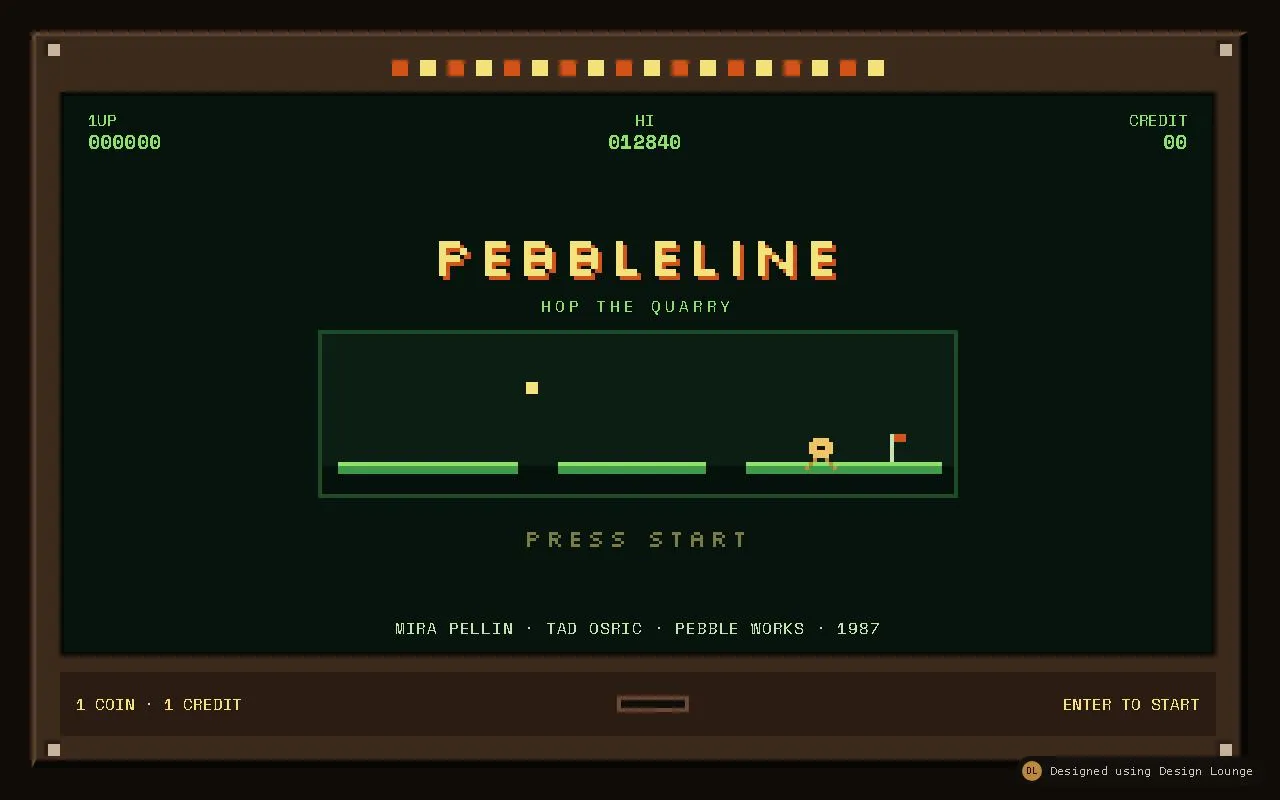
A Pebbleline coin-op attract screen: bezel, looping ledge demo, blinking Press start, high score, and a credit that opens Stage 1.
Preview
Use it
Free to use · credit appreciated1 Once, in your project
npx skills add SusanAcharya/Design-Lounge 2 Then ask
Using the Design Lounge skill, build "Pebbleline attract screen" (piece game-title-screen) in my stack. Match its brief; restyle it onto my product's theme.
No skill? Paste the brief instead. It carries the numbers, tokens and behaviour.
<!-- Design Lounge Nº 508 · "Pebbleline attract screen" · designlounge.vercel.app -->

# Pebbleline attract screen

> **Build brief for a coding agent.** Rebuild this piece in the reader's stack. If they haven't said which stack, ask once, then default to semantic HTML + CSS + a little vanilla JS. Match the numbers below; don't "improve" them.

## What it is

This is the attract mode of Pebbleline, a fictional 1987 quarry-hop from Pebble Works, shown as the glass of a coin-op cabinet. It is not a marketing page and it has no feature list. A wood bezel frames a phosphor screen. On that screen: a high score, a credit count, the wordmark, a looping drawn demo of a pebble crossing three ledges, a blinking PRESS START, and a staff line. Enter, or a click on the screen, inserts one credit and replaces the attract stack with a single line, STAGE 1. RETURN or Escape restores attract mode and keeps the credit count. Motion uses `steps()` on a 4px grid. Shadows are hard offsets with a 0px blur. There is no glow.

## Reference behaviour

1. First frame is attract mode. `body` has `data-mode="attract"`. The cabinet fills a 1280x800 viewport. CREDIT reads 00. HI reads 012840. 1UP reads 000000. The pebble demo is already looping. PRESS START is visible on the first half of its blink.
2. The demo is drawn with elements, not a video and not a canvas. Three ledges, a 12px coin, a 4px flagpole with an orange flag, and a 32px pebble built from 4px box-shadow cells. The pebble hops ledge to ledge, then back, forever.
3. Click anywhere on the screen except RETURN, or press Enter, while mode is attract. Credits become 01 (then 02, 03, on later starts). `data-mode` becomes `stage`. The attract stack and the staff line hide. The screen shows one line, STAGE 1, plus a RETURN button. A polite live region says "Credit 1. Stage 1."
4. Enter must not add a second credit in the same keypress. `preventDefault` on Enter in attract mode so the focused PRESS START button does not also click. After keyup of that Enter, focus moves to RETURN.
5. A mouse click that starts the game focuses RETURN immediately.
6. RETURN click, or Escape while mode is stage, sets mode back to attract, leaves the credit number as it is, shows the demo again, and focuses PRESS START. Live region: "Attract mode. Credit N."
7. Enter while already on STAGE 1 does not add a credit and does not leave. Only RETURN and Escape leave.
8. Clicking RETURN does not bubble into the screen's start handler.
9. The deck under the glass does not change between modes. It always reads "1 COIN · 1 CREDIT" and "ENTER TO START", with a slot between them.
10. Hover or focus on PRESS START stops the blink, sets opacity to 1, and turns the label `#D4531A`. Focus shows a 4px `#F4E27A` outline, offset 4px.
11. Hover or focus on RETURN fills it `#F4E27A` with `#07140E` text. Focus outline is 4px `#D4531A`, offset 4px.
12. Reduced motion: the hop, the leg cycle, the coin blink, and the PRESS START blink are `animation: none`. The pebble sits on the first ledge via its base transform. PRESS START stays at opacity 1. Both modes still switch.

## Structure

```
1280 x 800
room padding 32, background #100C08
┌────────────────────────────────────────────────────────────────────────────┐
│ cabinet 1216 x 736                                                         │
│ bevel: top/left 4px #6A4A32, right/bottom 8px #080604, fill #3C2A1C       │
│ screws 16px at 4px from the inner top/bottom, 8px from the inner sides    │
│ ┌────────────────────────────────────────────────────────────────────────┐ │
│ │ lamps: 18 x 16px squares, gap 12, odd #D4531A, even #F4E27A, static    │ │ 16
│ ├────────────────────────────────────────────────────────────────────────┤ │
│ │ screen #07140E, border 4px #050806, padding 72 24 16                   │ │
│ │ 1UP 000000          HI 012840          CREDIT 00     top 16, inset 24  │ │
│ │              PEBBLELINE (56px, 4px orange offset)                      │ │

… 215 more lines. Copy or download for the full brief. Loading the source…Brief
255 linesBuild brief for a coding agent. Rebuild this piece in the reader’s stack. If they haven’t said which stack, ask once, then default to semantic HTML + CSS + a little vanilla JS. Match the numbers below; don’t “improve” them.
What it is
This is the attract mode of Pebbleline, a fictional 1987 quarry-hop from Pebble Works, shown as the glass of a coin-op cabinet. It is not a marketing page and it has no feature list. A wood bezel frames a phosphor screen. On that screen: a high score, a credit count, the wordmark, a looping drawn demo of a pebble crossing three ledges, a blinking PRESS START, and a staff line. Enter, or a click on the screen, inserts one credit and replaces the attract stack with a single line, STAGE 1. RETURN or Escape restores attract mode and keeps the credit count. Motion uses steps() on a 4px grid. Shadows are hard offsets with a 0px blur. There is no glow.
Reference behaviour
- First frame is attract mode.
bodyhasdata-mode="attract". The cabinet fills a 1280x800 viewport. CREDIT reads 00. HI reads 012840. 1UP reads 000000. The pebble demo is already looping. PRESS START is visible on the first half of its blink. - The demo is drawn with elements, not a video and not a canvas. Three ledges, a 12px coin, a 4px flagpole with an orange flag, and a 32px pebble built from 4px box-shadow cells. The pebble hops ledge to ledge, then back, forever.
- Click anywhere on the screen except RETURN, or press Enter, while mode is attract. Credits become 01 (then 02, 03, on later starts).
data-modebecomesstage. The attract stack and the staff line hide. The screen shows one line, STAGE 1, plus a RETURN button. A polite live region says “Credit 1. Stage 1.” - Enter must not add a second credit in the same keypress.
preventDefaulton Enter in attract mode so the focused PRESS START button does not also click. After keyup of that Enter, focus moves to RETURN. - A mouse click that starts the game focuses RETURN immediately.
- RETURN click, or Escape while mode is stage, sets mode back to attract, leaves the credit number as it is, shows the demo again, and focuses PRESS START. Live region: “Attract mode. Credit N.”
- Enter while already on STAGE 1 does not add a credit and does not leave. Only RETURN and Escape leave.
- Clicking RETURN does not bubble into the screen’s start handler.
- The deck under the glass does not change between modes. It always reads “1 COIN · 1 CREDIT” and “ENTER TO START”, with a slot between them.
- Hover or focus on PRESS START stops the blink, sets opacity to 1, and turns the label
#D4531A. Focus shows a 4px#F4E27Aoutline, offset 4px. - Hover or focus on RETURN fills it
#F4E27Awith#07140Etext. Focus outline is 4px#D4531A, offset 4px. - Reduced motion: the hop, the leg cycle, the coin blink, and the PRESS START blink are
animation: none. The pebble sits on the first ledge via its base transform. PRESS START stays at opacity 1. Both modes still switch.
Structure
1280 x 800
room padding 32, background #100C08
┌────────────────────────────────────────────────────────────────────────────┐
│ cabinet 1216 x 736                                                         │
│ bevel: top/left 4px #6A4A32, right/bottom 8px #080604, fill #3C2A1C       │
│ screws 16px at 4px from the inner top/bottom, 8px from the inner sides    │
│ ┌────────────────────────────────────────────────────────────────────────┐ │
│ │ lamps: 18 x 16px squares, gap 12, odd #D4531A, even #F4E27A, static    │ │ 16
│ ├────────────────────────────────────────────────────────────────────────┤ │
│ │ screen #07140E, border 4px #050806, padding 72 24 16                   │ │
│ │ 1UP 000000          HI 012840          CREDIT 00     top 16, inset 24  │ │
│ │              PEBBLELINE (56px, 4px orange offset)                      │ │
│ │              HOP THE QUARRY                                            │ │
│ │              field 640 x 168                                           │ │
│ │              PRESS START                                               │ │
│ │              MIRA PELLIN · TAD OSRIC · PEBBLE WORKS · 1987             │ │
│ ├────────────────────────────────────────────────────────────────────────┤ │
│ │ deck 64px #2A1C12    1 COIN · 1 CREDIT    [slot]    ENTER TO START     │ │
│ └────────────────────────────────────────────────────────────────────────┘ │
└────────────────────────────────────────────────────────────────────────────┘

Stage replaces the attract stack and the staff line. Top scores stay.
The only new text is STAGE 1 (64px) and the RETURN button (min 200 x 48).main.cabis the cabinet. The screen is adiv#screen, not an iframe.- Attract content lives in
.attract:h1PEBBLELINE, ap.sub, the.field(aria-hidden="true"), andbutton#startlabelled PRESS START. - Staff is a
p.staffsibling under the attract block. - Stage is
.stage, hidden withbody[data-mode="attract"] .stage { display: none }. It holdsp.stagelineandbutton#back. - In stage,
.attractand.staffaredisplay: none. - Scores are three
pelements in.top. The credit number isb#credit. - A visually hidden
p#livehasaria-live="polite". - Lamps, screws, coin, flag, and slot are
aria-hidden.
Field, 640 by 168, border 4px #1E4A28, background #0C1E14. A ::after pit, height 28, colour #06110C, sits on the bottom. Ledges are bottom: 20px, height 12, fill #3F9A4A, with a 4px #8FE06A top lip.
| Ledge | left | width |
|---|---|---|
| a | 16 | 180 |
| b | 236 | 148 |
| c | 424 | 196 |
Coin: 12px square, #F4E27A, left 204, top 48. Flag: 4 by 28 pole #C6E2B4 at left 568, bottom 32, plus an ::after flag 12 by 8 #D4531A.
The pebble’s base transform is translate(48px, 104px), which stands on ledge A. The sprite box is 4px and the picture is box-shadow cells at a 4px step, 8 columns by 8 rows (32px tall). Body #F0C56A, eyes #1A120C at cells (3,2) and (4,2), feet #C48A3A.
Body cells, both frames: (2,0) (3,0) (4,0) (5,0), (1,1) through (6,1), (1,2) (2,2) (5,2) (6,2), (1,3) through (6,3), (2,4) through (5,4).
Frame A feet: (2,5) (5,5), (1,6) (6,6), (0,7) (7,7). Frame B feet: (3,5) (4,5), (2,6) (5,6), (1,7) (6,7).
Cabinet math at 1280 by 800, so an agent can check the boxes:
- Room padding 32. Cabinet border box is 1216 by 736, origin 32, 32.
- Bevel eats 4 top, 4 left, 8 right, 8 bottom. Padding inside the bevel is 24. Content box is 1156 by 676.
- Lamps 16, gap 16, deck 64, gap 16. Screen border box is 1156 by 564, origin about 60, 92.
- Screen border 4. Inner padding 72 top, 24 sides, 16 bottom. The attract column centres in what remains.
- Wordmark border box is about 411 by 56. PRESS START is about 251 by 48. Both sit inside the glass with room on either side at 1280.
- Stage block is
position: absolute; inset: 72px 24px 24pxinside the screen, so it clears the score row and does not cover the deck.
Screws sit in the padding, not on the glass. Each is 16 by 16, fill #C8B49A, with box-shadow: inset 4px 4px 0 0 #2A1C14. Corners: top 4px and left or right 8px, and the same on the bottom. They are decorative and aria-hidden.
The pebble must read as one 32px character, not a CSS circle. Build it from a 4px cell whose own background is transparent, and put every coloured cell in box-shadow with blur 0 and spread 0 (8px 0 0 0 #F0C56A). A border-radius on the pebble is wrong. A transform: scale() on the sprite is also wrong, because scaling softens the cells. If the character needs to be larger, use 8px cells and rewrite the shadow offsets, still on the 4px grid.
Lamp row is exactly 18 squares. Count them. Odd children are #D4531A, even children are #F4E27A. They do not blink. The only blinks are the coin and PRESS START.
Slot in the deck: 72 by 16, fill #120C08, inset ring 4px #6A4A32 via box-shadow: inset 0 0 0 4px. It is not a button. The deck type is Space Mono 16px #F4E27A on #2A1C12. Left plate and right plate share the row with justify-content: space-between and 16px horizontal padding.
Tokens
:root {
  --room: #100c08;
  --wood: #3c2a1c;
  --wood-hi: #6a4a32;
  --wood-dk: #080604;
  --deck: #2a1c12;
  --screen: #07140e;
  --field: #0c1e14;
  --pit: #06110c;
  --cream: #f4e27a;
  --green: #8fe06a;
  --plat: #3f9a4a;
  --orange: #d4531a;
  --body: #f0c56a;
  --foot: #c48a3a;
  --eye: #1a120c;
  --staff: #c6e2b4;
  --screw: #c8b49a;
  --px: 4px;
  --display: "Silkscreen", monospace;
  --mono: "Space Mono", ui-monospace, monospace;
}
Spacing that is chrome (padding, gaps, borders, type sizes used as rhythm) is a multiple of 4. The screen’s inner padding top is 72 so the absolute score row (top 16, two lines of 16 and 20) clears the wordmark. Gap between cabinet regions is 16. Deck height is 64. Screws are 16 with a 4px inset shadow.
Do not introduce a blur radius. text-shadow: 4px 4px 0 var(--orange) and box-shadow: inset 4px 4px 0 0 #2a1c14 are the only shadows. No filter, no spread glow, no gradient text.
Typography
| Role | Family | Size | Weight | Line-height | Tracking | Case |
|---|---|---|---|---|---|---|
| Wordmark, STAGE 1 | Silkscreen | 56px, stage 64px | 400 | 1 | 4px | Upper |
| PRESS START | Silkscreen | 24px | 400 | 1 | 4px | Upper |
| RETURN | Silkscreen | 16px | 400 | 1 | 4px | Upper |
| Score labels | Space Mono | 16px | 400 | 1 | 0 | Upper |
| Score figures | Space Mono | 20px | 700 | 1 | 0 | Digits |
| Subline, staff, deck | Space Mono | 16px | 400 | 1 | sub 4px, staff 1px, deck 0 | Upper |
-webkit-font-smoothing: none on the body. image-rendering: pixelated on the field. Silkscreen is the picture. Space Mono is the accounting (scores, staff, deck). Both are on screen in the first frame.
Load one stylesheet: Silkscreen at 400 and 700, and Space Mono at 400 and 700. No other family. No script src. No images.
Motion
| Thing | Trigger | Property | From, to | Duration | Easing | Reduced motion |
|---|---|---|---|---|---|---|
| Pebble path | always, attract | transform | 8 poses, alternate | 2.4s | steps(8, end) | none, stays at translate(48px, 104px) |
| Legs | always, attract | box-shadow | frame A to frame B | 0.48s | steps(2, end) | none, frame A |
| Coin | always | opacity | 1 to 0 | 1s | steps(2, end) | none, opacity 1 |
| PRESS START | always, until hover or focus | opacity | 1 to 0 | 1.1s | steps(2, end) | none, opacity 1 |
Hop poses, animation-direction: alternate:
| % | translate |
|---|---|
| 0 | 48px, 104px |
| 12.5 | 120px, 104px |
| 25 | 200px, 60px |
| 37.5 | 252px, 104px |
| 50 | 312px, 104px |
| 62.5 | 400px, 56px |
| 75 | 456px, 104px |
| 100 | 528px, 104px |
Poses at 0, 12.5, 37.5, 50, 75, and 100 stand on a ledge (sprite bottom at y 136, ledge top at y 136). Poses at 25 and 62.5 are the pits between ledges. There is no UI transition. Mode changes are instant, which matches a pixel snap.
States
- Attract: demo, wordmark, PRESS START, staff, CREDIT 00 or the stored count. RETURN is not displayed.
- Stage: STAGE 1 and RETURN. Scores stay, including the new credit. Demo and staff are not displayed.
- PRESS START hover and focus-visible: blink off, colour
#D4531A, 4px cream outline on focus-visible only. - RETURN hover and focus-visible: fill cream, text
#07140E. Focus-visible adds the orange outline. - No disabled control. No loading state. No error state. The credit count does not wrap; it keeps growing as two digits until 99, then three.
padStart(2, "0")is enough for the demo. - The deck does not gain a selected state. It is cabinet furniture.
Accessibility
- One
h1: PEBBLELINE. STAGE 1 is ap, not a second heading, because it replaces the attract picture rather than introducing a new page title. - PRESS START and RETURN are real
button type="button"elements. PRESS START is at least 48px tall. RETURN is at least 48px tall and 200px wide. - Enter starts from anywhere while attract is showing. Escape returns while stage is showing. Tab reaches the visible button. The hidden button is
display: none, so it leaves the tab order. - Focus rings are 4px solids, offset 4px, never removed.
#liveis visually hidden (clip: rect(0,0,0,0), 1px box) andaria-live="polite". It announces the credit and the mode. It is empty on first load so the page does not speak the opening frame.- The field, lamps, screws, coin, flag, and slot are
aria-hidden="true". - Contrast:
#F4E27Aon#07140Eis about 14:1.#8FE06Aon#07140Eis about 12:1.#C6E2B4on#07140Eis about 13:1.#F4E27Aon#2A1C12is about 13:1. Do not dim the staff line below#C6E2B4.
Responsive rules
The frame is 1280 by 800. The cabinet is height: 100% inside 32px room padding, so plus or minus 20 percent (about 1024 to 1536) keeps the same regions. The field is 640px wide until the viewport is under 900px.
- At 1024 and above: type sizes stay as in the table. The field stays 640 by 168 and remains centred.
- At 900px and under: the wordmark and STAGE 1 drop to 40px. The field becomes
width: 100%andoverflow: hidden, so the hop clips inside the glass instead of widening the page. - At 640px and under: room padding becomes 16px. Wordmark and STAGE 1 are 28px with 2px tracking. Subline, staff, and deck drop to 14px with tracking 0. The score row may sit closer to the wordmark. The deck stays one row.
- Do not turn this into a stacked marketing hero. The bezel, the score row, and PRESS START stay.
Acceptance checklist
Always
- One self-contained document. Google Fonts link only, max two families. No
script src, no images, no fetches. -
html, body { height: 100%; margin: 0 }. At 1280x800 nothing scrolls on either axis. - First frame is attract mode, with the demo already moving, before any click.
- Enter and a screen click insert one credit and show a one-line stage state. A control returns to attract without clearing the credit.
- The same keypress cannot insert two credits.
- Motion that loops uses
steps(). Reduced motion removes those animations and leaves PRESS START readable. - Focus-visible outlines are present on both buttons. Hit height of each button is at least 48px.
- Hard offsets only. No blur, no glow, no filter.
This demo
- Wordmark is PEBBLELINE. Subline is HOP THE QUARRY. Stage line is STAGE 1. Buttons read PRESS START and RETURN.
- Scores read 1UP 000000, HI 012840, CREDIT 00, then CREDIT 01 after one start.
- Staff line is MIRA PELLIN · TAD OSRIC · PEBBLE WORKS · 1987.
- Deck reads 1 COIN · 1 CREDIT and ENTER TO START.
- Field is 640 by 168 with three ledges (180, 148, 196 wide) and a pebble whose rest pose is translate(48px, 104px).
- Palette starts
#100C08,#07140E,#F4E27A,#8FE06A,#D4531A. Families are Silkscreen and Space Mono.
Implementation notes
- Keep the rest pose on the element, and let the animation override it. If reduced motion sets
animation: none, the base transform is what remains. If the only position lives inside@keyframes, the pebble jumps to the corner when motion is reduced.
.runner {
  transform: translate(48px, 104px);
  animation: hop 2.4s steps(8, end) infinite alternate;
}
@media (prefers-reduced-motion: reduce) {
  .runner, .pebble, .coin, #start { animation: none; }
  #start { opacity: 1; }
}- One start path. The screen listens for clicks. RETURN stops propagation. Enter is handled on keydown with
preventDefault, and focus moves to RETURN on keyup so the keyup does not activate RETURN in the same press.
function start() {
  if (mode !== "attract") return;
  credits += 1;
  mode = "stage";
  document.body.dataset.mode = mode;
  creditEl.textContent = String(credits).padStart(2, "0");
  live.textContent = "Credit " + credits + ". Stage 1.";
}
document.addEventListener("keydown", function (e) {
  if (e.key === "Enter" && mode === "attract") {
    e.preventDefault();
    start();
  }
});- Common mistakes: easing the hop with
ease(it must snap), drawing the demo as a marketing illustration beside a Play button that does nothing, using a blurred text-shadow, resetting the credit when returning to attract, and adding a second page for stage 1. Stage 1 is one line on the same glass. The deck copy stays “ENTER TO START” even after a credit is in, because the deck is the instruction plate, not a live credit counter. The live counter is the CREDIT figure on the glass. Do not animate the wood, the screws, or the lamp squares. Two loops are enough: the hop, and the blink.
Details
- Palette
- Type
- Silkscreen · Space Mono
- Motion
- Subtle motion
- Build
- One session
- Tags
Studied
Haunted Boulder CityPin the screen and let scroll turn the pages. Only the line you are on gets to shout.
All sourcesOn the shelves