Nº 011 of 520
Documentation three-column layout
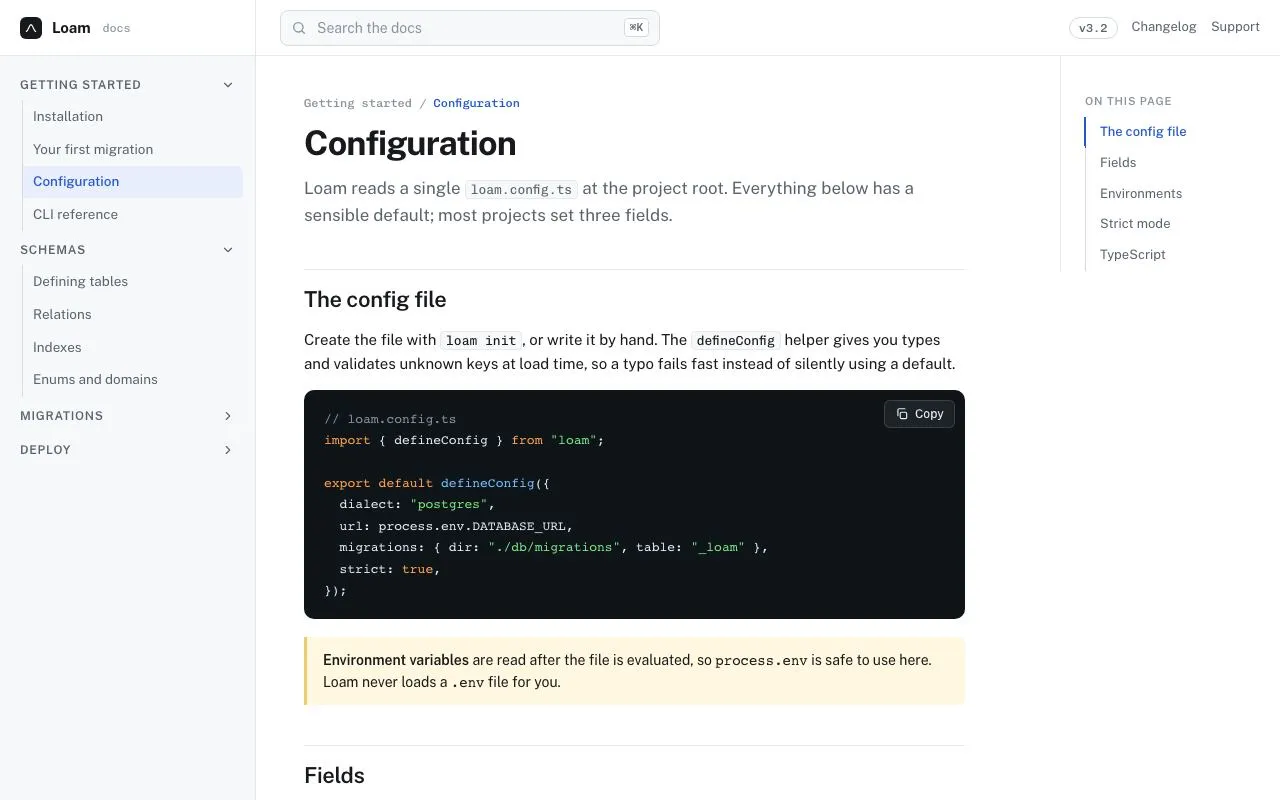
A docs shell: 256px collapsible nav tree, 72ch prose column, sticky 'On this page' TOC with scroll-spy, ⌘K search and a code block with a copy button.
Preview
Use it
Free to use · credit appreciated1 Once, in your project
npx skills add SusanAcharya/Design-Lounge 2 Then ask
Using the Design Lounge skill, build "Documentation three-column layout" (piece docs-three-column) in my stack. Match its brief; restyle it onto my product's theme.
No skill? Paste the brief instead. It carries the numbers, tokens and behaviour.
<!-- Design Lounge Nº 011 · "Documentation three-column layout" · designlounge.vercel.app -->

# Documentation three-column layout

> **Build brief for a coding agent.** Rebuild this piece in the reader's stack. If they haven't said which stack, ask once, then default to semantic HTML + CSS + a little vanilla JS. Match the numbers below; don't "improve" them.

## What it is

The reference layout for a developer documentation site ("Loam", a database migration tool). A 56px top bar holds the logo, a 380px search field with a ⌘K hint and version/links. Beneath it, three columns: a 256px left navigation tree with collapsible groups, a centre article whose prose is capped at 72ch and is the only region that scrolls, and a 220px right rail with a sticky "On this page" list whose 2px blue indicator slides to the section currently in view. The code block has a copy button that reports "Copied" for 1.6s. It is deliberately plain — white, one blue, hairlines — so it can sit under any product's brand.

## Reference behaviour

1. Initial state: nav groups "Getting started" and "Schemas" are open, "Migrations" and "Deploy" are closed (chevron rotated −90°). "Configuration" is the current page (blue text, blue 1px left bar, `--accent-soft` background). The article starts at the top; the TOC marks "The config file" and the indicator sits beside it.
2. Scroll the centre column: as each `<h2>` crosses 120px below the top of the scroll container, its TOC entry becomes active and the indicator moves to it (260ms). Scrolling back up reverses it.
3. Click a TOC entry: the article scrolls to that heading (16px above it) with smooth behaviour; the indicator follows.
4. Click a nav group header: the group collapses or expands its list with a height animation (grid rows `1fr` ↔ `0fr`, 260ms); the chevron rotates between 0° and −90°; `aria-expanded` on the button flips.
5. Press ⌘K (Ctrl+K): the search input receives focus and selects its contents; the field's border turns blue with a 3px `--accent-soft` ring. Escape blurs it.
6. Hover an `<h2>`: a grey "#" anchor link appears after it (opacity 0 → 1, 140ms).
7. Click "Copy" on the code block: the code text is written to the clipboard; the button turns green-outlined and reads "Copied" for 1.6s, then returns to "Copy". If clipboard access is denied, the code text is selected instead and the button reads "Select all".
8. Hover a nav link: `--ink` text on a 4% ink tint. Hover a pager card: border turns `--accent`.

## Structure

```
1280 × 800
┌──────────┬────────────────────────────────────────────────────┬──────────┐
│ ▣ Loam   │ [ 🔍 Search the docs            ⌘K ]   v3.2 Changelog Support │ 56
├──────────┼────────────────────────────────────────────────────┼──────────┤
│ GETTING  │ Getting started / Configuration                    │ ON THIS  │
│ STARTED ˅│ Configuration                        (h1 34px)     │ PAGE     │
│ │ Install│ lede …                                             │ ▌The con…│
│ │ First… │ ── The config file #                               │ │ Fields │
│ │▌Config │ ┌────────────────────────────────────┐ [Copy]      │ │ Enviro…│
│ │ CLI    │ │ // loam.config.ts                  │             │ │ Strict…│
│ SCHEMAS ˅│ │ import { defineConfig } from "loam"│             │ │ TypeSc…│
│ │ Tables │ └────────────────────────────────────┘             │          │
│ │ …      │ ▌ Environment variables are read after…            │          │
│ MIGRAT… >│ ── Fields #                                        │          │
│ DEPLOY  >│ table …                                            │          │
│          │ (scrolls)                                          │ (sticky) │

… 183 more lines. Copy or download for the full brief. Loading the source…Brief
223 linesBuild brief for a coding agent. Rebuild this piece in the reader’s stack. If they haven’t said which stack, ask once, then default to semantic HTML + CSS + a little vanilla JS. Match the numbers below; don’t “improve” them.
What it is
The reference layout for a developer documentation site (“Loam”, a database migration tool). A 56px top bar holds the logo, a 380px search field with a ⌘K hint and version/links. Beneath it, three columns: a 256px left navigation tree with collapsible groups, a centre article whose prose is capped at 72ch and is the only region that scrolls, and a 220px right rail with a sticky “On this page” list whose 2px blue indicator slides to the section currently in view. The code block has a copy button that reports “Copied” for 1.6s. It is deliberately plain — white, one blue, hairlines — so it can sit under any product’s brand.
Reference behaviour
- Initial state: nav groups “Getting started” and “Schemas” are open, “Migrations” and “Deploy” are closed (chevron rotated −90°). “Configuration” is the current page (blue text, blue 1px left bar,
--accent-softbackground). The article starts at the top; the TOC marks “The config file” and the indicator sits beside it. - Scroll the centre column: as each
<h2>crosses 120px below the top of the scroll container, its TOC entry becomes active and the indicator moves to it (260ms). Scrolling back up reverses it. - Click a TOC entry: the article scrolls to that heading (16px above it) with smooth behaviour; the indicator follows.
- Click a nav group header: the group collapses or expands its list with a height animation (grid rows
1fr↔0fr, 260ms); the chevron rotates between 0° and −90°;aria-expandedon the button flips. - Press ⌘K (Ctrl+K): the search input receives focus and selects its contents; the field’s border turns blue with a 3px
--accent-softring. Escape blurs it. - Hover an
<h2>: a grey ”#” anchor link appears after it (opacity 0 → 1, 140ms). - Click “Copy” on the code block: the code text is written to the clipboard; the button turns green-outlined and reads “Copied” for 1.6s, then returns to “Copy”. If clipboard access is denied, the code text is selected instead and the button reads “Select all”.
- Hover a nav link:
--inktext on a 4% ink tint. Hover a pager card: border turns--accent.
Structure
1280 × 800
┌──────────┬────────────────────────────────────────────────────┬──────────┐
│ ▣ Loam   │ [ 🔍 Search the docs            ⌘K ]   v3.2 Changelog Support │ 56
├──────────┼────────────────────────────────────────────────────┼──────────┤
│ GETTING  │ Getting started / Configuration                    │ ON THIS  │
│ STARTED ˅│ Configuration                        (h1 34px)     │ PAGE     │
│ │ Install│ lede …                                             │ ▌The con…│
│ │ First… │ ── The config file #                               │ │ Fields │
│ │▌Config │ ┌────────────────────────────────────┐ [Copy]      │ │ Enviro…│
│ │ CLI    │ │ // loam.config.ts                  │             │ │ Strict…│
│ SCHEMAS ˅│ │ import { defineConfig } from "loam"│             │ │ TypeSc…│
│ │ Tables │ └────────────────────────────────────┘             │          │
│ │ …      │ ▌ Environment variables are read after…            │          │
│ MIGRAT… >│ ── Fields #                                        │          │
│ DEPLOY  >│ table …                                            │          │
│          │ (scrolls)                                          │ (sticky) │
└──────────┴────────────────────────────────────────────────────┴──────────┘
256px 1fr (prose max 72ch, padding 40px 48px) 220px<body>:display: grid; grid-template-rows: 56px 1fr; overflow: hidden.<header class="top">: grid256px 1fr auto..logo(22px mark + name + mono “docs”),<label class="search">wrapping an<input type="search">and a.kbdspan,.tools(version pill + two links)..shell: grid256px 1fr 220px; min-height: 0.<nav class="side" aria-label="Docs">:.grpblocks, each<button aria-expanded aria-controls>+<div class="list" id>containing a<ul>of links. Current page link hasaria-current="page".<main id="main">(overflow: auto):<article class="prose">with breadcrumbs,<h1>, lede,<h2 id>sections (each with an anchor<a>), a<pre>with.copybutton and<code>, a.notecallout, a<table>, then<nav class="pager">.<aside class="toc" aria-label="On this page">(position: sticky; top: 0; align-self: start):<h6>+.wrap(relative) holding the.indindicator span and the<ul>of anchor links.
Tokens
:root {
  /* colour — white page, cool grey chrome, one blue */
  --bg: #ffffff;           /* page + article */
  --side: #f7f8fa;         /* nav column, search field, inline code */
  --line: #e6e8ec;         /* hairlines */
  --line-2: #d5d9e0;       /* borders on controls, nav tree rail */
  --ink: #17191c;          /* text */
  --ink-2: #5a6270;        /* secondary text, nav links */
  --ink-3: #8b93a1;        /* meta, placeholders, kbd */
  --accent: #2457d6;       /* current page, TOC active, focus */
  --accent-soft: #e8eefc;  /* current-page background, focus ring */
  --code-bg: #0f1419;      /* code block */
  --code-ink: #e6edf3;     /* code default */
  --code-2: #7ee787;       /* strings, "Copied" */
  --code-3: #79c0ff;       /* function names */
  --code-4: #ffa657;       /* keywords */
  --code-comment: #8b949e;
  --note: #fff7e0;         /* callout background */
  --note-line: #f0c96a;    /* callout left bar */
  --hover-tint: rgba(23, 25, 28, .04);

  /* type */
  --sans: "Public Sans", system-ui, sans-serif;
  --mono: "Chivo Mono", ui-monospace, monospace;
  --fs-h1: 34px; --fs-h2: 22px; --fs-lede: 17px; --fs-body: 15px; --fs-nav: 13.5px;
  --fs-code: 13px; --fs-toc: 13px; --fs-label: 12px; --fs-kbd: 11px;
  --measure: 72ch;

  /* layout */
  --w-nav: 256px; --w-toc: 220px; --h-top: 56px;
  --search-w: 380px; --search-h: 36px;
  --main-pad: 40px 48px 120px;
  --r: 6px; --r-field: 8px; --r-code: 10px; --r-card: 10px;
  --spy-offset: 120px;      /* how far below the scroll top a heading becomes "current" */

  /* motion */
  --t-micro: 140ms; --t-layout: 260ms;
  --ease: cubic-bezier(.2, .7, .2, 1);
}
Typography
| Role | Family | Size | Weight | Line-height | Tracking | Case |
|---|---|---|---|---|---|---|
| Body | Public Sans | 15px | 400 | 1.6 | 0 | sentence |
| Lede | Public Sans | 17px | 400 | 1.6 | 0 | --ink-2 |
| h1 | Public Sans | 34px | 700 | 1.15 | −0.025em | sentence |
| h2 | Public Sans | 22px | 600 | 1.3 | −0.015em | sentence; 1px top rule, 12px padding-top, 40px margin-top |
| Breadcrumbs | Chivo Mono | 12px | 500 | 1.6 | 0 | current page in --accent |
| Nav group | Public Sans | 12px | 600 | 1 | +0.06em | UPPERCASE |
| Nav link | Public Sans | 13.5px | 400 (500 current) | 1.5 | 0 | sentence |
| Logo | Public Sans | 15px | 700 | 1 | −0.01em | “docs” suffix Chivo Mono 12px --ink-3 |
| Search input | Public Sans | 14px | 400 | 1 | 0 | placeholder --ink-3 |
| Kbd hint | Chivo Mono | 11px | 500 | 1 | 0 | 1px --line-2 border, 4px radius, 3px 5px padding |
| Inline code | Chivo Mono | 13px | 400 | inherit | 0 | --side bg, 1px --line border, 4px radius |
| Code block | Chivo Mono | 13px | 400 | 1.65 | 0 | tab-size: 2 |
| Table header | Public Sans | 12px | 600 | 1.4 | +0.04em | UPPERCASE --ink-2 |
| Table body | Public Sans | 14px | 400 | 1.5 | 0 | first column Chivo Mono 13px |
| TOC heading | Public Sans | 11px | 600 | 1 | +0.08em | UPPERCASE --ink-3 |
| TOC entry | Public Sans | 13px | 400 (500 active) | 1.5 | 0 | sentence |
| Callout | Public Sans | 14px | 400 | 1.6 | 0 | lead-in 600 |
| Pager label | Public Sans | 11px | 500 | 1.6 | +0.06em | UPPERCASE --ink-3 |
Motion
| Element | Trigger | Property | From → To | Duration | Easing |
|---|---|---|---|---|---|
.grp .list | group button click | grid-template-rows | 1fr ↔ 0fr | 260ms | --ease |
.grp > button svg | group button click | rotate | 0 ↔ −90° | 140ms | --ease |
.toc .ind | scroll-spy change | top | previous entry → current entry (29px tall) | 260ms | --ease |
.toc a | scroll-spy change | color, border-color | --ink-2 → --accent | 140ms | --ease |
main | TOC click | scrollTop | current → heading − 16px | native smooth | — |
.search | focus-within | border-color, box-shadow | --line-2 → --accent; none → 0 0 0 3px --accent-soft | 140ms | --ease |
h2 a (anchor) | h2 hover | opacity | 0 → 1 | 140ms | linear |
.copy | click | swaps label to “Copied”, adds .ok (green text/border) | — | 1600ms hold | — |
.pager a | hover | border-color | --line → --accent | 140ms | --ease |
Reduced motion: all transitions 1ms; scroll-behavior: auto and scrollTo({behavior: 'auto'}); the group list still collapses and the indicator still jumps.
States
- Nav link hover: colour
--ink, background--hover-tint. - Nav link current (
aria-current="page"): colour--accent, weight 500, background--accent-soft, 1px--accentleft border overlapping the tree rail. - Nav group closed: list height 0, chevron −90°, button
aria-expanded="false". - Search focus-within: blue border, 3px soft ring, background becomes white.
- TOC active: colour
--accent, 500 weight, 1px--accentleft border; the 2px indicator overlaps the rail at that row. - Copy default / success / fallback: “Copy” → “Copied” (
.ok: text and border--code-2) → back after 1.6s; fallback label “Select all”. - Focus-visible (global):
outline: 2px solid --accent; outline-offset: 2px; on the copy button (dark surface) the outline is white. - Callout: 3px
--note-lineleft bar,--notebackground, right-side radius 6px.
Accessibility
- Landmarks:
<header>,<nav aria-label="Docs">,<main>,<aside aria-label="On this page">(a<nav>inside is also fine),<nav aria-label="Pagination">. - Nav groups are
<button aria-expanded aria-controls="listId">; the list keeps its DOM when collapsed (height 0,overflow: hidden) so its links are not reachable by Tab only if you also setvisibility: hiddenon the collapsed list — do that in production (transition: visibility 0s 260ms). - Search:
<input type="search" aria-label="Search the docs">; the ⌘K chip isaria-hidden. Keyboard: ⌘K / Ctrl+K focuses and selects; Escape blurs. - Headings: h1 → h2 (five) with
ids; each h2 has an anchor link labelled “Link to this section”.scroll-margin-top: 16pxso anchored headings clear the top. - Copy button has
aria-live="polite"so “Copied” is announced. - Table uses
<thead>/<th>; the first column is mono for field names. - Contrast:
--ink-2on white 6.9:1;--ink-3on white 3.6:1 — used only for placeholder, kbd and 11px labels;--accenton--accent-soft6.4:1; code colours on--code-bgall ≥ 7:1. - Only the centre column scrolls; the nav scrolls independently if it overflows. The TOC is sticky and never scrolls.
Responsive rules
- ≥ 1280: three columns as drawn.
- 1024–1279: same; search shrinks to 300px.
- 768–1023: right TOC hidden; shell is
256px 1fr. Optionally render the TOC as a collapsed “On this page” disclosure above the h1. - < 768: nav hidden behind a menu button in the top bar (opens as a 280px drawer with a scrim); search field fills the bar; prose padding 24px 20px; code block gains
overflow-x: auto(already set).
Acceptance checklist
- Column widths are 256px / 1fr / 220px and the top bar is 56px.
- Prose is capped at 72ch and only the centre column scrolls (body
overflow: hidden). - The right TOC is
position: sticky; top: 0and shows the active section with a 2px blue indicator that moves in 260ms. - Scroll-spy uses a 120px offset: a heading becomes current when its top is ≤ 120px below the scroll container’s top.
- Clicking a TOC entry scrolls the container to the heading minus 16px, smoothly (unless reduced motion).
- Nav groups collapse with an animated height (grid
0frtechnique), rotate their chevron −90°, and fliparia-expanded. - The current page link has blue text, a blue 1px left bar and
#E8EEFCbackground. - ⌘K / Ctrl+K focuses the search input and selects its text; Escape blurs it; the browser’s default ⌘K is prevented.
- Copy button writes the code text to the clipboard and shows “Copied” for 1.6s; on failure it selects the code and says “Select all”.
- Each h2 shows a ”#” anchor on hover and has
scroll-margin-top: 16px. - Code block:
#0F1419background, 10px radius, 13px/1.65 mono, keyword/string/function colours as tokens. - Focus rings are visible on every link, button and the search input.
- Under reduced motion the nav still collapses and the TOC indicator still moves, instantly.
Implementation notes
Scroll-spy without IntersectionObserver. Because the scroll container is main, not the window, compare offsetTop against scrollTop — it is simpler and deterministic:
const main = document.getElementById('main'), ind = document.querySelector('.ind');
const links = [...document.querySelectorAll('#toc a')];
const heads = links.map(a => document.getElementById(a.hash.slice(1)));
function spy() {
  const y = main.scrollTop + 120; let i = 0;
  heads.forEach((h, k) => { if (h && h.offsetTop <= y) i = k; });
  links.forEach((a, k) => a.classList.toggle('on', k === i));
  ind.style.top = links[i].offsetTop + 'px';
}
main.addEventListener('scroll', spy, { passive: true }); spy();
Animated collapse with grid rows — no measured heights, no max-height hacks:
.grp .list { display: grid; grid-template-rows: 1fr; transition: grid-template-rows 260ms var(--ease); }
.grp.closed .list { grid-template-rows: 0fr; }
.grp .list > ul { min-height: 0; overflow: hidden; }
Copy with a fallback — clipboard access can be denied in iframes and on http, so select the text instead and say so:
copy.addEventListener('click', async () => {
  let ok = false;
  try { await navigator.clipboard.writeText(code.textContent); ok = true; }
  catch { const r = document.createRange(); r.selectNodeContents(code);
          const s = getSelection(); s.removeAllRanges(); s.addRange(r); }
  label.textContent = ok ? 'Copied' : 'Select all'; copy.classList.toggle('ok', ok);
  setTimeout(() => { label.textContent = 'Copy'; copy.classList.remove('ok'); }, 1600);
});
Common mistakes: making the whole page scroll (the sticky TOC then needs a different offset and the nav scrolls away); putting a <div> directly inside a <ul> for the collapse wrapper (wrap the <ul> instead); positioning the TOC indicator inside the <ul> (put it in a relative wrapper next to the list); forgetting min-height: 0 on the shell grid so main can be shorter than its content and scroll.
Details
- Palette
- Type
- Public Sans · Chivo Mono
- Motion
- Subtle motion
- Build
- One session
- Tags
Studied
Tailwind CSS docsPut each instruction next to its code. Draw the grid with thin lines and let the empty sides carry a faint hatch.
All sources