Nº 060 of 520
Sidebar with overlay and pin modes
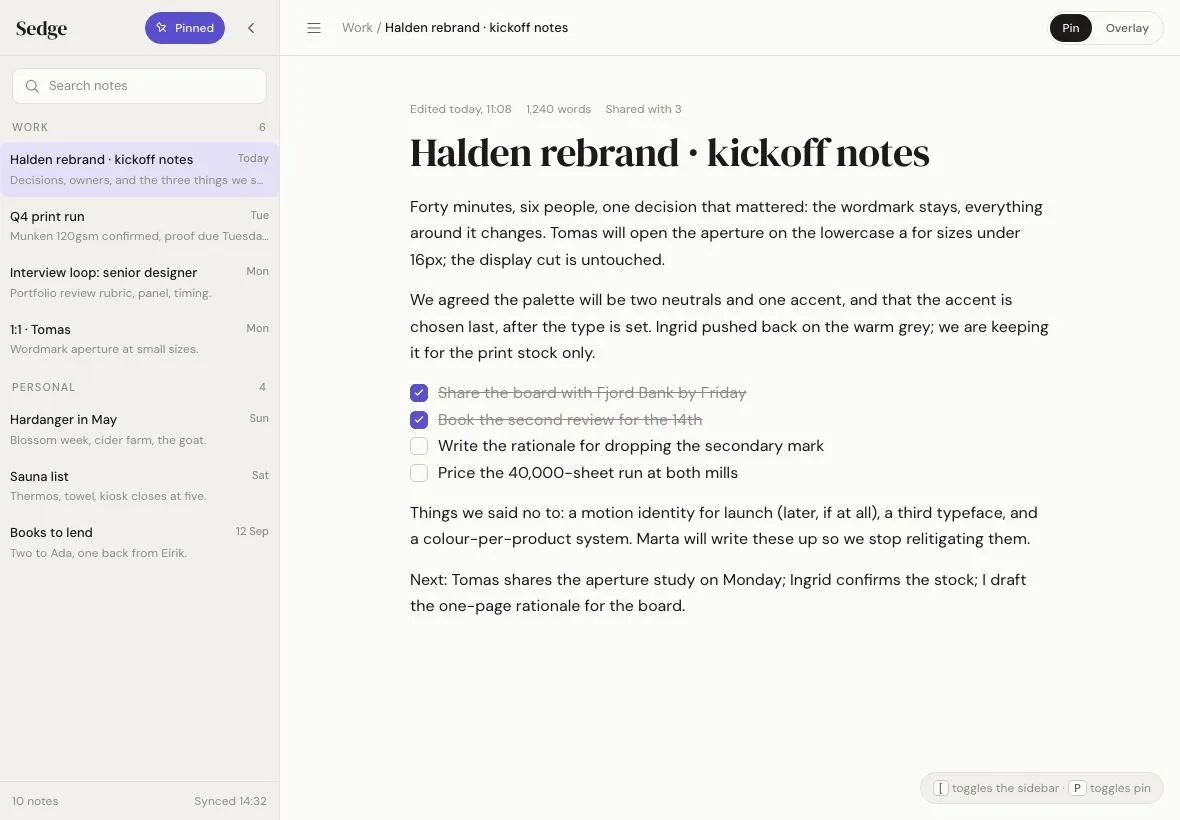
A 280px notes sidebar on a 1180×820 tablet that either overlays the page with a scrim and shadow or pins so the content reflows; a pin toggle switches modes with one 320ms transition.
Preview
Use it
Free to use · credit appreciated1 Once, in your project
npx skills add SusanAcharya/Design-Lounge 2 Then ask
Using the Design Lounge skill, build "Sidebar with overlay and pin modes" (piece tablet-sidebar-overlay-pin) in my stack. Match its brief; restyle it onto my product's theme.
No skill? Paste the brief instead. It carries the numbers, tokens and behaviour.
<!-- Design Lounge Nº 060 · "Sidebar with overlay and pin modes" · designlounge.vercel.app -->

# Sidebar with overlay and pin modes

> **Build brief for a coding agent.** Rebuild this piece in the reader's stack. If they haven't said which stack, ask once, then default to semantic HTML + CSS + a little vanilla JS. Match the numbers below; don't "improve" them.

## What it is

A notes app ("Sedge") on a landscape tablet with one sidebar that has two personalities. **Pinned:** it sits in the layout, the note content shifts right by 280px and there is no scrim. **Overlay:** it floats above the content with a soft right-hand shadow and a 32% scrim, and closes on scrim tap, Escape or picking a note. The pin toggle in the sidebar header switches modes while the sidebar stays exactly where it is; only the content margin and the scrim animate, so the switch reads as the page moving, not the sidebar. The sidebar is always the same absolutely positioned element; mode is expressed with two body classes and three transitions.

## Reference behaviour

1. Initial state: `body.open.pinned`. Sidebar visible at 0–280px with a search field, two notebook groups and eight notes; the first note is current. Main content starts at 280px and shows the note (serif 40px title, meta line, paragraphs, a to-do list with two done items). Pin button is filled accent and reads "Pinned"; the "Pin | Overlay" segment in the top bar shows Pin pressed.
2. Click "Pinned" (or press P, or click "Overlay" in the segment): `.pinned` is removed. Main's `margin-left` animates 280 → 0 over 320ms; the scrim fades in to 32% over 320ms; the sidebar grows a `12px 0 40px rgba(28,27,25,.14)` shadow; the pin icon rotates from −45° back to 0 and the button turns outlined, reading "Pin".
3. Click the scrim, press Escape, or click a note in overlay mode: the sidebar slides to `translateX(-100%)` over 320ms and becomes `visibility: hidden` once the slide finishes; the scrim fades out; focus moves to the menu button.
4. Click the menu button (or press `[`): the sidebar slides in from −100% over 320ms. In overlay mode the scrim returns; in pinned mode the main margin animates to 280px at the same time.
5. Click "Pin" while the overlay is open: the scrim fades out and main's margin animates 0 → 280 while the sidebar stays put. If the sidebar is closed when a mode button is pressed, it opens in that mode.
6. Click the chevron in the sidebar header: closes the sidebar in either mode (in pinned mode the content reflows back to the full width).
7. Click a note: it becomes current (`--selected` background); the breadcrumb and page title update; in overlay mode the sidebar then closes.

## Structure

```
1180 × 820 (pinned, open)                       overlay, open
┌───────────┬──────────────────────────────────┐ ┌───────────┬─────────────────────────┐
│ Sedge  [Pinned] < │ ≡ Work / Halden…  (Pin|Overlay)│ │ Sedge [Pin] <│▒▒ ≡ Work / … ▒▒▒▒▒▒▒▒▒ │
│ [ Search notes ]  │                              │ │ [ Search ] ▐▒▒ scrim 32%, shadow ▒▒│
│ WORK          6   │      Edited today · 1,240…   │ │ WORK      ▐▒▒                      │
│ ▌Halden rebrand…  │      Halden rebrand ·        │ │ ▌Halden…  ▐▒▒   content at x = 0   │
│  Q4 print run     │      kickoff notes           │ │  Q4 print ▐▒▒                      │
│  Interview loop…  │      paragraphs, 640px max   │ │  …        ▐▒▒                      │
│ PERSONAL      4   │      [x] Share the board…    │ │           ▐▒▒                      │
│  Hardanger in May │      [ ] Write the rationale │ │           ▐▒▒                      │
│ 10 notes  Synced  │            [ toggles · P pin │ │ 10 notes  ▐▒▒                      │
└───────────┴──────────────────────────────────┘ └───────────┴─────────────────────────┘
   280            main margin-left 280               280 (absolute, z 10)   margin 0
```

- `<body class="open pinned">` — state lives on the body: `.open` (sidebar visible) and `.pinned` (reflow mode).
- `<aside class="side" aria-label="Notebooks">` — `position: absolute; left: 0; top: 0; bottom: 0; width: 280px`. Contains `.shead` (wordmark, `<button class="pin" aria-pressed>`, close `<button class="ib">`), `.search`, `<ul class="notes">` (group headers as `<li class="group">`, notes as `<li><button class="note" aria-current>`), `.sfoot`.

… 172 more lines. Copy or download for the full brief. Loading the source…Brief
212 linesBuild brief for a coding agent. Rebuild this piece in the reader’s stack. If they haven’t said which stack, ask once, then default to semantic HTML + CSS + a little vanilla JS. Match the numbers below; don’t “improve” them.
What it is
A notes app (“Sedge”) on a landscape tablet with one sidebar that has two personalities. Pinned: it sits in the layout, the note content shifts right by 280px and there is no scrim. Overlay: it floats above the content with a soft right-hand shadow and a 32% scrim, and closes on scrim tap, Escape or picking a note. The pin toggle in the sidebar header switches modes while the sidebar stays exactly where it is; only the content margin and the scrim animate, so the switch reads as the page moving, not the sidebar. The sidebar is always the same absolutely positioned element; mode is expressed with two body classes and three transitions.
Reference behaviour
- Initial state:
body.open.pinned. Sidebar visible at 0–280px with a search field, two notebook groups and eight notes; the first note is current. Main content starts at 280px and shows the note (serif 40px title, meta line, paragraphs, a to-do list with two done items). Pin button is filled accent and reads “Pinned”; the “Pin | Overlay” segment in the top bar shows Pin pressed. - Click “Pinned” (or press P, or click “Overlay” in the segment):
.pinnedis removed. Main’smargin-leftanimates 280 → 0 over 320ms; the scrim fades in to 32% over 320ms; the sidebar grows a12px 0 40px rgba(28,27,25,.14)shadow; the pin icon rotates from −45° back to 0 and the button turns outlined, reading “Pin”. - Click the scrim, press Escape, or click a note in overlay mode: the sidebar slides to
translateX(-100%)over 320ms and becomesvisibility: hiddenonce the slide finishes; the scrim fades out; focus moves to the menu button. - Click the menu button (or press
[): the sidebar slides in from −100% over 320ms. In overlay mode the scrim returns; in pinned mode the main margin animates to 280px at the same time. - Click “Pin” while the overlay is open: the scrim fades out and main’s margin animates 0 → 280 while the sidebar stays put. If the sidebar is closed when a mode button is pressed, it opens in that mode.
- Click the chevron in the sidebar header: closes the sidebar in either mode (in pinned mode the content reflows back to the full width).
- Click a note: it becomes current (
--selectedbackground); the breadcrumb and page title update; in overlay mode the sidebar then closes.
Structure
1180 × 820 (pinned, open)                       overlay, open
┌───────────┬──────────────────────────────────┐ ┌───────────┬─────────────────────────┐
│ Sedge  [Pinned] < │ ≡ Work / Halden…  (Pin|Overlay)│ │ Sedge [Pin] <│▒▒ ≡ Work / … ▒▒▒▒▒▒▒▒▒ │
│ [ Search notes ]  │                              │ │ [ Search ] ▐▒▒ scrim 32%, shadow ▒▒│
│ WORK          6   │      Edited today · 1,240…   │ │ WORK      ▐▒▒                      │
│ ▌Halden rebrand…  │      Halden rebrand ·        │ │ ▌Halden…  ▐▒▒   content at x = 0   │
│  Q4 print run     │      kickoff notes           │ │  Q4 print ▐▒▒                      │
│  Interview loop…  │      paragraphs, 640px max   │ │  …        ▐▒▒                      │
│ PERSONAL      4   │      [x] Share the board…    │ │           ▐▒▒                      │
│  Hardanger in May │      [ ] Write the rationale │ │           ▐▒▒                      │
│ 10 notes  Synced  │            [ toggles · P pin │ │ 10 notes  ▐▒▒                      │
└───────────┴──────────────────────────────────┘ └───────────┴─────────────────────────┘
   280            main margin-left 280               280 (absolute, z 10)   margin 0
<body class="open pinned">— state lives on the body:.open(sidebar visible) and.pinned(reflow mode).<aside class="side" aria-label="Notebooks">—position: absolute; left: 0; top: 0; bottom: 0; width: 280px. Contains.shead(wordmark,<button class="pin" aria-pressed>, close<button class="ib">),.search,<ul class="notes">(group headers as<li class="group">, notes as<li><button class="note" aria-current>),.sfoot..scrim— absolute, full-bleed,z-index: 5.<main>— absolute full-bleed,margin-lefttransitions;.topbar (menu<button aria-expanded aria-controls="side">, breadcrumb,.mode[role=group]with twoaria-pressedbuttons),.docscroll area with the<article>, and a.hintchip bottom-right.
Content
- Wordmark “Sedge”; pin button “Pinned” / “Pin”; search placeholder “Search notes”; footer “10 notes” · “Synced 14:32”.
- Groups and notes (title · date · snippet): Work (6) — “Halden rebrand · kickoff notes” · Today · “Decisions, owners, and the three things we said no to.” (current); “Q4 print run” · Tue · “Munken 120gsm confirmed, proof due Tuesday.”; “Interview loop: senior designer” · Mon · “Portfolio review rubric, panel, timing.”; “1:1 · Tomas” · Mon · “Wordmark aperture at small sizes.” Personal (4) — “Hardanger in May” · Sun · “Blossom week, cider farm, the goat.”; “Sauna list” · Sat · “Thermos, towel, kiosk closes at five.”; “Books to lend” · 12 Sep · “Two to Ada, one back from Eirik.”
- Top bar: breadcrumb “Work / Halden rebrand · kickoff notes”; segment “Pin” | “Overlay”.
- Note: meta “Edited today, 11:08” · “1,240 words” · “Shared with 3”; h1 “Halden rebrand · kickoff notes”; two paragraphs; a task list — done: “Share the board with Fjord Bank by Friday”, “Book the second review for the 14th”; open: “Write the rationale for dropping the secondary mark”, “Price the 40,000-sheet run at both mills”; two closing paragraphs (“Things we said no to…”, “Next: …”).
- Hint chip: ”[ toggles the sidebar · P toggles pin”.
Tokens
:root {
  /* colour — warm off-white, putty sidebar, violet accent */
  --bg: #fbfbf9;             /* main */
  --side: #f1f0ec;           /* sidebar, hint chip */
  --hover: #e8e6e0;
  --selected: #e3e0f7;       /* current note */
  --line: #e4e2dc;
  --line-strong: #cfcbc2;    /* pin outline, checkbox border */
  --ink: #1c1b19;
  --ink-2: #5f5c55;
  --ink-3: #8f8b82;          /* meta, group labels, snippets */
  --accent: #5b4fcf;         /* pinned pin, done checks, markers, focus */
  --accent-ink: #ffffff;
  --scrim: rgba(28, 27, 25, .32);

  /* type */
  --serif: "DM Serif Display", Georgia, serif;
  --sans: "DM Sans", system-ui, sans-serif;

  /* layout */
  --w-side: 280px;
  --h-top: 56px;
  --doc-max: 640px;
  --doc-pad: 44px 64px 64px;
  --r: 8px;
  --r-pill: 999px;
  --shadow-side: 12px 0 40px rgba(28, 27, 25, .14);

  /* motion */
  --t-fast: 160ms;           /* pin colours, hovers */
  --t-layout: 320ms;         /* slide, margin, scrim, shadow, pin rotate */
  --ease: cubic-bezier(.2, .7, .2, 1);
  --ease-out: cubic-bezier(.16, 1, .3, 1);
}
Typography
| Role | Family | Size | Weight | Line-height | Tracking | Case |
|---|---|---|---|---|---|---|
| UI base | DM Sans | 14px | 400 | 1.5 | 0 | sentence |
| Wordmark | DM Serif Display | 20px | 400 | 1.2 | −0.01em | sentence |
| Pin / mode buttons | DM Sans | 12px | 500 | 1 | 0 | sentence |
| Search | DM Sans | 13px | 400 | 1 | 0 | sentence |
| Group label | DM Sans | 11px | 500 | 1.3 | +0.10em | UPPERCASE |
| Note title | DM Sans | 13px | 500 | 1.35 | 0 | sentence, ellipsis |
| Note snippet, date | DM Sans | 12px / 11px | 400 | 1.35 | 0 | sentence |
| Breadcrumb | DM Sans | 13px | 400 (current 500) | 1.3 | 0 | sentence |
| Note meta | DM Sans | 12px | 400 | 1.3 | 0 | sentence |
| Note title h1 | DM Serif Display | 40px | 400 | 1.1 | −0.015em | sentence |
| Note body | DM Sans | 16px | 400 | 1.65 | 0 | sentence |
| Hint chip | DM Sans | 12px | 400 (keys 500) | 1 | 0 | as written |
Motion
| Element | Trigger | Property | From → To | Duration | Easing | Notes |
|---|---|---|---|---|---|---|
.side | open / close | transform | translateX(-100%) ↔ 0 | 320ms | --ease | visibility flips immediately on open, after 320ms on close |
.side | mode → overlay | box-shadow | none → --shadow-side | 320ms | --ease | |
main | pinned open / close, mode change | margin-left | 0 ↔ 280px | 320ms | --ease | same clock as the slide |
.scrim | overlay open / close | opacity | 0 ↔ 1 | 320ms | --ease | pointer-events follows |
.pin svg | pin toggle | rotate | 0 ↔ −45° | 320ms | --ease-out | pinned = −45° (pin “stuck in”) |
.pin | pin toggle | background, color, border | outline ↔ --accent fill | 160ms | linear | |
.note, .ib | hover | background | → --hover | 0 | — | instant |
Reduced motion: all transitions 1ms; the visibility delay collapses to 1ms too, which is fine because the slide is also 1ms.
States
- Open, pinned: sidebar visible, no scrim, main margin 280px, pin filled, segment “Pin” pressed, menu
aria-expanded="true". - Open, overlay: sidebar visible with shadow, scrim at 32%, main margin 0, pin outlined, segment “Overlay” pressed.
- Closed (either mode): sidebar off-canvas,
visibility: hidden,inert; scrim hidden; main margin 0; menuaria-expanded="false". - Pin hover (unpressed): background
--hover, text--ink. - Note current:
aria-current="true", background--selected. Note hover:--hover. - Mode segment pressed:
--inkbackground with--bgtext. - To-do done: checkbox filled
--accentwith a white check; text--ink-3with line-through. - Focus-visible (all buttons, notes): 2px
--accentoutline, 2px offset.
Accessibility
- Sidebar is an
<aside aria-label="Notebooks">; when closed it getsinertandvisibility: hiddenso nothing inside is reachable. - Menu button carries
aria-expandedandaria-controls="side"; its label flips between “Open sidebar” and “Close sidebar”. - Pin button is
aria-pressedwith atitleexplaining the mode; the top-bar segment (role="group" aria-label="Sidebar mode") mirrors the same state with twoaria-pressedbuttons, so the mode is reachable from the main area even when the sidebar is closed. - Notes are
<button>s in a list; the current one hasaria-current="true". - Keyboard:
[toggles the sidebar, P toggles pin, Escape closes only in overlay mode (a pinned sidebar is part of the page and Escape should not remove it). Handlers ignore keys typed into inputs. - Focus returns to the menu button on every close.
- Contrast:
--ink-2on--side6.5:1;--ink-3on--side3.6:1 used at ≤ 12px for meta only; white on--accent6.3:1;--accenton--selected4.6:1. - Hit targets: icon buttons 36px, pin 32px tall × ≥ 64px, notes ≥ 44px, segment buttons 28px tall × ≥ 52px (raise to 36px on touch-only devices).
Responsive rules
- 1180 (reference): both modes available; default pinned.
- 1024: default pinned;
.docpadding 32px 48px. - 768 (portrait): default overlay on load; the mode segment stays but choosing Pin narrows the article to
100% − 280px. - < 640: overlay only; the pin button and mode segment are hidden; sidebar width becomes
min(280px, 85vw).
Acceptance checklist
- Sidebar is a single absolutely positioned 280px element; mode is expressed by
body.pinnedand visibility bybody.open. - Pinned + open:
mainhasmargin-left: 280px; overlay + open:margin-left: 0with a 32% scrim and a12px 0 40pxshadow on the sidebar. - Toggling pin while open animates only the main margin, scrim and shadow over 320ms; the sidebar does not move.
- Opening slides the sidebar from
translateX(-100%)over 320mscubic-bezier(.2,.7,.2,1); closing slides it out and then setsvisibility: hiddenandinert. - Scrim click, Escape (overlay only) and note selection (overlay only) close the sidebar; focus returns to the menu button.
- The pin icon rotates −45° when pinned; the button is accent-filled and reads “Pinned”, otherwise outlined and “Pin”.
- The top-bar segment mirrors the mode and can set it even when the sidebar is closed (which opens it).
-
[toggles the sidebar and P toggles pin; neither fires while typing in an input. - Menu button
aria-expandedandaria-controlsare correct in every state. - Current note has
aria-current="true"and a#e3e0f7background; selecting a note updates the breadcrumb and title. - Note title is DM Serif Display 40px / 1.1; body is DM Sans 16px / 1.65 in a 640px column.
- Reduced motion: all transitions ≤ 1ms; all states still reachable.
Implementation notes
One element, two modes. Keep the sidebar absolutely positioned in both modes and move the content instead:
.side { position: absolute; left: 0; top: 0; bottom: 0; width: var(--w-side);
        transform: translateX(-100%); visibility: hidden;
        transition: transform var(--t-layout) var(--ease), box-shadow var(--t-layout) var(--ease); }
body.open .side { transform: none; visibility: visible; }
body.open:not(.pinned) .side { box-shadow: var(--shadow-side); }
main { position: absolute; inset: 0; margin-left: 0; transition: margin-left var(--t-layout) var(--ease); }
body.open.pinned main { margin-left: var(--w-side); }
body.open:not(.pinned) .scrim { opacity: 1; pointer-events: auto; }
Delay visibility only on close. Add a class while closing so the visibility transition gets a delay; opening must flip it immediately:
.side.moving { transition: transform var(--t-layout) var(--ease), box-shadow var(--t-layout) var(--ease),
                           visibility 0s linear var(--t-layout); }
function setOpen(o) {
side.classList.toggle('moving', !o); // delay visibility only when hiding
body.classList.toggle('open', o);
sync(); // aria-expanded, aria-pressed, inert
if (!o) menu.focus();
}
side.addEventListener('transitionend', e => { if (e.propertyName === 'transform') side.classList.remove('moving'); });Mode change opens if closed, so pressing “Overlay” from a closed state does something visible:
function setPinned(p) {
  body.classList.toggle('pinned', p);
  if (!body.classList.contains('open')) body.classList.add('open');
  sync();
}
Common mistakes: switching the sidebar between position: absolute and position: static per mode (the sidebar jumps and cannot animate); transitioning visibility with a delay in both directions (the open slide runs invisible); forgetting inert on the closed sidebar (Tab lands on hidden notes); letting Escape close a pinned sidebar.
Details
- Palette
- Type
- DM Serif Display · DM Sans
- Motion
- Subtle motion
- Build
- One session
- Tags
On the shelves