Nº 486 of 520
Duskwell mission HUD
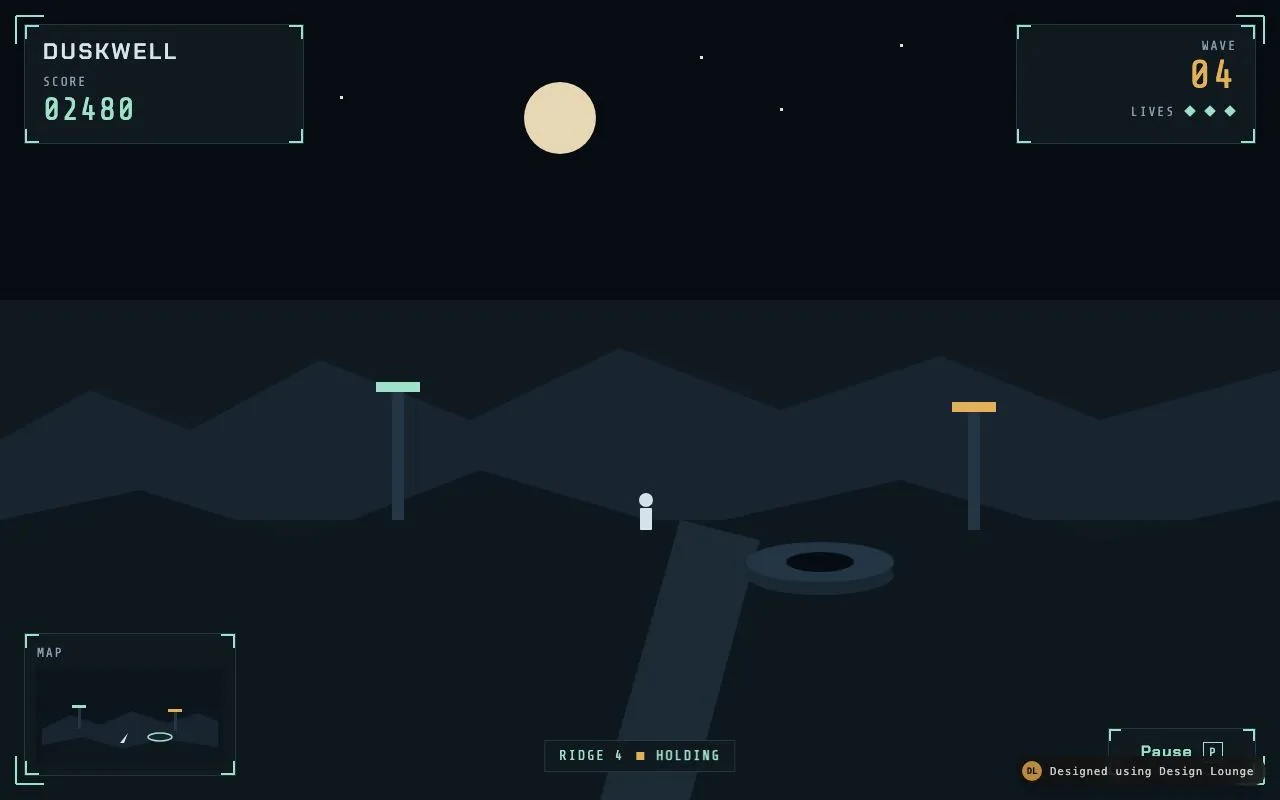
Duskwell chrome over a still night ridge: score, lives, wave, a minimap, and a pause menu that opens on P.
Preview
Use it
Free to use · credit appreciated1 Once, in your project
npx skills add SusanAcharya/Design-Lounge 2 Then ask
Using the Design Lounge skill, build "Duskwell mission HUD" (piece game-hud) in my stack. Match its brief; restyle it onto my product's theme.
No skill? Paste the brief instead. It carries the numbers, tokens and behaviour.
<!-- Design Lounge Nº 486 · "Duskwell mission HUD" · designlounge.vercel.app -->

# Duskwell mission HUD

> **Build brief for a coding agent.** Rebuild this piece in the reader's stack. If they haven't said which stack, ask once, then default to semantic HTML + CSS + a little vanilla JS. Match the numbers below; don't "improve" them.

## What it is

This is the chrome over a paused Duskwell run, not a second game. The picture behind the frames is a drawn still of Ridge 4 at night: a moon, two ridges, a path, a well, two relay masts, and a small standing figure. The HUD is the subject. First frame: score 02480, wave 04, three lives, a minimap, a status line that says RIDGE 4 and HOLDING, and a Pause control. The pause menu is closed, so the instruments are what you see. P or the Pause button opens a menu with Resume, Restart, and How to play. Restart does not start a new simulation. It closes the menu and sets the status word to RESTARTED. The still does not move.

## Reference behaviour

1. First frame: `#menu` is `hidden` and does not have the class `open`. Score reads 02480. Wave reads 04. The lives image is labelled "3 lives" and shows three diamonds. Status reads RIDGE 4, then HOLDING. Pause is `aria-expanded="false"`.
2. The scene is one SVG, `viewBox="0 0 1280 800"`, `preserveAspectRatio="xMidYMid slice"`, `aria-hidden="true"`. No canvas loop, no requestAnimationFrame for the world, no moving figure.
3. P or p, without a modifier key, toggles the menu. `preventDefault` so the key does not type into a control. The Pause button only opens. It sits under the scrim while the menu is open, so it cannot close.
4. Opening: remove `hidden`, then on a double `requestAnimationFrame` add class `open`. Focus Resume. `aria-expanded` becomes true. Live region says "Paused." The title is Paused. The kicker is RIDGE 4. The three actions are visible. How to play's block is `hidden`.
5. The scrim fades to opacity 1 over 200ms. The panel moves from `translateY(8px)` and opacity 0 to none and opacity 1, same 200ms, easing `cubic-bezier(0.2, 0.7, 0.2, 1)`. A click on the scrim does not close the menu.
6. Resume sets the live region to "Resumed." and closes. Escape does the same. Closing removes `open`, focuses Pause, sets `aria-expanded` false, and after 200ms (0ms if reduced motion) sets `hidden` if the menu was not reopened.
7. How to play hides the three actions, shows three sentences and a Back button, and sets the `h2` to How to play. Focus moves to Back. Live region: "How to play." Back restores the three actions, the title Paused, and focuses How to play.
8. The three sentences, in order: "Arrow keys move along the ridge." "The map marks the well and two relays." "P, or Pause, opens this menu."
9. Restart sets the status word to RESTARTED, announces "Wave 04 restarted.", and closes the menu. Score stays 02480. Wave stays 04. The three diamonds stay. The still stays. There is no second click to confirm.
10. Tab while the menu is open cycles only the buttons that are not inside a `[hidden]` ancestor. Shift+Tab wraps the other way. Buttons inside the hidden block are not in the list.
11. The amber pip beside the status word blinks with `steps(2, end)` over 1.4s, opacity 1 to 0.25. It is `aria-hidden`.
12. Reduced motion: the pip animation is none and opacity stays 1. Scrim, panel, and button transitions are none. The close timeout is 0. The menu still opens and closes. Focus rules do not change.

## Structure

```
1280 x 800, scene fills the viewport
┌────────────────────────────────────────────────────────────────────────────┐
│ corner ticks at 16px, 28px long, 2px #9FE1C8                               │
│ ┌──────────────────────┐                          ┌──────────────────────┐ │
│ │ DUSKWELL             │                          │ WAVE                 │ │
│ │ SCORE                │         moon             │ 04                   │ │
│ │ 02480                │                          │ LIVES ◆ ◆ ◆          │ │
│ └──────────────────────┘                          └──────────────────────┘ │
│                                                                            │
│     teal mast                         figure          amber mast          │
│                              path to the well                              │
│ ┌──────────────┐                                                         │

… 240 more lines. Copy or download for the full brief. Loading the source…Brief
280 linesBuild brief for a coding agent. Rebuild this piece in the reader’s stack. If they haven’t said which stack, ask once, then default to semantic HTML + CSS + a little vanilla JS. Match the numbers below; don’t “improve” them.
What it is
This is the chrome over a paused Duskwell run, not a second game. The picture behind the frames is a drawn still of Ridge 4 at night: a moon, two ridges, a path, a well, two relay masts, and a small standing figure. The HUD is the subject. First frame: score 02480, wave 04, three lives, a minimap, a status line that says RIDGE 4 and HOLDING, and a Pause control. The pause menu is closed, so the instruments are what you see. P or the Pause button opens a menu with Resume, Restart, and How to play. Restart does not start a new simulation. It closes the menu and sets the status word to RESTARTED. The still does not move.
Reference behaviour
- First frame:
#menuishiddenand does not have the classopen. Score reads 02480. Wave reads 04. The lives image is labelled “3 lives” and shows three diamonds. Status reads RIDGE 4, then HOLDING. Pause isaria-expanded="false". - The scene is one SVG,
viewBox="0 0 1280 800",preserveAspectRatio="xMidYMid slice",aria-hidden="true". No canvas loop, no requestAnimationFrame for the world, no moving figure. - P or p, without a modifier key, toggles the menu.
preventDefaultso the key does not type into a control. The Pause button only opens. It sits under the scrim while the menu is open, so it cannot close. - Opening: remove
hidden, then on a doublerequestAnimationFrameadd classopen. Focus Resume.aria-expandedbecomes true. Live region says “Paused.” The title is Paused. The kicker is RIDGE 4. The three actions are visible. How to play’s block ishidden. - The scrim fades to opacity 1 over 200ms. The panel moves from
translateY(8px)and opacity 0 to none and opacity 1, same 200ms, easingcubic-bezier(0.2, 0.7, 0.2, 1). A click on the scrim does not close the menu. - Resume sets the live region to “Resumed.” and closes. Escape does the same. Closing removes
open, focuses Pause, setsaria-expandedfalse, and after 200ms (0ms if reduced motion) setshiddenif the menu was not reopened. - How to play hides the three actions, shows three sentences and a Back button, and sets the
h2to How to play. Focus moves to Back. Live region: “How to play.” Back restores the three actions, the title Paused, and focuses How to play. - The three sentences, in order: “Arrow keys move along the ridge.” “The map marks the well and two relays.” “P, or Pause, opens this menu.”
- Restart sets the status word to RESTARTED, announces “Wave 04 restarted.”, and closes the menu. Score stays 02480. Wave stays 04. The three diamonds stay. The still stays. There is no second click to confirm.
- Tab while the menu is open cycles only the buttons that are not inside a
[hidden]ancestor. Shift+Tab wraps the other way. Buttons inside the hidden block are not in the list. - The amber pip beside the status word blinks with
steps(2, end)over 1.4s, opacity 1 to 0.25. It isaria-hidden. - Reduced motion: the pip animation is none and opacity stays 1. Scrim, panel, and button transitions are none. The close timeout is 0. The menu still opens and closes. Focus rules do not change.
Structure
1280 x 800, scene fills the viewport
┌────────────────────────────────────────────────────────────────────────────┐
│ corner ticks at 16px, 28px long, 2px #9FE1C8                               │
│ ┌──────────────────────┐                          ┌──────────────────────┐ │
│ │ DUSKWELL             │                          │ WAVE                 │ │
│ │ SCORE                │         moon             │ 04                   │ │
│ │ 02480                │                          │ LIVES ◆ ◆ ◆          │ │
│ └──────────────────────┘                          └──────────────────────┘ │
│                                                                            │
│     teal mast                         figure          amber mast          │
│                              path to the well                              │
│ ┌──────────────┐                                                         │
│ │ MAP          │              [ RIDGE 4  ·  HOLDING ]          [ Pause P ]│
│ │ minimap      │                                                           │
│ └──────────────┘                                                           │
└────────────────────────────────────────────────────────────────────────────┘

Menu, closed on the first frame, centred when open:
420px panel
RIDGE 4
Paused
[ Resume        ]
[ Restart       ]
[ How to play   ]
Measured at 1280x800 with the menu closed, then open:
| Region | x | y | w | h |
|---|---|---|---|---|
| Score panel | 24 | 24 | 280 | 120 min, about 120 |
| Wave panel | 1016 | 24 | 240 | 120 min |
| Map panel | 24 | 633 | 212 | about 143 |
| Status | centred, bottom 28 | about 191 | 32 | |
| Pause | right 24, bottom 24 | 728 | 148 | 48 |
| Menu panel | 430 | about 251 | 420 | about 299 |
- The scene SVG is the first child of
body. A second SVG, classbrackets, draws four corner paths and does not receive pointers. header.hudisposition: absolute; inset: 0; pointer-events: none. Panels, the status line, and#pausesetpointer-events: auto.- Score panel:
h1.brandDUSKWELL,p.labelSCORE,p.num#score02480.aria-label="Score"on the section. - Wave panel: label WAVE,
p.wave#wave04, a row LIVES plus.pips. The pips wrapper isrole="img"andaria-label="3 lives". Section label “Wave and lives”. - Map panel: label MAP, an inner svg
viewBox="0 0 176 96", height 96,aria-hidden. Section label “Minimap”. - Status is a
p.status: a span RIDGE 4, ani.pip, andb#hold(HOLDING, later RESTARTED). - Pause is a button: the word Pause, then
kbdwith the letter P.aria-controls="menu". #menuisrole="dialog"aria-modal="true"aria-labelledby="menu-title". Inside,p.kicker,h2#menu-title,#actions(three buttons),#help(three paragraphs and#help-back).#liveis visually hidden andaria-live="polite".
Scene shapes, in paint order, all in the 1280x800 viewBox:
| Shape | Geometry | Fill |
|---|---|---|
| Sky | rect 0,0 1280x800 | #070B12 |
| Lower sky | rect y 300, height 500 | #101820 |
| Stars | nine 3px squares | #D5E4EA at (90,64), (180,120), (260,48), (340,96), (700,56), (780,108), (900,44), (1040,88), (1160,52) |
| Moon | circle cx 560 cy 118 r 36 | #E7D7B4 |
| Far ridge | polygon through y about 348 to 440, down to y 520 | #182430 |
| Near ground | polygon from y 520 to the bottom | #0E161E |
| Path | polygon (600,800) (690,800) (760,540) (680,520) | #1C2A36 |
| Teal mast | rect x 392 y 390 w 12 h 130, cap x 376 y 382 w 44 h 10 | mast #243646, cap #9FE1C8 |
| Amber mast | rect x 968 y 410 w 12 h 120, cap x 952 y 402 w 44 h 10 | mast #243646, cap #E2B15A |
| Well | ellipses cx 820, outer cy 575 rx 74 ry 20 #1A2834, rim cy 562 #243646, hole rx 34 ry 10 #070B12 | |
| Figure | circle cx 646 cy 500 r 7, rect x 640 y 508 w 12 h 22 | #D5E4EA |
The minimap repeats that geography in 176 by 96: a far ridge, a near ground, a teal mast near x 36, an amber mast near x 132, a well ellipse at (118, 70), and a player triangle around (78, 76) to (86, 66). It is a drawing of the still, not a live tracker.
Corner ticks, stroke #9FE1C8 width 2, no fill:
M16 16 H44 M16 16 V44
M1264 16 H1236 M1264 16 V44
M16 784 H44 M16 784 V756
M1264 784 H1236 M1264 784 V756
Menu stack inside the 420px panel, padding 28px 28px 24px:
- Kicker RIDGE 4, 13px mono, amber, tracking 0.16em, margin 0.
- Title 36px, margin 8px 0 20px.
- Each action button: width 100%, height 48, margin-top 8, padding 0 16px, text-align left, background transparent, border 1px
#243840, text#D5E4EA. - The first button therefore sits 8px under the title’s margin. Three buttons plus two extra 8px gaps occupy 48 * 3 + 8 * 3 = 168px under the title block.
- Help paragraphs: margin 0 0 10px, 16px mono, line-height 1.45. Back is the same button style as the actions, so it is also 48px.
Focus order when the actions are showing: Resume, Restart, How to play, then wrap. When help is showing: Back only. Pause is not in that list because the scrim covers it and the trap listens on the dialog.
The status pill is not a button. It does not open the menu. Its job is to show HOLDING or RESTARTED in the closed frame, including after the menu has gone. Keep it on the HUD, not inside the dialog, or the restart has nothing to change in the picture.
Panel corner recipe, so the ticks survive a background change. Eight gradients, then the fill:
background:
  linear-gradient(var(--signal), var(--signal)) left top / 14px 2px no-repeat,
  linear-gradient(var(--signal), var(--signal)) left top / 2px 14px no-repeat,
  linear-gradient(var(--signal), var(--signal)) right top / 14px 2px no-repeat,
  linear-gradient(var(--signal), var(--signal)) right top / 2px 14px no-repeat,
  linear-gradient(var(--signal), var(--signal)) left bottom / 14px 2px no-repeat,
  linear-gradient(var(--signal), var(--signal)) left bottom / 2px 14px no-repeat,
  linear-gradient(var(--signal), var(--signal)) right bottom / 14px 2px no-repeat,
  linear-gradient(var(--signal), var(--signal)) right bottom / 2px 14px no-repeat,
  var(--panel);
The menu uses 16px and 2px in place of 14px. Do not also draw a pseudo-element tick on top of these strips or the corner doubles.
Tokens
:root {
  --void: #070b12;
  --panel: #101820;
  --line: #243840;
  --text: #d5e4ea;
  --dim: #8aa0ae;
  --signal: #9fe1c8;
  --amber: #e2b15a;
  --moon: #e7d7b4;
  --display: "Chakra Petch", sans-serif;
  --mono: "Share Tech Mono", ui-monospace, monospace;
  --ease: cubic-bezier(0.2, 0.7, 0.2, 1);
  --fast: 160ms;
  --menu: 200ms;
}
Signal #9FE1C8 is the live colour: score figures, corner ticks, life diamonds, the map well, the teal mast cap, focus outlines. Amber #E2B15A is the late colour: the wave figure, the pip, the kicker, the amber mast cap. Dim #8AA0AE is only for SCORE, WAVE, LIVES, and MAP labels. Body text on panels is #D5E4EA. Do not add a second glow, a scanline blend, or a purple rim.
Panels get their corner ticks from eight linear-gradient strips of #9FE1C8, each either 14px by 2px or 2px by 14px, placed at the four corners, over a #101820 fill, plus a 1px #243840 border. The menu uses 16px by 2px strips the same way. These gradients are hard-edged rules, not blurs.
Scrim colour is rgba(7, 11, 18, 0.72). No backdrop-filter.
Typography
| Role | Family | Size | Weight | Line-height | Tracking | Colour |
|---|---|---|---|---|---|---|
| DUSKWELL | Chakra Petch | 22px | 600 | 1 | 0.12em | --text |
| Paused, How to play | Chakra Petch | 36px | 600 | 1 | 0.02em | --text |
| Menu buttons, Pause | Chakra Petch | 18px buttons, 16px Pause | 600 | 1 | Pause 0.08em | --text, Pause --signal |
| SCORE, WAVE, LIVES, MAP | Share Tech Mono | 13px | 400 | 1 | 0.14em | --dim |
| Score figure | Share Tech Mono | 32px | 400 | 1 | 0.04em | --signal |
| Wave figure | Share Tech Mono | 40px | 400 | 1 | 0.06em | --amber |
| Status, kicker, help, kbd | Share Tech Mono | 14px status, 13px kicker and kbd, 16px help | 400 | help 1.45, else 1 | status 0.12em, kicker 0.16em | status and kbd --signal, kicker --amber, help --text |
DUSKWELL is uppercase in the h1. The menu title is sentence case: Paused, How to play. Button labels are sentence case: Pause, Resume, Restart, How to play, Back.
Load Chakra Petch at 500, 600, and 700, and Share Tech Mono at its single weight. No third family.
Motion
| Thing | Trigger | Property | From, to | Duration | Easing | Reduced motion |
|---|---|---|---|---|---|---|
| Pip | always | opacity | 1 to 0.25 | 1.4s loop | steps(2, end) | none, opacity 1 |
| Scrim | class open | opacity | 0 to 1 | 200ms | --ease | none |
| Menu panel | class open | opacity and translateY | 0 / 8px to 1 / 0 | 200ms | --ease | none, transform none |
| Menu buttons | hover | border-colour and colour | --line / --text to --signal | 160ms | --ease | none |
| Pause hover | hover | colour and border | signal to amber | none specified beyond colour | instant is fine | none |
The world does not animate. A sweeping scan, a bobbing figure, or a moving blip would turn this into a game. The pip is the only loop, and it is an 8px square.
Opening uses two animation frames before open is added, so the 200ms transition runs from the closed styles. If you add open in the same turn you remove hidden, the fade is skipped.
States
- HUD, menu closed: instruments readable, scene undimmed, status HOLDING, Pause expanded false. This is the first frame.
- Menu, actions: scrim on, title Paused, three buttons, Resume focused, its focus outline 2px
#9FE1C8offset 3px. - Menu, how to play: title How to play, three sentences, Back focused. Actions are
hidden. - Hover on a menu button: border and text become
#9FE1C8. - Hover or focus-visible on Pause: text and border become
#E2B15A. Focus-visible also draws the 2px signal outline. - After Restart: menu closed, status word RESTARTED, score and wave unchanged. Opening the menu again still says Paused. The status word does not revert.
- There is no disabled button. There is no empty radar. There is no error toast. Restart is not destructive and does not ask twice.
hiddenon the dialog and on the inactive menu block removes them from the accessibility tree. Do not only set opacity 0 and leave them readable.
Accessibility
- The
h1is DUSKWELL, present while the menu is closed, so the HUD frame has a name. - The dialog is labelled by
#menu-title, which changes between Paused and How to play. - Pause is 48px tall and at least 148px wide. Each menu button is 48px tall and full width of the 420px panel (padding 28px each side, so the button’s border box is 364px).
- Keys: P toggles. Escape closes and is announced as Resumed. It does not open the menu. Tab and Shift+Tab wrap inside the visible buttons. Enter and Space activate the focused button (native).
- On open, focus is Resume, not the dialog element. On close, focus returns to Pause. On How to play, focus is Back. On Back, focus is How to play.
- Lives are not three separate buttons. One
role="img"names the count. - The map svg inside the panel is
aria-hiddenbecause the section’saria-labelis Minimap. #liveis clipped to a 1px box. It does not speak on load.- Contrast on
#101820:#D5E4EAabout 14:1,#9FE1C8about 12:1,#E2B15Aabout 9:1,#8AA0AEabout 6.6:1. Labels at 13px still clear 4.5:1. Do not drop the dim colour darker than#8AA0AE.
Responsive rules
The scene SVG slices to the viewport. Panels are pinned to the corners with 24px insets, so they track the frame.
- At 1280 and at 1024: the sizes in the table. The moon at x 560 sits in the gap between the score panel (ends near 304) and the wave panel (starts at 1016 on a 1280 frame, and further left on a 1024 frame). At 1024 the wave panel’s right edge is 1000, left edge 760. The moon remains in open sky. The map stays bottom-left. Pause stays bottom-right. The status stays centred.
- At 720 and under: score and wave panels become
width: calc(50% - 40px)so they do not overlap. The map width becomes 168px. The menu width becomescalc(100% - 48px). Type sizes stay. - Under 640: the same 720 rule. The status line may sit close to the map. Do not move the menu to a bottom sheet. It stays centred. The corner ticks stay at the viewport corners; if a panel covers a tick, the panel’s own ticks are enough.
- The still is not redrawn per breakpoint.
slicecrops the sides. Keep the well and the figure near the middle of the viewBox so a crop does not delete them.
Acceptance checklist
Always
- First frame shows the HUD with the pause menu closed. The scene is a still drawing.
- Score, lives, wave, and a minimap are visible without opening the menu.
- P or a button opens a menu with Resume, Restart, and How to play.
- Resume and Escape close it and return focus to the button that opened it.
- How to play replaces the actions with instructions and a way back, inside the same dialog.
- Restart is visible as a status change and does not launch another game.
- Focus-visible outlines are 2px signal, offset 3px. Menu buttons and Pause are at least 48px tall.
- Reduced motion removes the pip blink and the menu fade. The menu still opens.
- One file. Chakra Petch and Share Tech Mono only. No images, no
script src, no storage.
This demo
- The name is DUSKWELL. Score is 02480. Wave is 04. Lives are three diamonds. Map label is MAP.
- Status starts as RIDGE 4 and HOLDING. After Restart it reads RESTARTED.
- Menu kicker is RIDGE 4. Titles are Paused and How to play.
- Help lines are the three sentences in Reference behaviour item 8.
- Moon is a flat circle at (560, 118) radius 36, fill
#E7D7B4, with no shadow. - Palette is
#070B12,#101820,#D5E4EA,#9FE1C8,#E2B15A.
Implementation notes
hiddenand the open class are a pair. Removinghiddenshows the dialog at opacity 0. The class runs the fade. The timeout putshiddenback only if the user did not reopen during the 200ms.
function openMenu() {
  if (open) return;
  open = true;
  menu.hidden = false;
  requestAnimationFrame(function () {
    requestAnimationFrame(function () { menu.classList.add("open"); });
  });
  document.getElementById("resume").focus();
}
function closeMenu() {
  if (!open) return;
  open = false;
  menu.classList.remove("open");
  pauseBtn.focus();
  setTimeout(function () { if (!open) menu.hidden = true; }, reduce ? 0 : 200);
}- The focus trap skips buttons that sit under
[hidden]. If you only checkoffsetParent, aposition: fixedbutton can lie to you.closest("[hidden]")matches the help block and the actions block when either is hidden.
var vis = [];
for (var i = 0; i < list.length; i++) {
  if (!list[i].closest("[hidden]")) vis.push(list[i]);
}- Common mistakes: building a second playfield under the chrome, opening the menu in the first frame, glowing the moon or the ticks, using a glass blur on the scrim, letting Restart change the score as if a game had run, and forgetting that P must toggle while a button is focused. P is not Space. Do not
preventDefaulton Space or the focused Resume button will not activate.
Details
- Palette
- Type
- Chakra Petch · Share Tech Mono
- Motion
- Subtle motion
- Build
- One session
- Tags
On the shelves