Nº 501 of 520
M3 search results
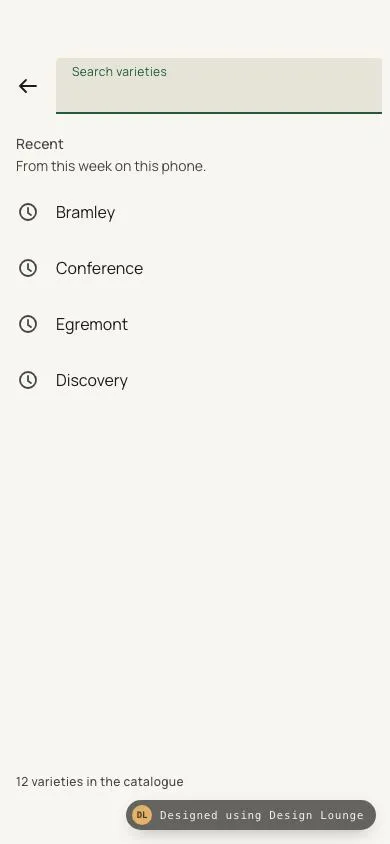
An Orchardbind search view with a focused filled field, tappable recent searches, live filtering, and an empty line that includes the query.
Preview
Use it
Free to use · credit appreciated1 Once, in your project
npx skills add SusanAcharya/Design-Lounge 2 Then ask
Using the Design Lounge skill, build "M3 search results" (piece m3-search-results) in my stack. Match its brief; restyle it onto my product's theme.
No skill? Paste the brief instead. It carries the numbers, tokens and behaviour.
<!-- Design Lounge Nº 501 · "M3 search results" · designlounge.vercel.app -->

# M3 search results

> **Build brief for a coding agent.** Rebuild this piece in the reader's stack. If they haven't said which stack, ask once, then default to semantic HTML + CSS + a little vanilla JS. Match the numbers below; don't "improve" them. When a kit is locked, map colours onto the kit tokens. This is the search view after the bar has opened. It is not the bar-morph animation (`m3-search-bar-morph`).

## What it is

The catalogue search of Orchardbind, an invented fruit-tree nursery, in Material 3. A small top row holds a back arrow and a filled text field. Before any query, the field is in its focused look and the body lists recent searches. Tapping a recent search writes it into the field and shows matches. Typing filters the catalogue on every input event. No matches produces one plain line that includes the query, with no illustration. The clear control appears only when the field has text. The scheme is a leaf-green tonal palette from seed `#1F5C38` on warm paper. Variety names are Literata. The field, the recent rows, and the supporting lines are Manrope.

Language: Material 3 on Android. Filled text field (not an outlined field, not an iOS search pill), 48px targets, ripple on press, M3 type scale. The back icon is an arrow with a stem. No grouped inset cards.

## Reference behaviour

1. **Initial state (hero).** The field is empty and focused. It already has the focused look, without waiting for a transition: label "Search varieties" floated at 6px from the top in `--primary` at 12/16, input text area empty, caret `--primary`, bottom indicator 2px `--primary`. The clear button is hidden. Section "Recent", the line "From this week on this phone.", then four rows: Bramley, Conference, Egremont, Discovery. Each row is a clock icon plus the words. A footer reads "12 varieties in the catalogue". No results list.
2. **Tap a recent row.** The field value becomes that string, the clear button appears, Recent hides, and the results list shows every variety whose name, kind, season, or rootstock contains the query (case insensitive). Focus returns to the field. Bramley returns two rows: Bramley's Seedling and Bramley 20.
3. **Typing.** The `input` event filters immediately. There is no debounce. "pear" matches Conference, Worcester Pearmain (the name contains those letters), Doyenne du Comice, and Beth.
4. **No matches.** The results list is empty and one line reads "No matches for " plus the query exactly, including the user's capitals. Example: "No matches for medlar". No icon, no second sentence, no button.
5. **Clear.** The clear button, Escape, and the back arrow (when the field is not empty) set the value to empty, hide results, show Recent again, hide clear, and focus the field.
6. **Back arrow when the field is empty.** Does nothing visible. This demo has no screen behind the search view.
7. **Whitespace only.** A value of spaces shows the clear button but keeps Recent, because the trimmed query is empty.
8. **Announcement.** After the user types or taps, a visually hidden polite live region says "N matches", "1 match", "No matches for {query}", or "Recent searches". The hero does not announce.

## Structure

```
390 x 844
┌────────────────────────────────────┐
│ (54px safe area)                   │
│ [←] ┌ Search varieties ─────────┐ │ 56px filled field
│     └━━━━━━━━━━━━━━━━━━━━━━━━━━━┘ │ 2px primary indicator
│ Recent                             │ 14/20
│ From this week on this phone.      │
│ (clock) Bramley                    │ 56px row
│ (clock) Conference                 │
│ (clock) Egremont                   │
│ (clock) Discovery                  │
│                                    │
│ 12 varieties in the catalogue      │ above 34px inset
└────────────────────────────────────┘

… 214 more lines. Copy or download for the full brief. Loading the source…Brief
254 linesBuild brief for a coding agent. Rebuild this piece in the reader’s stack. If they haven’t said which stack, ask once, then default to semantic HTML + CSS + a little vanilla JS. Match the numbers below; don’t “improve” them. When a kit is locked, map colours onto the kit tokens. This is the search view after the bar has opened. It is not the bar-morph animation (
m3-search-bar-morph).
What it is
The catalogue search of Orchardbind, an invented fruit-tree nursery, in Material 3. A small top row holds a back arrow and a filled text field. Before any query, the field is in its focused look and the body lists recent searches. Tapping a recent search writes it into the field and shows matches. Typing filters the catalogue on every input event. No matches produces one plain line that includes the query, with no illustration. The clear control appears only when the field has text. The scheme is a leaf-green tonal palette from seed #1F5C38 on warm paper. Variety names are Literata. The field, the recent rows, and the supporting lines are Manrope.
Language: Material 3 on Android. Filled text field (not an outlined field, not an iOS search pill), 48px targets, ripple on press, M3 type scale. The back icon is an arrow with a stem. No grouped inset cards.
Reference behaviour
- Initial state (hero). The field is empty and focused. It already has the focused look, without waiting for a transition: label “Search varieties” floated at 6px from the top in
--primaryat 12/16, input text area empty, caret--primary, bottom indicator 2px--primary. The clear button is hidden. Section “Recent”, the line “From this week on this phone.”, then four rows: Bramley, Conference, Egremont, Discovery. Each row is a clock icon plus the words. A footer reads “12 varieties in the catalogue”. No results list. - Tap a recent row. The field value becomes that string, the clear button appears, Recent hides, and the results list shows every variety whose name, kind, season, or rootstock contains the query (case insensitive). Focus returns to the field. Bramley returns two rows: Bramley’s Seedling and Bramley 20.
- Typing. The
inputevent filters immediately. There is no debounce. “pear” matches Conference, Worcester Pearmain (the name contains those letters), Doyenne du Comice, and Beth. - No matches. The results list is empty and one line reads “No matches for ” plus the query exactly, including the user’s capitals. Example: “No matches for medlar”. No icon, no second sentence, no button.
- Clear. The clear button, Escape, and the back arrow (when the field is not empty) set the value to empty, hide results, show Recent again, hide clear, and focus the field.
- Back arrow when the field is empty. Does nothing visible. This demo has no screen behind the search view.
- Whitespace only. A value of spaces shows the clear button but keeps Recent, because the trimmed query is empty.
- Announcement. After the user types or taps, a visually hidden polite live region says “N matches”, “1 match”, “No matches for {query}”, or “Recent searches”. The hero does not announce.
Structure
390 x 844
┌────────────────────────────────────┐
│ (54px safe area)                   │
│ [←] ┌ Search varieties ─────────┐ │ 56px filled field
│     └━━━━━━━━━━━━━━━━━━━━━━━━━━━┘ │ 2px primary indicator
│ Recent                             │ 14/20
│ From this week on this phone.      │
│ (clock) Bramley                    │ 56px row
│ (clock) Conference                 │
│ (clock) Egremont                   │
│ (clock) Discovery                  │
│                                    │
│ 12 varieties in the catalogue      │ above 34px inset
└────────────────────────────────────┘

With a query:
│ [←] ┌ Search varieties        [x]┐│ clear 48px
│     │ pear                       ││
│ (C) Conference          October  │ 72px
│     Pear, rootstock Quince A    │
│ No matches for medlar │ plain 16/24 lineh1“Search Orchardbind” is visually hidden. The visible label is the field label.<search>holds the backbutton(48x48,aria-label="Navigate up") and.field.- The field holds
label[for=q],input#q(type="text",role="searchbox",autocomplete="off",enterkeyhint="search"), and#clear(aria-label="Clear search",hiddenuntil there is text). #recentis a section with anh2and four buttons (data-qis the string to insert).#resultsis a section, hidden in the hero. It holdsul#resultListandp#empty.#liveis a visually hiddenaria-live="polite"node, outside the scroller.- Footer
p.footstays at the bottom of the scroll column (margin-top: auto).
Catalogue, in this order. Avatar letter is the first character of the name.
| Name | Kind | Season | Rootstock |
|---|---|---|---|
| Bramley’s Seedling | Cooking apple | Late September | M26 |
| Bramley 20 | Cooking apple | Late September | M9 |
| Conference | Pear | October | Quince A |
| Egremont Russet | Dessert apple | September | M26 |
| Discovery | Early apple | August | MM106 |
| Cox’s Orange Pippin | Dessert apple | Late September | M9 |
| Worcester Pearmain | Early dessert apple | August | MM106 |
| Doyenne du Comice | Pear | October | Quince A |
| Pitmaston Pineapple | Russet apple | October | M26 |
| Ashmead’s Kernel | Late russet | October | MM106 |
| Lord Lambourne | Dessert apple | September | M9 |
| Beth | Compact pear | September | Quince C |
Result supporting line: “{kind}, rootstock {rootstock}”. The season sits on the same line as the name and wraps under it when it does not fit.
Tokens
:root {
  --primary: #1f5c38;
  --on-primary: #fff;
  --primary-c: #b7f0c8;
  --on-primary-c: #00210e;
  --surface: #f7f6f0;
  --surface-c: #f0efe6;
  --surface-highest: #e6e4d8;
  --on-surface: #1a1c16;
  --on-surface-v: #43483e;
  --outline: #73796c;
  --outline-v: #c3c8ba;
  --f-head: "Literata", Georgia, serif;
  --f-ui: "Manrope", system-ui, sans-serif;
  --ease: cubic-bezier(.2, 0, 0, 1);
  --t-ripple: 450ms;
}
One light tonal scheme from seed #1F5C38. The filled field container is --surface-highest. The active indicator is --primary, not a second accent.
Typography
| Role | Family | Size / line | Weight | Tracking | Colour |
|---|---|---|---|---|---|
| Field label, resting (body-large) | Manrope | 16 / 24 | 400 | 0 | --on-surface-v |
| Field label, floated (label-small) | Manrope | 12 / 16 | 400 | 0.4px | --primary when focused, else --on-surface-v |
| Field input (body-large) | Manrope | 16 / 24 | 400 | 0 | --on-surface |
| Section (title-small) | Manrope | 14 / 20 | 500 | 0.1px | --on-surface-v |
| Hint, footer (body-medium / label-medium) | Manrope | 14 / 20 and 12 / 16 | 400 and 500 | 0 and 0.4px | --on-surface-v |
| Recent row (body-large) | Manrope | 16 / 24 | 400 | 0 | --on-surface |
| Variety name (title-medium) | Literata | 16 / 24 | 600 | 0 | --on-surface |
| Season and kind (body-medium) | Manrope | 14 / 20 | 400 | 0 | --on-surface-v |
| Avatar | Literata | 18 / 24 | 600 | 0 | --on-primary-c |
| Empty line (body-large) | Manrope | 16 / 24 | 400 | 0 | --on-surface |
Literata is the variety name and the avatar letter. The field and every other label are Manrope. The input stays 16px so a focused field does not zoom the page.
Motion
| Thing | Trigger | Property | From | To | Duration | Easing |
|---|---|---|---|---|---|---|
| Label | focus, or value becoming non-empty | top, font-size, line-height | 16px, 16px, 24px | 6px, 12px, 16px | 150ms | --ease |
| Label colour | focus | color | --on-surface-v | --primary | 150ms | linear |
| Indicator | focus | box-shadow inset | 1px --on-surface-v | 2px --primary | none | cut |
| State layer | hover / focus-visible | opacity | 0 | .08 / .10 | 150ms | linear |
| Ripple | pointerdown, or Enter / Space | scale | 0 | 1 | 450ms | --ease |
| Ripple fade | release | opacity | .12 | 0 | 300ms | linear |
Filtering is instant. Do not animate the list height. The hero field carries class hot in the HTML, so the first frame is the floated label and the 2px indicator with no travel. Reduced motion: durations become 1ms, ripples appear at full size at 10% opacity and still fade. The label still ends in the floated position.
States
- Field, empty, blurred: label centred in the 56px container at 16/24, indicator 1px
--on-surface-vvia an inset shadow, clear hidden. The hero is not this state. - Field, focused (
hotor:focus-within): label attop: 6px, 12/16,--primary. Indicator 2px--primary. Caret--primary. - Field, has value, blurred: label stays floated, colour returns to
--on-surface-v, indicator returns to 1px, clear stays visible. - Clear: 48x48,
position: absolute, vertically centred (top: 50%,margin-top: -24px), icon colour--on-surface-v.hiddenwhilevalue.length === 0. The input’s right padding becomes 48px only while clear is shown, so the text does not run under the icon. - Recent row: min-height 56px, full width, clock icon
--on-surface-v, gap 16px, padding 8px 16px. Hover 8% state layer. Focus-visible adds a 2px--primaryoutline inset 2px. - Result row: min-height 72px, 40px rounded square (radius 12px) in
--primary-c, name and season on one wrapping line, kind underneath, hairline--outline-v. Results are not buttons. - Empty: the
pis shown, theulis empty. Text isNo matches forconcatenated with the raw trimmed query. It wraps (overflow-wrap: break-word). - Back: 48x48 circle. With a query, it clears. Without a query, it stays put.
Accessibility
- The landmark is
<search>. The input isrole="searchbox"with the visible label “Search varieties”.aria-controlspoints atresultsandrecent.aria-describedbypoints at the live region. - Back:
aria-label="Navigate up". Clear:aria-label="Clear search". Recent buttons use their visible word as the name. Icons arearia-hidden. - Escape clears the query when one exists, and does not move focus out of the field.
- The live region does not speak on load. It speaks after a tap or an edit.
[hidden]isdisplay: none !important, because.icon { display: grid }would otherwise override the user-agenthiddenrule and leave a clear button in the empty hero.- Contrast:
#1A1C16on#F7F6F0is 15.9:1.#43483Eon#F7F6F0is 8.7:1. Primary#1F5C38on the field#E6E4D8is 6.2:1. Avatar#00210Eon#B7F0C8is 13.3:1. The resting indicator#73796Con#E6E4D8is 3.5:1. - Hit targets: back and clear are 48x48. The input is at least 56px tall and fills the field width. Recent rows are at least 56px tall and full width.
Responsive rules
- Frame 390x844. The top row’s padding-top is 54px. The row is
min-height: 64pxwith 4px gap, back at 48px, fieldflex: 1; min-width: 0. Footer padding-bottom is 42px (8px plus a 34px home inset). Do not draw a status bar. - 360 wide: the field shrinks. Long variety names wrap. The season wraps onto its own line because
.lineisflex-wrap. The empty sentence wraps instead of widening the page. Clear stays 48px inside the field. - Largest text (about 200%): the field uses
min-height: 56px, so the 16px input grows the container. The floated label stays at the top. Recent rows and result rows use min-height, not height, so they grow. The name and the season stack (flex-wrapon.line). The avatar stays 40px (flex: none) and vertically centred. The clear button stays 48x48, centred withtop: 50%and a negative margin, not a transform, so it does not fight the ripple. - Tablet: cap the column at 640px and centre it. Do not turn the filled field into a full-bleed desktop search bar.
Acceptance checklist
Always
- The view is a back arrow, a filled text field, and a clear button that exists only while the field has text.
- Before a query, recent searches are shown. Tapping one fills the field and shows results.
- Results filter on each input event, with no debounce.
- No matches is one plain line that contains the query. No illustration.
- The focused field uses a 2px primary bottom indicator and a floated 12px label. It is not an outlined box and not a pill.
- Back, clear, and recent rows are at least 48px. Result rows are at least 72px.
- Escape and clear return to the recent state. Reduced motion keeps the floated label and drops the travel.
This demo
- Brand Orchardbind. Hero: empty focused field, label “Search varieties”, four recents (Bramley, Conference, Egremont, Discovery), clear hidden, footer “12 varieties in the catalogue”.
- Bramley shows Bramley’s Seedling and Bramley 20.
- The empty line for medlar is exactly “No matches for medlar”.
- Catalogue has 12 varieties. Match is a case-insensitive substring of name, kind, season, or rootstock.
- Primary
#1F5C38, field#E6E4D8, surface#F7F6F0. Fonts Literata and Manrope.
Implementation notes
Queries to expect
| Query | What you see |
|---|---|
| empty | Recent: Bramley, Conference, Egremont, Discovery. Clear hidden. |
| Bramley | Bramley’s Seedling, Bramley 20. Clear shown. |
| Conference | Conference only. |
| Egremont | Egremont Russet. |
| Discovery | Discovery. |
| pear | Conference, Worcester Pearmain, Doyenne du Comice, Beth. |
| October | Conference, Pitmaston Pineapple, Doyenne du Comice, Ashmead’s Kernel. |
| M26 | Bramley’s Seedling, Egremont Russet, Pitmaston Pineapple. |
| medlar | The line “No matches for medlar”. No rows. |
| MEDLAR | The line “No matches for MEDLAR”. Matching is case insensitive, but the empty line keeps the typed case. |
Field box:
- Container
min-height: 56px,background: var(--surface-highest), top radius 4px, bottom radius 0. - Resting indicator:
box-shadow: inset 0 -1px 0 var(--on-surface-v). - Focused indicator:
box-shadow: inset 0 -2px 0 var(--primary). The shadow swap does not change layout, so the row does not jump by 1px. - Label
left: 16px. Restingtop: 16px. Floatedtop: 6px. - Input
min-height: 56px; padding: 22px 16px 6px. With a value,padding-right: 48px. - Clear is 48 by 48 at
right: 0; top: 50%; margin-top: -24px.
Recent row: min-height: 56px; gap: 16px; padding: 8px 16px. Clock is a 24px circle with two hands, stroke 1.8. Result avatar is 40px with radius 12px. Result row min-height: 72px; gap: 16px; padding: 12px 16px.
The footer is not a button. It sits in the scroll column with margin-top: auto and padding: 24px 16px 42px, so on the short recent list it rests just above the home inset, and on a long result list it follows the last row.
Keep the hero in the focused look before paint. Class hot on the field in the HTML applies the floated label and the 2px indicator immediately. :focus-within covers the same rules after a real focus. Remove hot on blur and add it again on focus, so a blurred empty field can drop the label back to the centre.
Substring match, and a safe empty line. Trim only to decide whether a query exists. Put the trimmed query in the empty line with textContent, never HTML.
function apply(speak) {
  const query = q.value.trim();
  field.classList.toggle('has-value', q.value.length > 0);
  clear.hidden = q.value.length === 0;
  if (!query) { recent.hidden = false; results.hidden = true; return; }
  const hits = ITEMS.filter(it =>
    (it.name + ' ' + it.kind + ' ' + it.season + ' ' + it.root)
      .toLowerCase().includes(query.toLowerCase()));
  recent.hidden = true; results.hidden = false;
  if (!hits.length) {
    resultList.innerHTML = '';
    empty.hidden = false;
    empty.textContent = 'No matches for ' + query;
  }
}
hidden must win. .icon { display: grid } beats the user-agent [hidden] { display: none } rule, which leaves the clear icon on screen in the hero. Add [hidden] { display: none !important; }.
Do not animate the search field from a resting bar into this view. That morph is a different piece. This screen starts as the search view.
Back and Escape share one clear function: set the value to an empty string, run the same apply path as typing, and focus the field. Back does that only when value.length > 0. Escape does that only when there is a value, and it calls preventDefault so the key does not leave the control. A value of only spaces shows Clear (length is not zero) and still shows Recent, because the trimmed query is empty and no filter runs.
The result rows are divs inside lis, not buttons. They are not a second navigation. The only controls below the field are the recent searches, Clear, and Back. Avatar letters and clock icons are aria-hidden. The visually hidden h1 is “Search Orchardbind”, so the page has a heading even though the visible title is the field label.
Top row, from the viewport top: 54px safe area, then min-height: 64px with padding 4px 8px 8px 4px and a 4px gap. The back button is 48px. The field is flex: 1 and min-width: 0, so at 360px wide it shrinks instead of forcing scrollWidth past the viewport. The clear control is taken out of flow, so hiding it does not change the field’s width.
Google Fonts: Literata opsz 7..72 at 500 and 600, and Manrope at 400, 500, 600, and 700. Two families. Manrope 700 is available for the avatar if a product needs a heavier letter; this demo’s avatar is Literata 600. The input stays Manrope 16px.
The hint under Recent is Manrope 14/20, padding 2px 16px 8px, colour --on-surface-v. It is not a heading. The footer is Manrope 12/16 weight 500, tracking 0.4px, and it is the same sentence whether or not a query is active, because the catalogue size does not change.
Clock icon, 24px viewBox, stroke 1.8, round caps: circle cx 12 cy 12 r 8, hands M12 8v5l3 2. Clear icon: M6 6l12 12 and M18 6L6 18. Both are currentColor and aria-hidden. The back arrow matches the other Android pieces: shaft M20 12H4, head M10 6l-6 6 6 6.
Result hairlines are border-bottom: 1px solid var(--outline-v) on the row, full width of the row’s padding box. Recent rows have no hairline. The empty line has no border, no background, and no max-width other than the page padding of 16px, so a long query wraps inside the column.
The scroller is .grow (flex: 1; overflow-y: auto; display: flex; flex-direction: column). html and body are height: 100% and overflow: hidden. A wrapped season or a long empty query grows the column downward and scrolls inside .grow. It does not widen the document. color-scheme: light keeps the caret and the focus ring on the paper surface.
Details
- Palette
- Type
- Literata · Manrope
- Motion
- Subtle motion
- Build
- One session
- Tags
Studied
Tailwind CSS docsPut each instruction next to its code. Draw the grid with thin lines and let the empty sides carry a faint hatch.
All sourcesOn the shelves