Nº 055 of 520
PWA install sheet
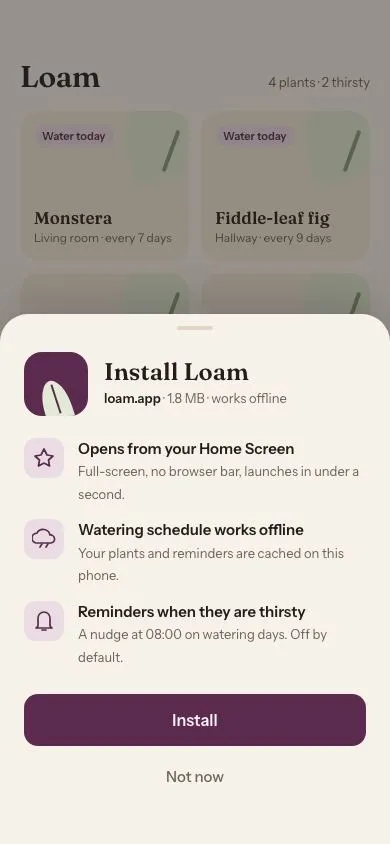
A bottom sheet that springs up to pitch installing a PWA, with an icon, three benefits, Install and Not now. Then it shows an inline progress bar and an 'Added to Home Screen' chip.
Preview
Use it
Free to use · credit appreciated1 Once, in your project
npx skills add SusanAcharya/Design-Lounge 2 Then ask
Using the Design Lounge skill, build "PWA install sheet" (piece pwa-install-sheet) in my stack. Match its brief; restyle it onto my product's theme.
No skill? Paste the brief instead. It carries the numbers, tokens and behaviour.
<!-- Design Lounge Nº 055 · "PWA install sheet" · designlounge.vercel.app -->

# PWA install sheet

> **Build brief for a coding agent.** Rebuild this piece in the reader's stack. If they haven't said which stack, ask once, then default to semantic HTML + CSS + a little vanilla JS. Match the numbers below; don't "improve" them.

## What it is

A custom **install prompt** for "Loam", a plant-care PWA, shown as a modal bottom sheet over the app's plant grid. It replaces the browser's default mini-infobar: a 64px CSS-drawn app icon, name and size line, three benefits with tinted icon tiles, a plum "Install" button and a quiet "Not now". The sheet rises with a spring (a 560ms overshoot curve); on Install, a 4px progress bar fills along the button's bottom edge for 1.4s, the sheet drops away, a dark "Added to Home Screen" chip springs up from the bottom and a small home-screen icon pops in beside the "Show install prompt" control. The detail worth copying is the button-as-progress: no spinner, no modal swap — the CTA itself reports the install.

## Reference behaviour

1. Initial state: the sheet is already up (`body.show`), scrim at `rgba(36,30,26,.45)` over a page with a 30px serif "Loam" title and a 2×2 grid of plant cards. The Install button holds focus.
2. Tap **Install**: `body.busy`; label changes to "Installing…"; the button's bottom bar grows from 0 to 100% width over 1400ms `cubic-bezier(.2,.7,.2,1)` at 90% opacity; pointer events on the button are disabled.
3. At 1400ms: `show` and `busy` are removed, `done` is added. Sheet translates to 110% over 260ms `cubic-bezier(.4,0,1,1)`; scrim fades on the same clock. The chip (44px pill, `--ink` background, green check) springs from `translate(-50%, 24px)` and opacity 0 to rest over 560ms; a 52px home-screen icon with the label "Loam" scales from .6 to 1 in the tools row.
4. At 4400ms: `done` is removed; chip and icon fade out over 260ms.
5. Tap **Not now**, the scrim, or press Esc: sheet and scrim exit as in step 3 with no chip; focus returns to "Show install prompt".
6. Tap **Show install prompt**: `show` is added; the sheet rises from 110% to 0 over 560ms `cubic-bezier(.22,1.2,.36,1)` (visible overshoot of ~6px); scrim fades in over 560ms standard; the Install button takes focus after 100ms. Any pending timers from a previous install are cancelled.

## Structure

```
390 × 844
┌────────────────────────────────────┐
│ (54px clearance)                   │
│ Loam                4 plants · 2…  │  header 62px top pad, serif 30
│ ┌──────────────┐ ┌──────────────┐  │
│ │ Water today  │ │ Water today  │  │  plant cards 150px, 20px radius
│ │ Monstera     │ │ Fiddle-leaf  │  │
│ └──────────────┘ └──────────────┘  │
│ ┌──────────────┐ ┌──────────────┐  │
│ │ Pothos       │ │ Snake plant  │  │
│ └──────────────┘ └──────────────┘  │
│ [Show install prompt]      (icon)  │  tools row, 44px ghost button
│ ░░░░░░░░░░░ scrim ░░░░░░░░░░░░░░░ │
│ ╭────────────────────────────────╮ │  sheet, 28px top radii
│ │            ────                │ │  grab 36×4
│ │ ▣ Install Loam                 │ │  icon 64 · h2 serif 24
│ │   loam.app · 1.8 MB · offline  │ │
│ │ ◆ Opens from your Home Screen  │ │  benefit tiles 40px

… 191 more lines. Copy or download for the full brief. Loading the source…Brief
231 linesBuild brief for a coding agent. Rebuild this piece in the reader’s stack. If they haven’t said which stack, ask once, then default to semantic HTML + CSS + a little vanilla JS. Match the numbers below; don’t “improve” them.
What it is
A custom install prompt for “Loam”, a plant-care PWA, shown as a modal bottom sheet over the app’s plant grid. It replaces the browser’s default mini-infobar: a 64px CSS-drawn app icon, name and size line, three benefits with tinted icon tiles, a plum “Install” button and a quiet “Not now”. The sheet rises with a spring (a 560ms overshoot curve); on Install, a 4px progress bar fills along the button’s bottom edge for 1.4s, the sheet drops away, a dark “Added to Home Screen” chip springs up from the bottom and a small home-screen icon pops in beside the “Show install prompt” control. The detail worth copying is the button-as-progress: no spinner, no modal swap — the CTA itself reports the install.
Reference behaviour
- Initial state: the sheet is already up (
body.show), scrim atrgba(36,30,26,.45)over a page with a 30px serif “Loam” title and a 2×2 grid of plant cards. The Install button holds focus. - Tap Install:
body.busy; label changes to “Installing…”; the button’s bottom bar grows from 0 to 100% width over 1400mscubic-bezier(.2,.7,.2,1)at 90% opacity; pointer events on the button are disabled. - At 1400ms:
showandbusyare removed,doneis added. Sheet translates to 110% over 260mscubic-bezier(.4,0,1,1); scrim fades on the same clock. The chip (44px pill,--inkbackground, green check) springs fromtranslate(-50%, 24px)and opacity 0 to rest over 560ms; a 52px home-screen icon with the label “Loam” scales from .6 to 1 in the tools row. - At 4400ms:
doneis removed; chip and icon fade out over 260ms. - Tap Not now, the scrim, or press Esc: sheet and scrim exit as in step 3 with no chip; focus returns to “Show install prompt”.
- Tap Show install prompt:
showis added; the sheet rises from 110% to 0 over 560mscubic-bezier(.22,1.2,.36,1)(visible overshoot of ~6px); scrim fades in over 560ms standard; the Install button takes focus after 100ms. Any pending timers from a previous install are cancelled.
Structure
390 × 844
┌────────────────────────────────────┐
│ (54px clearance)                   │
│ Loam                4 plants · 2…  │  header 62px top pad, serif 30
│ ┌──────────────┐ ┌──────────────┐  │
│ │ Water today  │ │ Water today  │  │  plant cards 150px, 20px radius
│ │ Monstera     │ │ Fiddle-leaf  │  │
│ └──────────────┘ └──────────────┘  │
│ ┌──────────────┐ ┌──────────────┐  │
│ │ Pothos       │ │ Snake plant  │  │
│ └──────────────┘ └──────────────┘  │
│ [Show install prompt]      (icon)  │  tools row, 44px ghost button
│ ░░░░░░░░░░░ scrim ░░░░░░░░░░░░░░░ │
│ ╭────────────────────────────────╮ │  sheet, 28px top radii
│ │            ────                │ │  grab 36×4
│ │ ▣ Install Loam                 │ │  icon 64 · h2 serif 24
│ │   loam.app · 1.8 MB · offline  │ │
│ │ ◆ Opens from your Home Screen  │ │  benefit tiles 40px
│ │ ◆ Watering schedule works off… │ │
│ │ ◆ Reminders when they're thir… │ │
│ │ ┌────────────────────────────┐ │ │
│ │ │          Install           │ │ │  52px, progress bar 4px along bottom
│ │ └────────────────────────────┘ │ │
│ │           Not now              │ │  48px text button
│ │ (44px bottom padding)          │ │
│ ╰────────────────────────────────╯ │
└────────────────────────────────────┘
      done: [✓ Added to Home Screen] chip at bottom 52px
<header class="top">—<h1>+ count span.<section class="plants" aria-label="Your plants">— four.plantcards; a leaf drawn with::before/::after..tools—<button class="ghost" id="again">and the hidden.homeicon preview (aria-hidden).<button class="scrim" tabindex="-1" aria-label="Dismiss">.<section class="sheet" role="dialog" aria-modal="true" aria-labelledby aria-describedby>—.grab,.app(icon +<h2>+<p>),<ul class="why">of three benefits,.actswith.btn#install(label span +.bar) and.text#later..chip—role="status" aria-live="polite".
Sample content:
- Header: “Loam” / “4 plants · 2 thirsty”.
- Plant cards: Monstera (Living room · every 7 days, “Water today”); Fiddle-leaf fig (Hallway · every 9 days, “Water today”); Pothos (Kitchen · in 3 days); Snake plant (Bedroom · in 12 days). Each card draws a leaf: a 78px
--leaf-softteardrop (border-radius:50% 50% 50% 0, rotated −20°) at the top-right and a 4×44px--leafstem rotated 20°. - Sheet: “Install Loam” / “loam.app · 1.8 MB · works offline”.
- Benefits: “Opens from your Home Screen — Full-screen, no browser bar, launches in under a second.”; “Watering schedule works offline — Your plants and reminders are cached on this phone.”; “Reminders when they are thirsty — A nudge at 08:00 on watering days. Off by default.”
- Buttons: “Install” → “Installing…”; “Not now”. Chip: “Added to Home Screen”. Tools: “Show install prompt”.
- App icon drawing: 64px
--plumsquare, 18px radius; a--leaf-softleaf (::before, 28×44,border-radius:50% 50% 0 0 / 70% 70% 0 0, rotated −18°, bottom −8px, left 18px) with a 2px plum midrib (::after).
Tokens
:root {
  /* paper neutrals, warm */
  --paper: #f6f1e9;        /* page + sheet */
  --paper-2: #efe7db;      /* cards, hover */
  --line: #e0d6c7;         /* grab handle, ghost border */
  --ink: #241e1a;          /* text, chip background */
  --ink-2: #6b625a;        /* secondary text */
  --ink-3: #9a9086;

  /* accent — plum, plus a leaf green for the illustration */
  --plum: #5b2a4e;         /* Install button, app icon, focus ring */
  --plum-ink: #fbeef6;     /* text on plum, progress bar */
  --plum-soft: #eadbe4;    /* benefit tiles, "Water today" pill */
  --leaf: #5f7a4b;
  --leaf-soft: #e2e9d6;
  --check: #b7d59d;        /* chip check mark */

  --scrim: rgba(36, 30, 26, .45);

  /* type */
  --serif: "Fraunces", Georgia, serif;          /* opsz 9..144, wght 500/600 */
  --sans: "Instrument Sans", system-ui, sans-serif;
  --fs-h1: 30px; --fs-h2: 24px; --fs-card: 17px; --fs-cta: 16px; --fs-body: 15px; --fs-sub: 13px; --fs-tag: 11px;

  /* shape */
  --r-sheet: 28px;
  --r-icon: 18px;          /* 64px app icon */
  --r-icon-home: 14px;     /* 52px home-screen icon */
  --r-card: 20px;
  --r-btn: 14px;
  --r-tile: 12px;

  /* spacing */
  --sheet-x: 24px; --sheet-bottom: 44px; --benefit-gap: 14px;

  /* elevation */
  --shadow-sheet: 0 -12px 40px rgba(36,30,26,.18);
  --shadow-chip: 0 8px 24px rgba(36,30,26,.25);

  /* motion */
  --t-micro: 160ms;
  --t-sheet: 560ms;
  --t-exit: 260ms;
  --t-progress: 1400ms;
  --t-chip-hold: 3000ms;
  --ease-spring: cubic-bezier(.22, 1.2, .36, 1);
  --ease-std: cubic-bezier(.2, .7, .2, 1);
  --ease-exit: cubic-bezier(.4, 0, 1, 1);
}
Typography
| Role | Family | Size | Weight | Line-height | Tracking | Notes |
|---|---|---|---|---|---|---|
| Page title | Fraunces | 30px | 600 | 1 | −0.01em | opsz auto |
| Sheet title | Fraunces | 24px | 600 | 1.1 | 0 | |
| Plant name | Fraunces | 17px | 600 | 1.2 | 0 | |
| Benefit title | Instrument Sans | 15px | 600 | 1.35 | 0 | |
| Benefit body | Instrument Sans | 13px | 400 | 1.45 | 0 | colour --ink-2 |
| App meta line | Instrument Sans | 13px | 400 (domain 600) | 1.4 | 0 | |
| Install CTA | Instrument Sans | 16px | 600 | 1 | 0 | |
| Not now | Instrument Sans | 15px | 500 | 1 | 0 | colour --ink-2 |
| Chip | Instrument Sans | 14px | 500 | 1 | 0 | |
| “Water today” pill | Instrument Sans | 11px | 600 | 1.4 | 0 | |
| Home icon label | Instrument Sans | 10px | 400 | 1.3 | 0 |
Motion
| Element | Trigger | Property | From → To | Duration | Easing | Delay |
|---|---|---|---|---|---|---|
.sheet | show | translateY | 110% → 0 | 560ms | --ease-spring | 0 |
.sheet | hide / done | translateY | 0 → 110% | 260ms | --ease-exit | 0 |
.scrim | show | opacity | 0 → 1 | 560ms | --ease-std | 0 |
.scrim | hide | opacity | 1 → 0 | 260ms | --ease-exit | 0 |
.btn .bar | install | width | 0 → 100% | 1400ms | --ease-std | 0 |
.btn | :active | scale | 1 → .98 | 160ms | --ease-std | 0 |
.chip | done | opacity, translateY | 0, 24px → 1, 0 | 300 / 560ms | --ease-spring | 0 (fires at 1400ms) |
.chip | done removed | opacity, translateY | 1, 0 → 0, 24px | 260ms | --ease-exit | 0 (fires at 4400ms) |
.home | done | opacity, scale | 0, .6 → 1, 1 | 300 / 560ms | --ease-spring | 0 |
Reduced motion: all transitions 1ms. The progress bar jumps to full and the sheet/chip states still sequence on the same timers so the flow is legible.
States
- Shown:
body.show— sheet at rest, scrim interactive, Install focused. - Busy:
body.busy— Install label “Installing…”, bar filling, buttonpointer-events:none. - Done:
body.done— sheet hidden, chip and home icon visible for 3s. - Hidden: none of the above — sheet
visibility:hiddenafter its exit. - Hover: ghost and Not now buttons take
--paper-2. - Focus-visible: 3px
--plumoutline, 2px offset, on all buttons. - Pressed (Install): scale .98.
Accessibility
- Sheet is
role="dialog" aria-modal="true"labelled by the<h2>and described by the meta line. - Focus moves to Install 100ms after opening; Esc, scrim, and Not now close it and return focus to “Show install prompt”.
- Chip is
role="status" aria-live="polite"so “Added to Home Screen” is announced once. - The Install label change (“Installing…”) is inside the button, so the busy state is announced on re-read; add
aria-busy="true"on the button if the framework supports it. - Decorative icon and leaf shapes are
aria-hidden. - Contrast:
--ink-2on--paper5.6:1;--plum-inkon--plum10.9:1;--plumon--plum-soft7.2:1. - Hit targets: Install 52px, Not now 48px, ghost 44px, chip 44px.
Responsive rules
- 390 wide: as specified.
- 360 wide: sheet padding 20px; benefit body text may wrap to three lines — allow it, don’t clamp.
- ≥ 600 wide: sheet becomes a centred card 420px wide, 28px radius on all corners,
bottom:32px; the chip stays bottom-centre. - Short viewports (< 700px tall): the plant grid is hidden behind the sheet anyway; make the sheet
max-height:calc(100% - 54px)and scroll its benefits.
Acceptance checklist
- Sheet has 28px top radii, 24px side padding, 44px bottom padding and casts
0 -12px 40px rgba(36,30,26,.18). - Sheet enters over 560ms with
cubic-bezier(.22,1.2,.36,1)and visibly overshoots; exits over 260ms withcubic-bezier(.4,0,1,1). - App icon is 64px, 18px radius,
#5B2A4E, drawn in CSS (no image). - Three benefits each have a 40px
#EADBE4tile with a plum icon, a 15px/600 title and 13px#6B625Abody. - Install button is 52px,
#5B2A4E, and shows a 4px progress bar along its bottom edge filling over 1400ms. - After the bar fills, the sheet drops and a 44px
#241E1Achip reading “Added to Home Screen” springs in at bottom 52px. - Chip and home icon disappear 3s later.
- Not now, scrim and Esc dismiss without the chip; focus returns to the trigger.
- “Show install prompt” re-opens the sheet and cancels stale timers.
- Dialog semantics present:
role="dialog" aria-modal="true" aria-labelledby. - Focus rings are visible on every button.
- Reduced motion collapses all transitions to 1ms.
Implementation notes
Spring via a single overshoot curve. No JS physics needed; a cubic-bezier with y > 1 gives a ~6px overshoot at 560ms:
.sheet { transform:translateY(110%); visibility:hidden;
  transition: transform 260ms var(--ease-exit), visibility 0s linear 260ms; }
.show .sheet { transform:none; visibility:visible;
  transition: transform 560ms cubic-bezier(.22,1.2,.36,1), visibility 0s; }
Progress inside the button. The bar is a child of the CTA; overflow:hidden on the button clips it to the radius:
.btn { position:relative; overflow:hidden; border-radius:14px; }
.btn .bar { position:absolute; left:0; bottom:0; height:4px; width:0; opacity:0; background:var(--plum-ink); }
.busy .btn .bar { opacity:.9; width:100%; transition: width 1400ms var(--ease-std); }
Timer hygiene — cancel both timers on re-open so a fast Not now → Show → Install cannot leave the chip stuck:
function open() {
  clearTimeout(t1); clearTimeout(t2);
  body.classList.remove('done', 'busy'); lbl.textContent = 'Install';
  body.classList.add('show'); setTimeout(() => install.focus(), 100);
}
Common mistakes: using the standard curve for the sheet (no spring, feels like a slide); hiding the sheet with display:none (kills the exit); swapping the CTA for a spinner (the brief’s point is that the button itself is the progress indicator).
Details
- Palette
- Type
- Fraunces · Instrument Sans
- Motion
- Rich motion
- Build
- One session
- Tags